
1. Konec produktuview
The EASYGUARD ES002 is a smart push engine start module designed to integrate with existing car alarm systems or keyless entry systems. It provides a convenient push-button start/stop function and an optional remote engine start feature for compatible vehicles.
Klíčové vlastnosti:
- Push button start/stop functionality.
- Ability to switch between ACC, ON, and OFF modes.
- Remote engine start (optional, for automatic transmission cars).
- Remote engine stop.
- Compatible with most DC12V vehicles, including petrol and diesel, manual and automatic transmissions.
2. Důležité bezpečnostní informace a varování
- Doporučená profesionální instalace: Installation of this system requires advanced automotive electrical knowledge. It is highly recommended to have it installed by a professional car alarm installer.
- Steering Lock Release: If your vehicle has a steering lock, it must be released during installation.
- Automatic Transmission Only for Remote Start: The remote engine start function is exclusively for automatic transmission vehicles.
- Remote Start Signal Requirement: To use the remote engine start function on automatic transmission cars, your existing remote (key fob) must provide a 3-time lock signal when the lock button is pressed three times. If this signal is not present, the remote engine start function cannot be utilized.
- Bypass Module for Chip Keys: If your original car remote control (key) contains a chip immobilizer, an additional bypass module (e.g., ASIN: B00MEHBVIC or other universal versions) is required for proper functionality.
3. Obsah balení
Prosím, ověřte, zda jsou v balení přítomny všechny položky:
- Brain Unit x 1
- Tlačítko x 1
- 6P Ignition Harness x 1
- Kabelový svazek x 1
- English User Manual & Installation Guide x 1

Obrázek 3.1: Nadview of the EASYGUARD ES002 system components, including the main control unit, push start button, and various wiring harnesses.
4. Instalační příručka
As noted in the safety section, professional installation is strongly recommended due to the complexity of automotive wiring. This section provides general guidance.
4.1 Identifikace součásti

Obrázek 4.1.1: Úhlové view of the main control unit, showing various ports for connecting harnesses.

Obrázek 4.1.2: Nahoru view of the main control unit, highlighting the DIP switches (red) for configuration.
4.2 Kabelové svazky

Obrázek 4.2.1: The 6-pin ignition harness, used for connecting to the vehicle's ignition system.

Obrázek 4.2.2: The main wire harness, containing multiple colored wires for various connections.
4.3 Obecné kroky instalace (poraďte se s odborníkem)
- Odpojit baterii: Před zahájením jakýchkoli elektrických prací vždy odpojte baterii vozidla.
- Mount Brain Unit: Securely mount the main control unit in a hidden, dry location within the vehicle.
- Instalace tlačítka: Install the push start button in a convenient and accessible location on the dashboard.
- Připojení kabeláže: Carefully connect the 6P ignition harness and the main wire harness to the vehicle's electrical system according to the detailed wiring diagram provided in the included installation guide. This typically involves connections to ACC, ON, START, ground, and other relevant circuits.
- Steering Lock Release: Ensure the steering lock is properly released. This may involve removing the original ignition cylinder or using a key in the ignition.
- Bypass Module (if needed): If your vehicle has a chip immobilizer, install the bypass module and integrate it with the ES002 system as per the bypass module's instructions.
- Testovací systém: Reconnect the battery and thoroughly test all functions of the ES002 system before reassembling the vehicle's interior.
5. Provozní pokyny
5.1 Push Button Start/Stop

Obrázek 5.1.1: Visual guide for starting and stopping the vehicle using the push button.
Method 1: Quick Start
- Ensure the system is disarmed.
- Step on the foot brake pedal.
- Short press the push start button once. The car will start.
Method 2: Hold to Start
- Ensure the system is disarmed.
- Keep holding the push start button for 3 seconds while stepping on the foot brake pedal. The car will start.
To Shut Off the Car:
- Once the car is started, step on the foot brake pedal.
- Short press the push start button once. The engine will shut off.
5.2 ACC-ON-OFF Switching
- Without pressing the foot brake, short press the push button to cycle through ACC, ON, and OFF modes.
5.3 Remote Engine Start (Optional)
- This function is only available for automatic transmission vehicles that meet the 3-time lock signal requirement from the existing key fob.
- To initiate remote start, press the lock button on your existing key fob three times in quick succession.
5.4 Remote Engine Stop
- To stop the engine remotely after a remote start, press the lock button on your existing key fob three times again.
5.5 Push Button Indicator Colors

Obrázek 5.5.1: Illustration of the push button's dimensions and its color changes.
- When the system is disarmed, or the ACC/ON modes are active, the engine start button will illuminate in modrý.
- Once the car engine has successfully started, the engine start button will change to zelený.
- When the car is locked, the push button's blue light will turn off, and it will not be possible to turn on ACC or start the car.
6. Údržba
The EASYGUARD ES002 system is designed for minimal maintenance. Ensure all connections remain secure and free from corrosion. Avoid exposing the main unit to excessive moisture or extreme temperatures.
7. Řešení problémů
If you encounter issues with your ES002 system, consider the following common problems and solutions:
- Systém nereaguje:
- Zkontrolujte všechna kabelová spojení, zda nejsou uvolněná nebo korozivá.
- Ensure the vehicle battery is fully charged.
- Verify the system is disarmed before attempting to start.
- Remote Engine Start Not Working:
- Confirm your vehicle is an automatic transmission.
- Verify your existing key fob sends a 3-time lock signal when pressed three times.
- Ensure the system is properly armed before attempting remote start.
- Engine Starts but Shuts Off Immediately:
- This often indicates an issue with the immobilizer bypass. Ensure the bypass module is correctly installed and functioning, especially if your vehicle has a chip key.
- Push Button Stays ON (Blue Light):
- This could indicate an issue with the lock/unlock signal integration. Review the wiring for the lock/unlock signals to ensure they are correctly connected and functioning with your car's alarm/keyless entry system.
V případě přetrvávajících problémů se prosím obraťte na technickou podporu.
8. Specifikace
| Rozměry produktu | 6.3 x 5.71 x 1.97 palce |
| Hmotnost položky | 12.7 unce |
| Číslo modelu | ES002 |
| Značka | EASYGUARD |
| Speciální funkce | Univerzální |
| Barva | Černý |
| Kompatibilní zařízení | Most DC12V cars, including diesel and petrol cars with manual and automatic transmissions |
| Technologie připojení | Infračervené, rádiové frekvence |
| Výrobce | easyguard electronics co.,ltd |
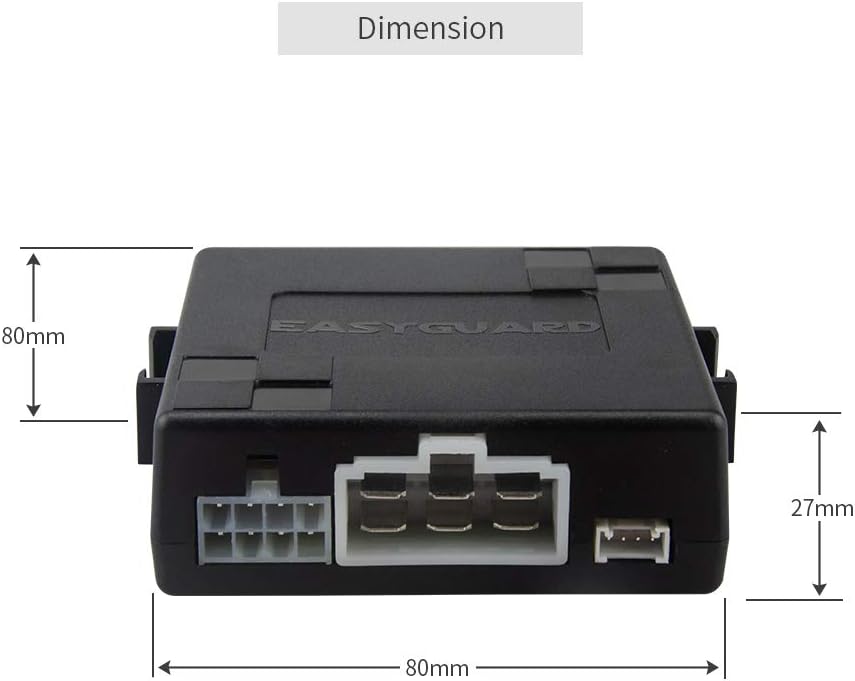
Obrázek 8.1: Dimensions of the main control unit (80mm x 80mm x 27mm).
9. Záruka a podpora
EASYGUARD is committed to providing quality products and support. While specific warranty details are not provided in this manual, technical support is available for assistance with installation or troubleshooting.
For technical assistance, please refer to the contact information provided with your purchase or visit the official EASYGUARD webmísto.