
Zavedení
This manual provides essential instructions for the installation, operation, and maintenance of your RISCO RPKEL0WT000A Elegant Touch Keypad. This device features an ultra-flat design with a 7-inch touchscreen, adjustable contrast and backlight, and adjustable buzzer volume. It is compatible with all versions of ProSYS systems.
Konec produktuview
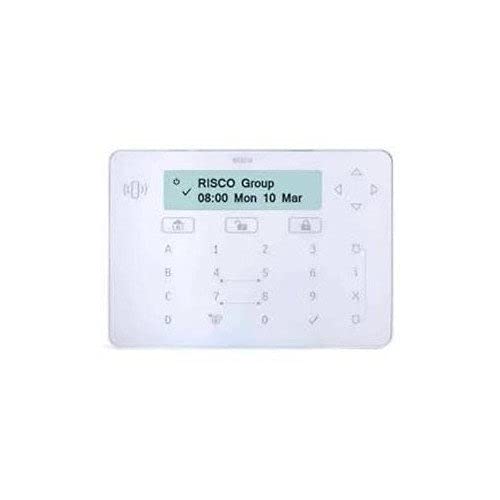
Obrázek 1: Přední strana view of the RISCO RPKEL0WT000A Elegant Touch Keypad, showcasinjeho elegantní design a dotykové rozhraní.
Nastavení
1. Vybalení a obsah balení
Carefully open the product packaging and ensure all components are present. The package should contain:
- RISCO RPKEL0WT000A Elegant Touch Keypad (Plastic material)
- USB kabel
- Tato uživatelská příručka
2. Fyzická instalace
The keypad is designed for indoor use. Choose a suitable location for installation, ensuring it is easily accessible and protected from extreme temperatures or moisture. Mount the keypad securely using appropriate hardware (not included, unless specified in packaging). Connect the USB cable to the keypad and to your ProSYS system or designated connection point.
3. Počáteční zapnutí
Connect the power cable to the keypad and a suitable power source. The keypad will initiate its startup sequence. Follow any on-screen prompts for initial configuration or system pairing with your ProSYS system.
Návod k obsluze
1. Základní funkce
- Rozhraní dotykové obrazovky: Navigate through menus and input commands using the 7-inch touchscreen.
- Nastavitelné podsvícení: The keypad features a backlight. Adjust its intensity via the system settings for optimal visibility in various lighting conditions.
- Adjustable Buzzer Volume: The integrated buzzer provides audible feedback. Adjust its volume through the system settings to suit your preference.
2. Kompatibilita systému
This keypad is compatible with all versions of RISCO ProSYS security systems. Ensure your ProSYS system is updated to the latest firmware for optimal performance and feature compatibility.
3. Keypad Layout and Input
The virtual keypad features a QWERTY layout with 104 keys, providing a familiar input experience for text and numerical entries. Use the touchscreen to select characters and functions.
Údržba
1. Čištění klávesnice
To clean the touchscreen and plastic casing, use a soft, lint-free cloth slightly dampened with water or a mild, non-abrasive cleaning solution. Do not spray cleaners directly onto the keypad. Avoid using harsh chemicals, solvents, or abrasive materials, as these can damage the surface.
2. Aktualizace softwaru
Information regarding guaranteed software updates for this product is not available. Please refer to the official RISCO website or your system integrator for any available firmware updates for your ProSYS system, which may include updates relevant to the keypad's functionality.
Odstraňování problémů
If you encounter issues with your RISCO RPKEL0WT000A keypad, please refer to the following common troubleshooting steps:
- Klávesnice nereaguje: Ensure the USB cable is securely connected and the keypad is receiving power. Try restarting the ProSYS system.
- Problémy se zobrazením: Check the backlight settings in the system menu. If the screen remains blank, verify power connection.
- Bzučák nefunguje: Check the buzzer volume settings in the system menu.
- Problémy s připojením: Ensure the keypad is properly paired or connected to your ProSYS system according to the system's installation guide.
For persistent issues, consult the comprehensive ProSYS system manual or contact RISCO technical support.
Specifikace
| Funkce | Detail |
|---|---|
| Číslo modelu | RPKEL0WT000A |
| Značka | Risco |
| Výrobce | RIZIKO |
| ASIN | B01MTO9ECQ |
| GTIN/UPC | 712073720180 |
| Zobrazit | 7palcový dotykový displej |
| Speciální funkce | Backlit, Adjustable Buzzer Volume |
| Technologie připojení | USB |
| Kompatibilní zařízení | ProSYS Systems |
| Popis klávesnice | Gaming (Note: This description might be a misclassification from the source data, as it's a security keypad.) |
| Rozložení klávesnice | QWERTY |
| Počet klíčů | 104 (virtual) |
| Materiál | Plast |
| Zdroj napájení | Elektrický kabel |
| Zahrnuté komponenty | USB kabel |
Informace o záruce
Specific warranty details for the RISCO RPKEL0WT000A Elegant Touch Keypad are not provided in this manual. For comprehensive warranty information, please refer to the official RISCO website or contact your authorized RISCO dealer or installer.
Podpora
For technical assistance, product inquiries, or further support, please visit the official RISCO website or contact your local RISCO support representative. Contact information can typically be found on the RISCO webna vašem webu nebo prostřednictvím dodavatele produktu.


