
1. Úvod
Thank you for choosing the Stryker SR-94HPC 10 Meter Radio. This compact and powerful radio is designed for reliable communication, featuring AM/FM modulation, a full-color TFT display, and robust construction. This manual provides essential information for the proper setup, operation, and maintenance of your SR-94HPC radio to ensure optimal performance and longevity.
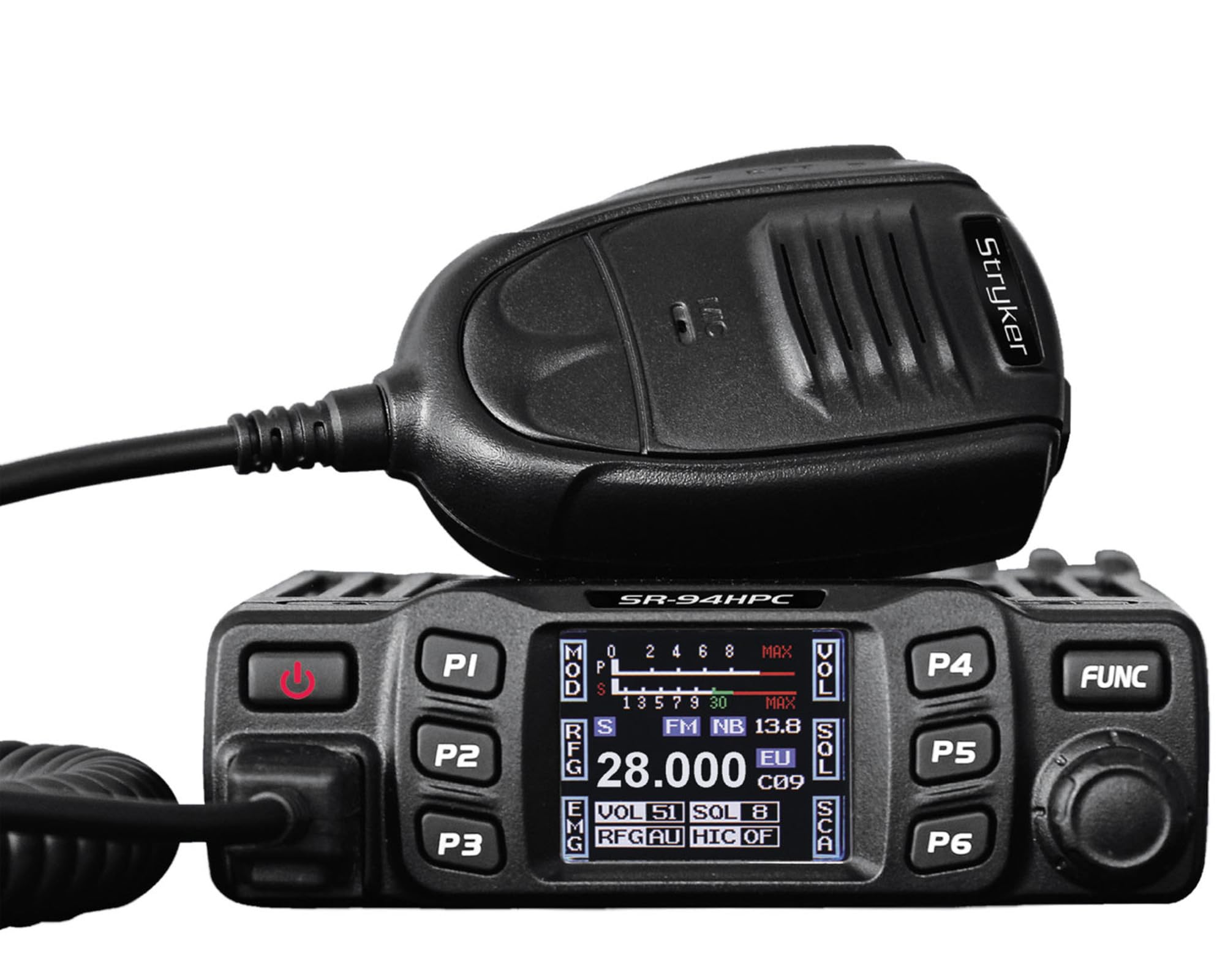
Figure 1: Stryker SR-94HPC 10 Meter Radio. This image shows the compact design of the radio, featuring its front panel with controls and the full-color TFT display.
2. Důležité bezpečnostní informace
Please read and understand all safety instructions before operating the radio. Failure to do so may result in injury, damage to the radio, or voiding the warranty.
- Zdroj napájení: Connect the radio only to a 12V or 24V DC power source as specified. Incorrect voltagmůže poškodit jednotku.
- Anténa: Always connect a properly tuned antenna before transmitting. Transmitting without an antenna or with a poorly tuned antenna can cause damage to the radio's final transistors.
- Odvod tepla: Ensure adequate ventilation around the radio, especially the heat sink, to prevent overheating during prolonged transmission.
- Vystavení vodě: While the radio has some water resistance, avoid direct exposure to water or extreme moisture.
- Bezpečnost jízdy: Nepoužívejte rádio způsobem, který by vás rozptyloval od řízení. Upřednostněte bezpečnost silničního provozu.
- Návrh 65 Varování: Tento produkt vás může vystavit chemikáliím, o kterých je ve státě Kalifornie známo, že způsobují rakovinu a vrozené vady nebo jiné reprodukční poškození. Více informací naleznete na www.P65Warnings.ca.gov.
3. Obsah balení
Ověřte, zda jsou v balení přítomny všechny položky:
- Stryker SR-94HPC 10 Meter Radio Unit
- Mikrofon
- Napájecí kabel
- Montážní konzola a hardware
- Uživatelská příručka (tento dokument)
4. Ovládací prvky a funkce
The SR-94HPC features a user-friendly interface with a full-color TFT display and intuitive controls. Familiarize yourself with the following:
- Full-Color TFT Display: Zobrazuje frekvenci, objemtage, S units, functions, and other operational data. The display is designed for clarity and ease of reading while driving.
- Channel Selector/Encoder: Used to change channels and navigate menu options.
- Ovládání hlasitosti: Nastavuje výstupní úroveň zvuku.
- Ovládání Squelch: Eliminates background noise when no signal is present.
- Tlačítko režimu: Přepíná mezi modulačními režimy AM a FM.
- Funkční tlačítka: Access various radio features and settings. Refer to the on-screen menu for specific functions.
- Konektor mikrofonu: Front-panel connection for the supplied microphone.
- Tlačítko PTT (Push-To-Talk): Located on the microphone, used to transmit.
5. Nastavení
Follow these steps for initial setup of your SR-94HPC radio:
- Montáž: Securely mount the radio using the provided bracket and hardware in a location that allows for good ventilation and easy access to controls. Ensure the wrap-around cast aluminum heat sink has clear airflow.
- Připojení antény: Connect a 10-meter antenna with a UHF, SO-239 connector to the antenna port on the rear of the radio. Ensure the antenna is properly tuned for the 28.000 ~ 29.700MHz frequency range to prevent damage to the radio.
- Připojení napájení: Connect the supplied power cable to the radio's power input. Connect the other end to a stable 12V or 24V DC power source in your vehicle or base station. Observe correct polarity (red to positive, black to negative).
- Připojení mikrofonu: Plug the microphone into the dedicated microphone jack on the front panel of the radio.
- Počáteční zapnutí: Once all connections are secure, turn on the radio. The TFT display should illuminate, showing the current operating status.
6. Návod k obsluze
This section details the basic operation of your Stryker SR-94HPC radio.
6.1 Zapnutí/vypnutí
Press and hold the power button (usually integrated with the volume knob or a dedicated button) to turn the radio on or off. A quick tap of the power button may mute the audio.
6.2 Výběr kanálu
Rotate the Channel Selector knob to change the operating frequency or channel. The selected channel will be displayed on the TFT screen.
6.3 Modulation Mode
Press the Mode button to toggle between AM (Amplitude Modulation) and FM (Frequency Modulation) modes. The active mode will be indicated on the display.
6.4 Nastavení hlasitosti a šumu
- Objem: Nastavte knoflík hlasitosti na požadovanou úroveň poslechu.
- Squelch: Rotate the Squelch knob clockwise until background noise disappears. Rotate counter-clockwise to hear weaker signals. The SR-94HPC may also feature an automatic squelch control (ASC) setting, which can be adjusted via the menu.
6.5 Převodovka
To transmit, press and hold the PTT button on the microphone. Speak clearly into the microphone. Release the PTT button to receive. Ensure the antenna is properly connected and tuned before transmitting to avoid damage.
6.6 Zobrazení informací
The full-color TFT display provides real-time information, including:
- Frekvence/Kanál: Current operating frequency or channel number.
- svtage: Vstupní objemtage to the radio.
- S Units: Signal strength indicator for received signals.
- Výkon: Indication of transmitted power.
- SWR: Standing Wave Ratio, indicating antenna tuning efficiency.
7. Údržba
Proper maintenance ensures the longevity and reliable operation of your SR-94HPC radio.
- Čištění: Use a soft, dry cloth to clean the radio's exterior and display. Avoid abrasive cleaners or solvents.
- Anténní systém: Regularly check your antenna and coaxial cable for damage. Periodically verify your antenna's SWR (Standing Wave Ratio) to ensure efficient power transfer and prevent damage to the radio. An SWR meter can be used for this purpose.
- Chladič: Ensure the wrap-around cast aluminum heat sink on the rear of the radio remains free of obstructions to allow for proper heat dissipation, especially during high-power transmissions.
- Spojení: Pravidelně kontrolujte všechna kabelová připojení (napájení, anténa, mikrofon), abyste se ujistili, že jsou bezpečná a bez koroze.
8. Řešení problémů
Pokud se s přístrojem SR-94HPC setkáte s problémy, podívejte se na následující běžné problémy a jejich řešení:
| Problém | Možná příčina | Řešení |
|---|---|---|
| Rádio se nezapne. | Žádné připojení k napájení; nesprávná hlasitosttage; spálená pojistka. | Check power cable connections; verify 12V/24V DC source; inspect and replace fuse if necessary. |
| Žádný zvuk z reproduktoru. | Volume too low; squelch set too high; speaker disconnected. | Increase volume; decrease squelch; check speaker connection. |
| "Error" message on display during transmission. | High SWR (Standing Wave Ratio); antenna not connected or poorly tuned. | Check antenna connection; tune antenna using an SWR meter. Do not transmit until SWR is acceptable. |
| Poor transmission or reception range. | Antenna issues; environmental interference; low power setting. | Verify antenna tuning and condition; check for local interference; ensure power output is set correctly. |
If the problem persists after attempting these solutions, please contact Stryker customer support for assistance.
9. Specifikace
Detailed technical specifications for the Stryker SR-94HPC 10 Meter Radio:
| Funkce | Specifikace |
|---|---|
| Modulační režim | AM/FM |
| Frekvenční rozsah | 28.000 ~ 29.700MHz (FM), 28.000 ~ 29.700MHz (AM) |
| Frekvenční tolerance | ±5.0 ppm |
| Vstupní objemtage | 12 V / 24 V DC |
| Ovládání frekvence | PLL syntezátor |
| Rozsah provozních teplot | -4 °F až +131 °F (-20 °C až +55 °C) |
| Konektor pro externí anténu | UHF, SO-239 |
| Výkon | 4 Watts FM/AM / 10 Watts AM/FM (PEP up to 45+ watts) |
| Rušení přenosu | Inferior to 4nW (-54dBm) |
| Frekvenční odezva | 300-3000Hz |
| Modulované zkreslení signálu | Inferior to 5% |
| Výstupní impedance | 50 ohmů |
| Odmítnutí obrázku | 70 dB |
| Odmítnutí sousedního kanálu | 60 dB |
| IF frekvence | 1st: 10.695MHz, 2nd: 455KHz |
| Rozměry (ŠxHxV) | 4.88" x 6.42" x 1.54" (12.4 cm x 16.3 cm x 3.9 cm) |
| Hmotnost | Přibl. 1.48 lb (0.67 kg) |
| Speciální funkce | Backlit Keys, Full-color TFT Display |
10. Záruka a podpora
Stryker Radios are manufactured to high-quality standards. For warranty information, please refer to the warranty card included with your product or visit the official Stryker Radios webwebu. Uschovejte si účtenku jako doklad o koupi.
For technical support, troubleshooting assistance beyond this manual, or service inquiries, please contact Stryker customer support through their official channels. Contact information can typically be found on the manufacturer's webmísto.