
Zavedení
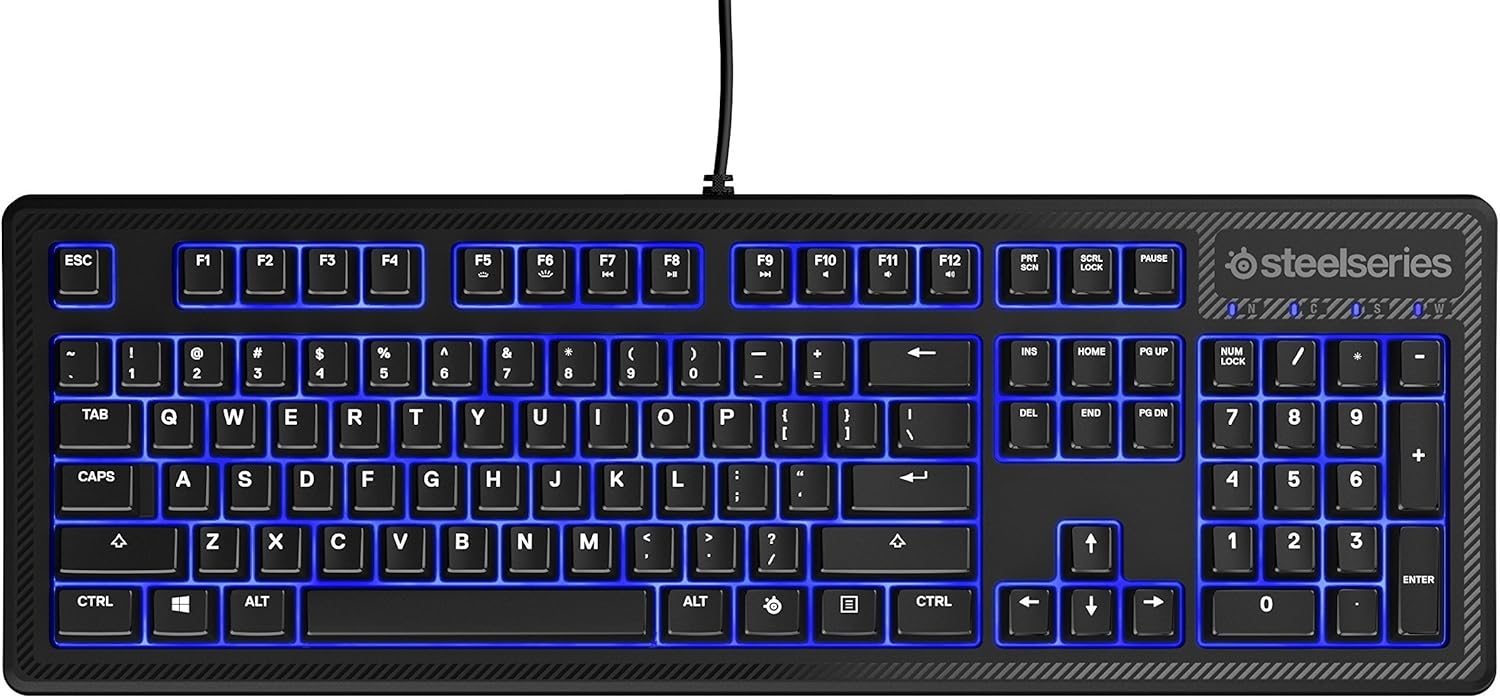
The SteelSeries Apex 100 Gaming Keyboard is designed for optimal gaming performance, featuring Quick Tension Switches for fast reaction times, tactile feedback, and quiet operation. It includes blue LED backlighting, advanced anti-ghosting, and is built with splash resistance for durability.
Nastavení
1. Připojení klávesnice
Connect the keyboard's USB-A cable to an available USB port on your computer. The keyboard is plug-and-play, and your operating system should automatically detect and install the necessary drivers.

Obrázek: Nahoře view of the SteelSeries Apex 100 Gaming Keyboard, showing the full QWERTY layout with blue LED backlighting and the attached USB cable.
2. Instalace softwaru (volitelné)
For advanced customization, including macro programming and backlighting adjustments, download and install the SteelSeries Engine 3 software from the official SteelSeries webweb (steelseries.com/engine). Postupujte podle pokynů na obrazovce pro instalaci.
Ovládání klávesnice
Klíčové vlastnosti
- Quick Tension Switches: Designed to mimic mechanical switches, providing a tactile feel and fast actuation.
- Modré LED podsvícení: Offers brilliant ground effects backlighting. Intensity can be adjusted via SteelSeries Engine 3.
- Pokročilá ochrana proti ghostingu: Ensures all key presses are registered accurately during intense gaming sessions.
- Ovládání médií: Integrated media control functions are accessible via function keys (F7-F12) in combination with the Fn key.
Obrázek: Boční view of the SteelSeries Apex 100 Gaming Keyboard, highlighting its ergonomic design and keycap profile.
Customization with SteelSeries Engine 3
The SteelSeries Engine 3 software allows you to:
- Create and assign macros to any key.
- Adjust the intensity of the blue LED backlighting.
- Configure polling rates and other performance settings.
Údržba
Čištění
To clean your keyboard, disconnect it from your computer. Use a soft, dry cloth to wipe down the keys and chassis. For stubborn dirt, a slightly damp cloth with mild soap can be used, ensuring no liquid enters the key switches or internal components. The keyboard is splash resistant, but not waterproof; avoid submerging it or exposing it to excessive liquids.
Trvanlivost
The Apex 100 keyboard features a guaranteed 20-million click lifespan for its switches, ensuring long-term reliability under heavy use.

Obrázek: Spodní část view of the SteelSeries Apex 100 Gaming Keyboard, showing the drainage channels and adjustable feet.
Odstraňování problémů
Klávesnice nereaguje
- Ujistěte se, že je kabel USB bezpečně připojen k klávesnici i k počítači.
- Zkuste připojit klávesnici k jinému USB portu.
- Restartujte počítač.
- Pokud používáte USB rozbočovač, zkuste jej připojit přímo k počítači.
Problémy s podsvícením
- Check the backlighting settings within the SteelSeries Engine 3 software.
- Ensure the keyboard's brightness level is not set to minimum.
Klíče se neregistrují
- Vyčistěte okolí postižených kláves, abyste odstranili veškeré nečistoty.
- If the issue persists, consider reinstalling the SteelSeries Engine 3 software or updating your USB drivers.
Pro další pomoc se prosím obraťte na podporu SteelSeries. webmísto.
Specifikace
| Funkce | Detail |
|---|---|
| Značka | SteelSeries |
| Název modelu | Apex 100 |
| Číslo modelu | 64435 |
| Technologie připojení | USB-A |
| Popis klávesnice | Hraní |
| Doporučená použití | Hraní |
| Speciální funkce | Podsvícený |
| Barva | Modrý |
| Podpora barev podsvícení klávesnice | Single Color (Blue) |
| Styl | Whisper Quiet – Tactile & Silent |
| Rozměry produktu | 18.21 cm D x 6.13 cm Š x 1.58 cm V |
| Zdroj napájení | USB |
| Typ přepínače | Tactile (Quick Tension Switches) |
| Rozložení klávesnice | QWERTY |
| Množství tlačítek | 104 |
| Kompatibilní rodina operačních systémů | Windows |
| Počet klíčů | 100 |
| Materiál pouzdra | Plast |
| Hmotnost položky | 2.42 libry |
| UPC | 813682020101 |
Informace o záruce
Podle informací o produktu je tato položka dodávána s bez záruky. Please check with your retailer for their return or exchange policies.
Podpora
For additional support, driver downloads, or frequently asked questions, please visit the official SteelSeries support webmísto: