
Zavedení
This manual provides essential instructions for the setup, operation, maintenance, and troubleshooting of your NEC NP-M403H projector. Please read this manual thoroughly before using the projector to ensure proper and safe operation.
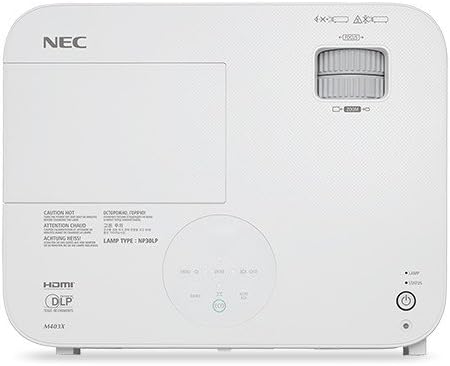
Obrázek: Nahoře view of the NEC NP-M403H projector, showing the lens, control panel, and ventilation. This image illustrates the overall design and key external features from a top-down perspective.
Nastavení
Follow these steps for initial setup of your NEC NP-M403H projector.
- Rozbalení: Carefully remove the projector and all accessories from the packaging. Ensure all components are present.
- Umístění: Position the projector on a stable, flat surface or mount it to the ceiling. Ensure adequate ventilation around the unit. The compact and lightweight design allows for flexible placement.
- Připojení napájení: Connect the power cord to the projector and then to a suitable electrical outlet.
- Připojení vstupních zdrojů:
The projector supports various connectivity options. Use appropriate cables to connect your source devices (e.g., computer, media player) to the projector's input ports.
- HDMI: Pro digitální video a audio ve vysokém rozlišení.
- VGA (vstup pro počítač): Pro analogové počítačové signály.
- USB: For certain data or control functions.
- Audio vstup: Pro analogový audio vstup.

Obrázek: Zadní view of the NEC NP-M403H projector, displaying the array of input and output ports including HDMI, VGA, USB, and audio connections. This image helps users identify where to connect their source devices.
- Počáteční zapnutí: Press the power button on the projector or remote control. The projector will initiate its startup sequence.
Návod k obsluze
This section details the basic operation of your projector.
Zapnutí/vypnutí
- Zapnutí: Press the power button. The projector features a quick startup function.
- Vypnout: Press the power button again. The projector supports direct power off, allowing for quick shutdown.
Úprava obrazu
- Soustředit: Rotate the focus ring on the lens to achieve a clear image.
- Lupa: Velikost obrazu změníte otáčením kroužku zoomu na objektivu.
- Korekce lichoběžníkového zkreslení: Pokud projektor není dokonale kolmý k promítací ploše, použijte k opravě lichoběžníkového zkreslení nabídku projektoru nebo vyhrazená tlačítka.

Obrázek: Přední strana view of the NEC NP-M403H projector, highlighting the lens assembly and front ventilation. This image assists users in locating the lens for focus and zoom adjustments.
Výběr zdroje vstupu
The projector can automatically detect input signals (Autosense™). You can also manually select the input source using the "Input" button on the projector or remote control.
Režim ECO
Pro prodloužení lamp life and reduce power consumption, activate ECO Mode. This feature contributes to energy savings and environmental protection. The projector offers a lamp life of up to 8,000 hours in ECO Mode.
Údržba
Pravidelná údržba zajišťuje optimální výkon a prodlužuje životnost vašeho projektoru.
- Lamp Nahrazení: Projektor lamp has a life of up to 8,000 hours in ECO Mode. When the lamp reaches the end of its life, a warning indicator will appear. Refer to the full service manual for detailed lamp pokyny k výměně.
- Čištění/výměna filtru: The projector is equipped with an air filter to prevent dust accumulation. Regularly clean the filter to maintain proper airflow and cooling. Replace the filter as needed; the projector features an extended filter life.
- Čištění objektivu: Objektiv projektoru jemně očistěte měkkým hadříkem bez žmolků, který je speciálně určen pro optické povrchy. Nepoužívejte abrazivní čisticí prostředky.
- Čištění exteriéru: Vnější povrch projektoru otřete měkkým, suchým hadříkem. Nepoužívejte agresivní chemikálie.
Odstraňování problémů
This section addresses common issues you might encounter with your NEC NP-M403H projector.
| Problém | Možná příčina | Řešení |
|---|---|---|
| Není zobrazen žádný obrázek |
|
|
| Obraz je rozmazaný |
|
|
| Obrázek je lichoběžníkový |
|
|
| Projektor se přehřívá nebo vypíná |
|
|
Specifikace
Key technical specifications for the NEC NP-M403H projector:
- Model: NP-M403H
- Značka: NEC
- Technologie displeje: DLP
- Jas: 4000 XNUMX lumenů
- Nativní rozlišení: 1920 x 1080 (1080p)
- Maximální rozlišení displeje: 1920 x 1080
- Kontrastní poměr: Až 10,000:1
- Lamp Život: Up to 8,000 hours (ECO Mode)
- Konektivita: HDMI, USB, VGA
- Rozměry (Š x V x H): 14.5 x 4.3 x 11.5 palce
- Hmotnost: 9.8 libry
- Speciální vlastnosti: Lightweight, Portable, ECO Mode, Autosense™
Záruka a podpora
For detailed warranty information, please refer to the warranty card included with your product or visit the official NEC website. Technical support contact details are typically provided in the product packaging or on the manufacturer's support pages.