
1. Úvod
The Imperial DABMAN i400 is a versatile audio adapter designed to enhance your existing stereo system with modern radio and streaming capabilities. It provides access to thousands of internet radio stations, digital radio (DAB+), and traditional FM radio. Additionally, it supports audio streaming via Bluetooth, UPnP/DLNA, and USB, offering a comprehensive listening experience.
2. Bezpečnostní pokyny
- Napájení: Používejte pouze dodaný napájecí adaptér. Ujistěte se, že hlasitosttage odpovídá místnímu napájení.
- Voda a vlhkost: Nevystavujte zařízení dešti, vlhkosti ani kapajícím/stříkajícím tekutinám. Na zařízení nestavte předměty naplněné tekutinami, například vázy.
- Větrání: Zajistěte dostatečné větrání. Neblokujte větrací otvory. Neumísťujte zařízení na měkké povrchy, které by mohly bránit proudění vzduchu.
- Zdroje tepla: Uchovávejte zařízení mimo dosah zdrojů tepla, jako jsou radiátory, topná tělesa, sporáky nebo jiné spotřebiče produkující teplo.
- Čištění: Před čištěním odpojte napájení. Použijte měkký, suchý hadřík. Nepoužívejte tekuté ani aerosolové čisticí prostředky.
- Servis: Nepokoušejte se tento výrobek opravit sami. Veškerý servis svěřte kvalifikovanému servisnímu personálu.
3. Obsah balení
Zkontrolujte prosím, zda jsou v balení přítomny všechny položky:
- Imperial DABMAN i400 Internet Digital Radio
- Napájecí adaptér
- Telescopic Antenna with F-connector
- Wire Antenna with F-connector
- RCA kabel
- Audio Cable (3.5mm jack)
- Dálkové ovládání
- Uživatelská příručka (tento dokument)

Image: Imperial DABMAN i400 with its power adapter, telescopic antenna, wire antenna, RCA cable, 3.5mm audio cable, and remote control.
4. Konec produktuview
Přední View

Image: The front of the Imperial DABMAN i400, showing its display and control buttons on the top edge.
The front of the DABMAN i400 features a clear 3.2-inch LCD display for navigation and information. Control buttons are located on the top edge of the device for easy access to functions like power, mode selection, volume, and station presets.
Zadní View a Připojení
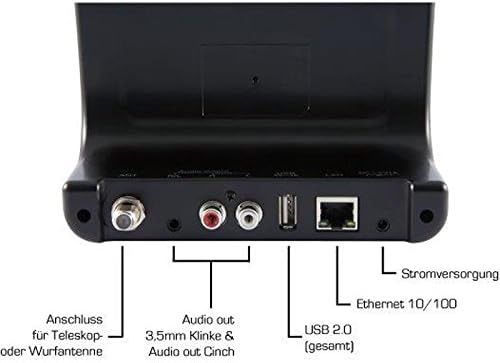
Image: The rear panel of the Imperial DABMAN i400, detailing its various connection ports. From left to right: Antenna connection (ANT), Audio output (RCA L/R and 3.5mm jack), USB 2.0 ports, Ethernet 10/100 (LAN), and Power supply (DC 5V/1A).
- MRAVENEC: F-connector for connecting the telescopic or wire antenna for DAB+/FM reception.
- Audio Output (R/L): RCA (Cinch) stereo audio output for connecting to an ampzesilovač nebo stereo systém.
- Audio výstup (3.5mm jack): 3.5mm stereo audio output for connecting to other audio devices.
- USB 2.0: USB port for playing media from a USB storage device.
- LAN: Ethernet port (RJ45) for wired network connection.
- Stejnosměrné napájení 5 V/1 A: Vstup pro napájení z přiloženého napájecího adaptéru.
5. Nastavení
- Připojení antény: Screw the telescopic antenna or connect the wire antenna to the MRAVENEC F-connector on the rear panel. Extend the telescopic antenna for optimal reception.
- Připojení k audio systému: Use the provided RCA cable to connect the Audio Output (R/L) on the DABMAN i400 to an available audio input (e.g., AUX, CD, LINE IN) on your amplifier or stereo system. Alternatively, use the 3.5mm audio cable if your system has a compatible input.
- Internetové připojení:
- Kabelové (LAN): Připojte ethernetový kabel z routeru k LAN port on the rear of the DABMAN i400.
- Wireless (WLAN): The device will prompt you to set up Wi-Fi during the initial startup wizard. Select your network and enter the password.
- Připojte napájení: Zapojte napájecí adaptér do DC 5V/1A input on the rear panel, then plug the adapter into a wall outlet. The device will power on automatically or enter standby mode.
- Průvodce počátečním nastavením: Upon first power-on, the device will guide you through an initial setup process, including language selection, time/date settings, and network configuration. Follow the on-screen instructions.
6. Návod k obsluze
Základní navigace
Use the control buttons on the top of the device or the remote control to navigate menus, select options, adjust volume, and change modes.
Výběr režimu
Press the 'Mode' button (or equivalent on remote) to switch between available modes:
- Internetové rádio: Access thousands of online radio stations worldwide. Browse by genre, location, or search for specific stations.
- Digitální rádio DAB+: Enjoy high-quality digital radio broadcasts. The device will scan for available stations in your area.
- FM rádio: Tune into traditional analog FM radio stations.
- Bluetooth: Stream audio wirelessly from your Bluetooth-enabled smartphone, tablet, or computer.

Image: Bluetooth connectivity icon.
To pair: Select Bluetooth mode on the DABMAN i400. On your external device, search for available Bluetooth devices and select 'DABMAN i400'.
- UPnP/DLNA: Streamovat hudbu files from compatible devices on your local network (e.g., a network-attached storage (NAS) drive or a computer running a media server).

Image: UPnP (Universal Plug & Play) icon.
- USB přehrávání: Přehrát zvuk files (e.g., MP3) from a USB flash drive connected to the USB port on the rear of the device.

Image: MP3 music file ikona.
Předvolby
Save your favorite stations as presets for quick access. Refer to the on-screen menu for instructions on how to save and recall presets.
Air Music Control App
Control your DABMAN i400 using the Air Music Control App available for smartphones and tablets. This app allows for convenient remote control and browsing of stations.

Image: Air Music Control App icon.
7. Údržba
- Čištění: Wipe the device with a soft, dry, lint-free cloth. Do not use abrasive cleaners, waxes, or solvents.
- Aktualizace softwaru: Periodically check for available software updates through the device's system settings menu to ensure optimal performance and access to new features.
- Skladování: Pokud zařízení skladujete delší dobu, odpojte jej od napájení a uložte jej na chladném a suchém místě.
8. Řešení problémů
- Bez napájení:
- Ujistěte se, že je napájecí adaptér bezpečně připojen k zařízení a k funkční zásuvce.
- Zkuste jinou zásuvku.
- Žádný zvuk:
- Check the volume level on both the DABMAN i400 and your connected audio system.
- Ensure the audio cables are correctly connected to the appropriate input on your audio system.
- Verify that your audio system is set to the correct input source.
- Nelze se připojit k Wi-Fi/internetu:
- Ujistěte se, že váš Wi-Fi router je zapnutý a funguje správně.
- Zkontrolujte znovu heslo k Wi-Fi.
- Try moving the device closer to your Wi-Fi router or use a wired LAN connection.
- Restart your router and the DABMAN i400.
- Poor DAB+/FM Reception:
- Ensure the antenna is fully extended and positioned for optimal reception.
- Try repositioning the device or antenna.
- Check if you are in an area with good DAB+ or FM coverage.
- Problémy s párováním Bluetooth:
- Ensure the DABMAN i400 is in Bluetooth pairing mode.
- Ujistěte se, že je na externím zařízení zapnutá funkce Bluetooth a že je viditelné.
- Move your external device closer to the DABMAN i400.
- Zkuste zařízení zrušit a znovu spárovat.
9. Specifikace
| Funkce | Specifikace |
|---|---|
| Značka | Císařský |
| Číslo modelu | 22-241-00 |
| Barva | Černý |
| Velikost obrazovky | 3.2 palce |
| Technologie připojení | Bluetooth, LAN (Ethernet), WLAN (Wi-Fi), RCA (Cinch) L/R, 3.5mm Audio Jack |
| Speciální funkce | Portable (as an adapter), Internet Radio, DAB+, FM, UPnP/DLNA |
| Celkový počet portů USB | 1 |
| Kompatibilní zařízení | Bluetooth devices, UPnP/DLNA compatible devices |
| Zdroj napájení | AC (via power adapter) |
| Podporovaná rádiová pásma | FM, DAB, DAB+, internetové rádio |
| Rozměry produktu | 15 l x 8.1 š x 14 v centimetrů |
| Zahrnuté komponenty | Power Adapter, Telescopic Antenna, Wire Antenna, RCA Cable, Audio Cable, Remote Control, User Manual |
| Podporované jazyky | German, English, French, Dutch |
10. Záruka a podpora
Záruka výrobce
The Imperial DABMAN i400 comes with a manufacturer's warranty. Please refer to the warranty card included in your package or the manufacturer's official website for specific terms and conditions. Spare parts availability is guaranteed for 1 year.
Zákaznická podpora
For technical assistance, troubleshooting beyond this manual, or warranty claims, please contact Imperial customer support. Contact information can typically be found on the manufacturer's webmístě nebo na obalu produktu.