
1. Úvod
Thank you for choosing the Kaidi KD-766 Gaming Headset. This manual provides essential information for the proper setup, operation, and maintenance of your new headset. Please read it thoroughly before use to ensure optimal performance and longevity of the product.
2. Bezpečnostní informace
- Vyhněte se delšímu poslechu při vysoké hlasitosti, abyste předešli poškození sluchu.
- Nevystavujte sluchátka extrémním teplotám, vlhkosti ani korozivním látkám.
- Udržujte zařízení mimo dosah vody a jiných kapalin.
- Nepokoušejte se rozebírat ani upravovat sluchátka. Zrušíte tak platnost záruky.
- Čistěte sluchátka pouze měkkým, suchým hadříkem.
3. Obsah balení
Ujistěte se, že v balení jsou přítomny všechny položky:
- Kaidi KD-766 Gaming Headset
- Uživatelská příručka (tento dokument)

Image: Retail box of the Kaidi KD-766 Gaming Headset, showing the headset with RGB lighting and the model number KD-766.
4. Konec produktuview
Familiarize yourself with the components of your KD-766 Gaming Headset.
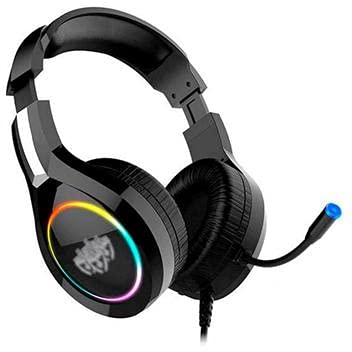
Image: The Kaidi KD-766 Gaming Headset, featuring over-ear cups, an adjustable headband, and a flexible boom microphone.
- Nastavitelná čelenka: Pro pohodlné nošení.
- Polstrované náušníky: Over-ear design for sound isolation and comfort.
- Flexibilní ramenový mikrofon: Adjustable for clear voice communication.
- Dálkové ovládání na kabelu: For volume adjustment and microphone mute.
- 3.5mm Audio Jack (P2): Pro audio vstup/výstup.
- USB konektor: For powering LED lighting.
5. Pokyny k nastavení
5.1 Connecting to a PC/Console
- Audio připojení: Locate the 3.5mm audio jack (P2) on your computer or gaming console. Plug the 3.5mm connector from the headset into this port. Ensure it is fully inserted.
- USB Power (for LED): If your headset features LED lighting, plug the USB connector into an available USB port on your computer or console. This provides power for the lighting effects.
- Nastavení mikrofonu: If your device has separate audio and microphone jacks, you may need a Y-splitter adapter (not included) to use both the headset audio and microphone simultaneously with a single 3.5mm combo jack. For devices with separate ports, plug the 3.5mm audio jack into the headphone port and the microphone jack (if separate) into the microphone port. The KD-766 typically uses a single 3.5mm jack for audio and mic, plus a USB for LED.
- Upravit nastavení: After connecting, go to your device's sound settings to ensure the headset is selected as the default audio output and input device. Adjust volume levels as needed.
6. Návod k obsluze
6.1 Ovládání hlasitosti
Use the in-line remote control on the headset cable to adjust the volume. Rotate the volume wheel up to increase volume and down to decrease it.
6.2 Použití mikrofonu
Position the flexible boom microphone approximately 2-3 cm (1 inch) from your mouth for optimal voice clarity. Use the microphone mute switch on the in-line remote to quickly turn the microphone on or off.
6.3 LED osvětlení
The LED lighting on the earcups will illuminate automatically when the USB connector is plugged into a powered USB port. There are no user-adjustable controls for the LED lighting.
7. Údržba
- Čištění: Wipe the headset with a soft, dry, lint-free cloth. Do not use liquid cleaners or aerosols.
- Skladování: Store the headset in a cool, dry place when not in use. Avoid direct sunlight and extreme temperatures.
- Péče o kabely: Vyhněte se ostrým ohybům nebo nadměrnému tahání za kabely, abyste předešli jejich poškození.
8. Řešení problémů
| Problém | Možná příčina | Řešení |
|---|---|---|
| Žádný zvuk z náhlavní soupravy. | Headset not properly connected. Volume too low. Incorrect audio output selected. | Ensure the 3.5mm jack is fully inserted. Increase volume using the in-line control and your device's settings. Check your device's sound settings and select the headset as the default output. |
| Mikrofon nefunguje. | Microphone muted. Incorrect audio input selected. | Check the microphone mute switch on the in-line remote. Ensure the headset microphone is selected as the default input device in your device's sound settings. |
| LED světla nefungují. | Konektor USB není zapojen nebo není napájen. | Ensure the USB connector is securely plugged into a powered USB port. Try a different USB port. |
| Kvalita zvuku je nízká. | Loose connection. Audio source issue. | Check all connections. Test the headset with another device to rule out an issue with the audio source. |
9. Specifikace
| Značka: | Kaidi |
| Model: | KD-766 |
| Umístění uší: | Circum-aural (Over-ear) |
| Kontrola hluku: | Zvuková izolace |
| Citlivost: | 108 dB |
| Frekvenční rozsah: | 20 Hz - 20 kHz |
| Technologie připojení: | Kabelové |
| Vstup pro sluchátka: | 3.5mm Jack |
| Kompatibilní zařízení: | Desktops, Notebooks, Gaming Consoles |
| Způsob ovládání: | Dálkové (in-line) |
10. Záruka a podpora
For warranty information and technical support, please refer to the warranty card included with your product or contact your local Kaidi distributor or retailer. Keep your proof of purchase for warranty claims.