
Zavedení
This manual provides detailed instructions for the setup, operation, maintenance, and troubleshooting of your Brightsign XT243 True 4K Dual Video Decode HTML5 Player. Please read this manual thoroughly before using the device to ensure proper functionality and to prevent damage.
Bezpečnostní informace
Při používání tohoto výrobku vždy dodržujte základní bezpečnostní opatření, abyste snížili riziko požáru, úrazu elektrickým proudem a zranění osob. Uschovejte si tento návod k obsluze pro budoucí použití.
- Nevystavujte zařízení vlhkosti nebo extrémním teplotám.
- Use only the power adapter supplied or recommended by Brightsign.
- Nepokoušejte se zařízení otevírat ani opravovat sami. Veškerý servis svěřte kvalifikovanému personálu.
- Zajistěte dostatečné větrání kolem zařízení, aby nedošlo k přehřátí.
Obsah balení
Ověřte, zda jsou v balení přítomny všechny položky:
- Brightsign XT243 Player
- Napájecí adaptér
- Stručný průvodce (pokud je k dispozici)
- Other accessories (e.g., mounting brackets, cables)
Zařízení skončiloview
Familiarize yourself with the ports and indicators on your Brightsign XT243 player.
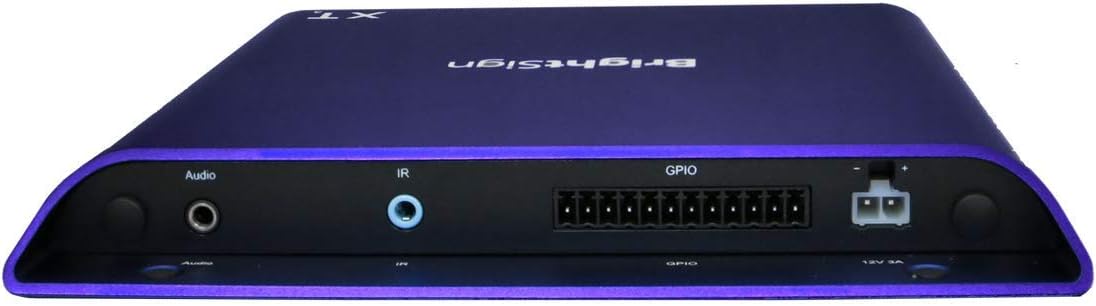
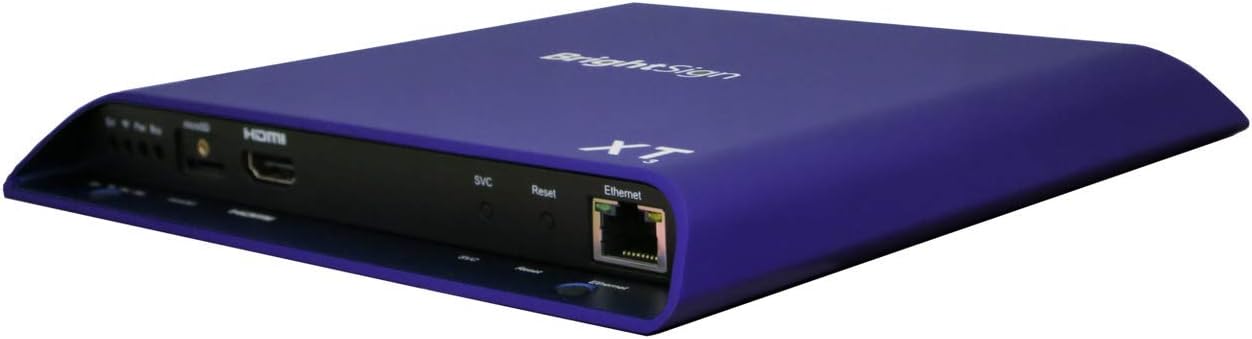
Obrázek: Přední a boční view of the Brightsign XT243 player, highlighting the HDMI, Ethernet, and USB ports for connectivity.
Obrázek: Zadní view of the Brightsign XT243 player, displaying the Audio output, IR input, GPIO port, and 12V 3A power input.
Front/Side Panel Connections:
- HDMI výstup: Connects to a display device (TV, monitor).
- Ethernet (RJ45): Connects to a network for content updates and control. Supports Power over Ethernet (PoE+).
- USB: For connecting peripherals like touchscreens, keyboards, or storage devices.
- SVC/Reset Button: Service port and reset functionality.
Připojení zadního panelu:
- Audio výstup: 3.5mm jack for analog audio output.
- IR vstup: 3.5mm jack for infrared remote control input.
- GPIO: General Purpose Input/Output port for interactive controls.
- Napájecí vstup 12V 3A: Pro připojení externího napájecího adaptéru.
Nastavení
Follow these steps to set up your Brightsign XT243 player:
- Připojení k displeji: Connect an HDMI cable from the XT243's HDMI Out port to an HDMI input on your display device.
- Připojit k síti:
- For wired network: Connect an Ethernet cable from the XT243's Ethernet port to your network router or switch. If your network supports PoE+, the device may power on automatically.
- For Wi-Fi (if supported by an optional module, not included with standard I/O package): Refer to the Wi-Fi module's instructions for setup.
- Připojte napájení: If not using PoE+, connect the provided power adapter to the 12V 3A Power Input port on the XT243, then plug the adapter into a power outlet. The device will power on automatically.
- Vložte SD kartu (volitelné): If using an SD card for content storage, insert it into the designated slot. Ensure the card is properly formatted.
- Počáteční spuštění: The player will boot up. Follow any on-screen prompts for initial configuration, such as network settings or content loading.
Operating the Brightsign XT243
The Brightsign XT243 is designed for digital signage applications. Content is typically managed and deployed using Brightsign's BrightAuthor software or BrightSign Network.
Content Deployment:
- BrightAuthor: Create presentations using BrightAuthor software on a Windows PC. Publish the presentation to an SD card or directly to the player via a local network.
- BrightSign Network: For remote management and content updates, subscribe to BrightSign Network. This allows for cloud-based content deployment and player monitoring.
Základní provoz:
- Once content is loaded, the player will automatically begin playback according to the presentation schedule.
- The player operates continuously. To power off, disconnect the power adapter or disable PoE+.
- For interactive presentations, ensure all connected peripherals (e.g., touchscreens, buttons via GPIO) are properly configured in your BrightAuthor project.
Údržba
Regular maintenance ensures optimal performance and longevity of your Brightsign XT243 player.
- Čištění: K čištění vnější strany zařízení používejte měkký, suchý hadřík. Nepoužívejte tekuté čisticí prostředky ani aerosoly.
- Větrání: Ensure that the ventilation openings are not blocked. Maintain adequate airflow around the device.
- Aktualizace firmwaru: Periodically check the Brightsign website for firmware updates. Keeping the firmware updated can improve performance and add new features. Follow the instructions provided by Brightsign for firmware update procedures.
- Správa obsahu: Pravidelně znovuview and update your digital signage content to keep it fresh and engaging.
Odstraňování problémů
If you encounter issues with your Brightsign XT243, refer to the following common problems and solutions:
| Problém | Možná příčina | Řešení |
|---|---|---|
| Žádný video výstup |
|
|
| Player not powering on |
|
|
| Content not updating |
|
|
Specifikace
Key technical specifications for the Brightsign XT243 player:
- Model: XT243
- Dekódování videa: True 4K, Dual Video Decode
- Konektivita: Ethernet, HDMI, USB
- Moc: PoE+ (Power over Ethernet Plus) or 12V 3A external power adapter
- Rozměry: 7.08 x 8.03 x 0.86 palce (180 x 204 x 22 mm)
- Hmotnost: 1.24 libry (0.56 kg)
- Barva: Fialová
- Podporované internetové služby: Netflix, Hulu, Amazon Prime Video (Note: Player primarily for digital signage; these services may require specific configurations or apps not typically used in standard signage deployments.)
- Typ ovladače: Ovládání tlačítkem (Refers to physical buttons on the device and external controls via GPIO/IR.)
- Záruka: 12 měsíců
Záruka a podpora
Informace o záruce:
The Brightsign XT243 comes with a Záruka 12 měsíců from the date of purchase. This warranty covers defects in materials and workmanship under normal use. It does not cover damage caused by misuse, accidents, unauthorized modifications, or external causes such as power surges.
For warranty claims, please retain your proof of purchase and contact Brightsign customer support.
Zákaznická podpora:
For technical assistance, troubleshooting, or further information, please visit the official Brightsign support webnebo kontaktujte jejich oddělení zákaznických služeb.
Brightsign Official Webmísto: www.brightsign.biz
Zdroje podpory: www.brightsign.biz/support