
Zavedení
This manual provides essential information for the safe and efficient operation of your Amazon Basics 15-Sheet Cross-Cut Paper, CD, and Credit Card Shredder. Please read all instructions carefully before use and retain this manual for future reference.
Bezpečnostní informace
Pro zajištění bezpečného provozu vždy dodržujte následující pokyny:
- Udržujte ruce, vlasy a volné oblečení v dostatečné vzdálenosti od vstupního otvoru pro papír.
- Nestříkejte ani neuchovávejte žádné aerosolové produkty v skartovačce nebo v jejím okolí.
- Do not shred items like metallic credit cards, adhesive labels, or continuous forms.
- Odpojte drtič ze zásuvky, když jej nepoužíváte nebo před čištěním.
- Keep the shredder out of reach of children and pets.
- Nepoužívejte drtič, pokud je poškozený napájecí kabel.
Konec produktuview
The Amazon Basics 15-Sheet Cross-Cut Shredder is designed for efficient document destruction, offering a high level of security for personal and office use.

Obrázek 1: Přední strana view of the Amazon Basics 15-Sheet Cross-Cut Shredder.
Klíčové vlastnosti:
- Kapacita 15 listů: Shreds up to 15 sheets of 20 lb. paper at once.
- Cross-Cut Shredding: Shreds paper into 3/16" x 1-7/32" (4.7 x 31mm) particles for enhanced security (Security Level P-4).
- Multi-Material Shredding: Also destroys CD/DVDs, credit cards, staples, and small paper clips.
- Prodloužená doba běhu: Features a 20-minute continuous run time.
- Bezpečnostní funkce: Includes Overheat / Overload protection.
- LED indikátory: Provides visual alerts for Standby, Overheat, Overload, Door open, and Bin full status.
- Large Capacity Bin: Equipped with a 6-gallon pull-out basket for easy waste disposal.
- Mobilita: Casters included for convenient movement.
- 4-Mode Switch: Auto/Off/Forward/Reverse settings for versatile control.
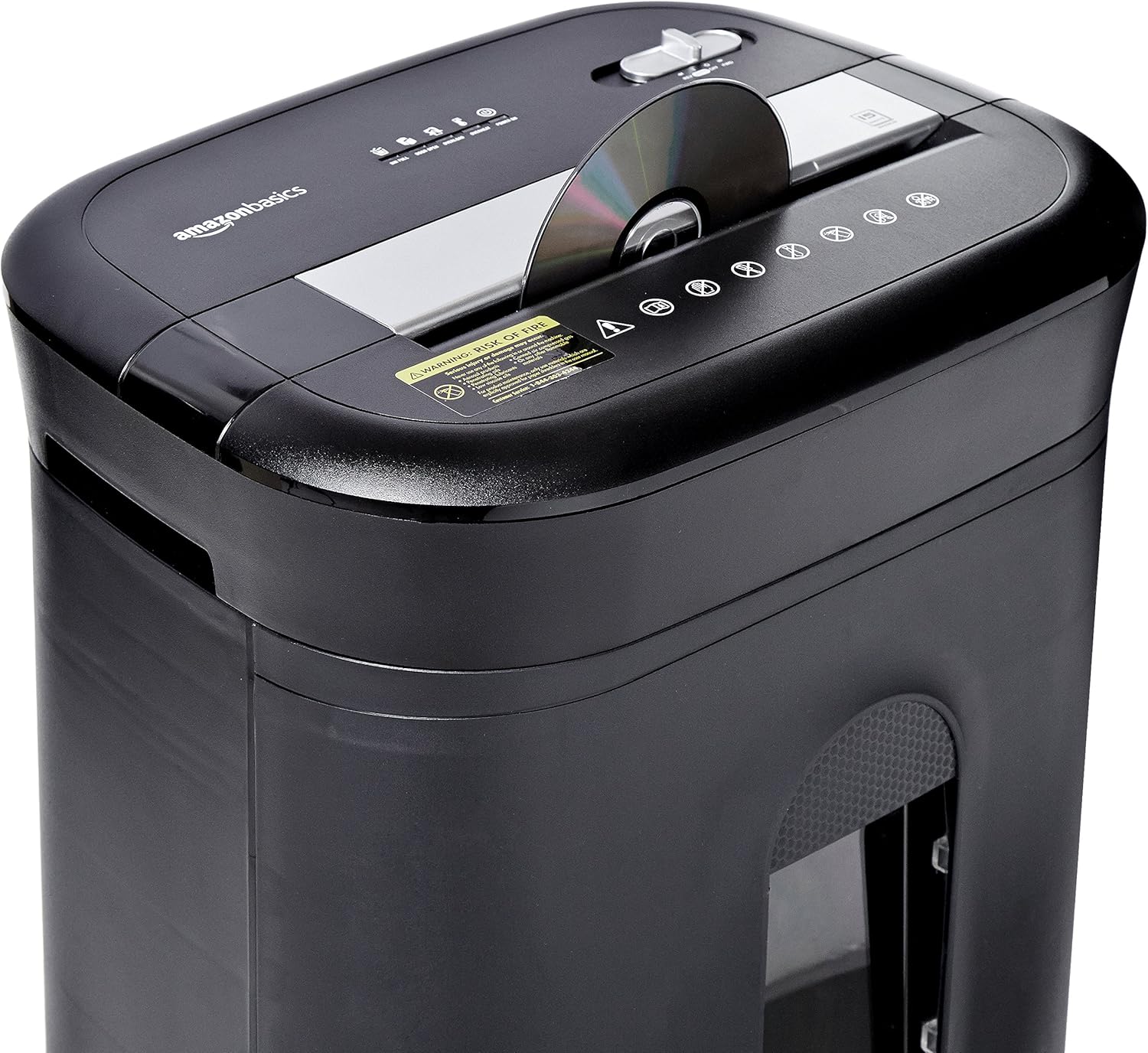
Figure 2: Diagram illustrating key features of the shredder.
Nastavení
Pro nastavení skartovačky postupujte podle těchto kroků:
- Rozbalit: Opatrně vyjměte všechny součásti z obalu.
- Pozice: Place the shredder on a flat, stable surface. Ensure the waste bin is securely closed and properly inserted into the main unit.
- Připojte napájení: Plug the power cord into a standard 120-volt AC outlet.
Video 1: Official product video demonstrating the setup and basic operation of the Amazon Basics 15-Sheet Cross-Cut Shredder.
Návod k obsluze
Přepínač režimu napájení:
The shredder features a 4-mode slide switch located on the top panel:
- AUTO (I): The shredder will automatically start when paper is inserted and stop when shredding is complete. This is the recommended setting for normal use.
- VYP (O): Turns off all shredder functions. Always select this setting when emptying the waste bin or when the shredder is not in use.
- FORWARD (▶▶): Manually activates the shredder to continuously cut. Useful for clearing minor jams.
- REVERSE (◀◀): Reverses the shredder mechanism to help clear paper jams.

Figure 3: Close-up of the control panel with the 4-mode switch.
Skartování papíru:
- Ensure the power mode switch is set to AUTO (I).
- Insert up to 15 sheets of paper (20 lb. bond) straight into the paper entry slot. The shredder will automatically start and stop.
- Do not force paper into the shredder. If the shredder struggles, reduce the number of sheets.

Figure 4: Inserting paper into the shredder.
Skartování kreditních karet a CD/DVD:
- Ensure the power mode switch is set to AUTO (I).
- Insert one credit card or CD/DVD at a time into the dedicated slot.
- The shredder will automatically start and stop.

Figure 5: Shredding a credit card.
Údržba
Emptying the Shredder Bin:
Regularly empty the waste bin to prevent paper jams and ensure optimal performance.
- Set the power mode switch to VYPNUTO (O) and unplug the shredder.
- Pull out the waste bin from the front of the shredder.
- Zlikvidujte rozdrcený materiál.
- Slide the waste bin back into the shredder until it clicks securely into place.

Obrázek 6: Výsuvný odpadkový koš pro snadné vyprázdnění.
Mazání drtiče:
To maintain the shredder's performance and longevity, it is recommended to oil the cutting blades periodically, especially after emptying the bin multiple times or if performance decreases.
- Apply shredder oil (or vegetable oil) in a zigzag pattern across the paper entry slot.
- Set the power mode switch to FORWARD (▶▶) for 2-3 seconds to distribute the oil.
- Then, set the switch to REVERSE (◀◀) po dobu 2-3 sekund.
- Shred a few sheets of paper to remove any excess oil.
Odstraňování problémů
The shredder is equipped with LED indicators to help diagnose common issues:
- Standby (Green): Indicates the shredder is powered on and ready for operation.
- Overheat (Red): The shredder has exceeded its maximum operating temperature. Allow it to cool down for approximately 20-30 minutes before resuming use.
- Overload (Red): Too much material has been inserted. Use the REVERSE (◀◀) function to clear the jam, then reduce the amount of material.
- Door Open (Red): The waste bin is not properly closed or inserted. Ensure the bin is fully pushed in.
- Bin Full (Red): Odpadkový koš je plný a je třeba ho vyprázdnit.
| Problém | Možná příčina | Řešení |
|---|---|---|
| Skartovačka se nezapne. | Not plugged in; Power switch in OFF position; Waste bin not properly inserted. | Check power connection; Set switch to AUTO; Re-insert waste bin securely. |
| Drtič se během provozu zastaví. | Overheat protection activated; Overload protection activated; Bin full. | Allow to cool down; Clear jam using REVERSE, then reduce material; Empty bin. |
| Zaseknutý papír. | Too much paper inserted; Paper inserted at an angle. | Use REVERSE function; Reduce paper quantity; Insert paper straight. |
Specifikace
| Funkce | Specifikace |
|---|---|
| Značka | Základy Amazonu |
| Číslo modelu | PBH-49976 |
| Skartovat typ | Příčný řez |
| Velikost Shred | 3/16" x 1-7/32" (4.7 x 31mm) |
| Úroveň zabezpečení | P-4 |
| Kapacita listu | 15 sheets (20 lb. paper) |
| Nepřetržitá doba chodu | 20 minut |
| Doba ochlazování | 30 minut |
| Kapacita odpadkového koše | 6 galonů |
| Hmotnost položky | 22 libry |
| Rozměry produktu | 11 x 14.4 x 20.9 palce |
| Barva | Černý |
Záruka a podpora
For warranty information or technical support, please refer to the documentation included with your product or contact Amazon Basics customer service.
Zákaznický servis: 1-844-303-4244
Další zdroje naleznete na Základní obchod Amazonu.