
1. Konec produktuview
The Baseus Mini Type-C to USB Adapter (Model CAAOTG-01) is a compact and durable accessory designed to connect USB-C devices to standard USB-A ports. This adapter enables efficient data transfer, device synchronization, and fast charging capabilities up to 5 Amperes.

Obrázek 1.1: Přední strana view of the Baseus Mini Type-C to USB Adapter, showing the USB-A male connector and the Type-C female port.
2. Vlastnosti produktu
- Kompaktní design: Small and lightweight, ideal for portability.
- Odolná konstrukce: Made from aluminum alloy for enhanced durability and heat dissipation.
- Vysokorychlostní přenos dat: Supports USB 2.0 standard with data transfer speeds up to 480 Mbps.
- Rychlé nabíjení: Capable of delivering up to 5 Amperes for quick device charging.
- Univerzální kompatibilita: Connects USB-C devices (laptops, phones, tablets) to USB-A ports.
3. Obsah balení
Ověřte, zda jsou v balení přítomny všechny položky:
- 1 x Baseus Mini Type-C to USB Adapter (Model CAAOTG-01)

Image 3.1: The Baseus Mini Type-C to USB Adapter shown in its retail packaging.
4. Nastavení
The Baseus Mini Type-C to USB Adapter is a plug-and-play device and requires no special driver installation.
- Identify the USB-A port on your host device (e.g., computer, wall charger, power bank).
- Insert the USB-A male connector of the adapter into the USB-A port of your host device. Ensure it is fully seated.
- Connect your USB-C cable or USB-C device into the Type-C female port of the adapter.
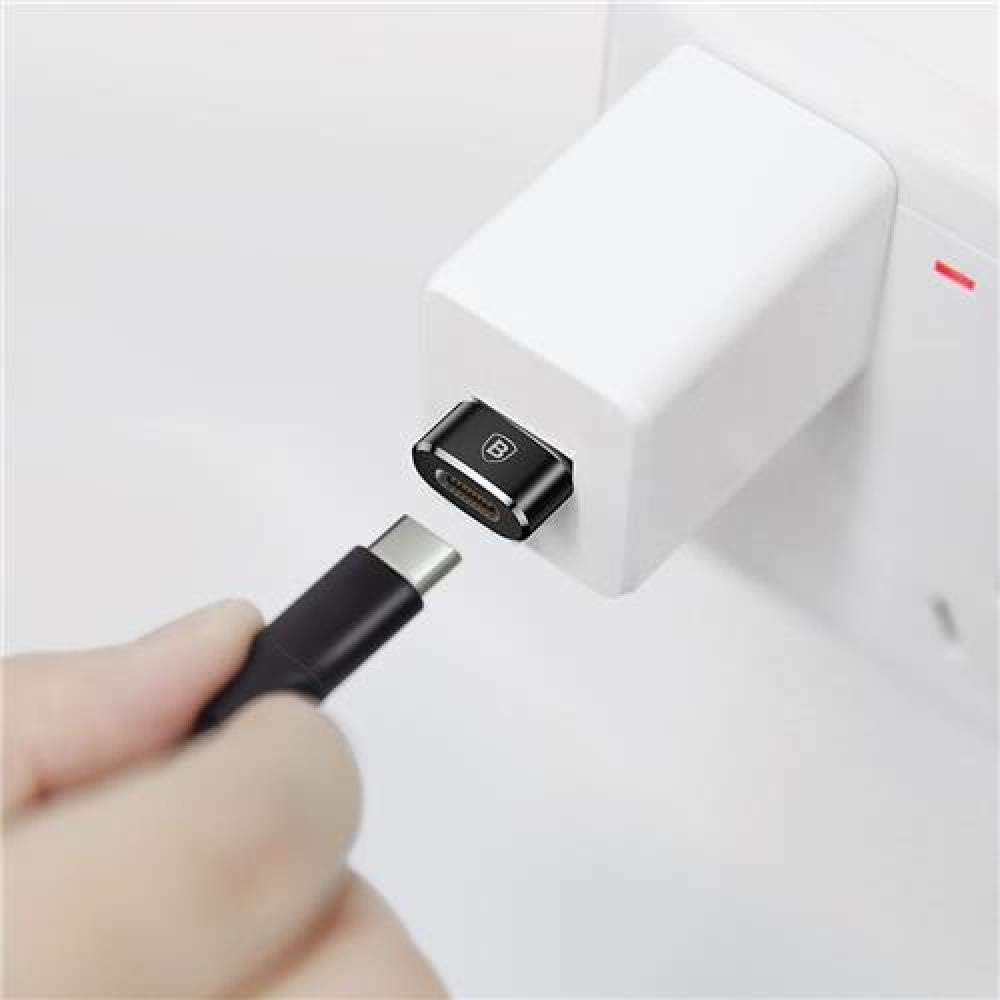
Image 4.1: The adapter connected to a wall charger, ready to receive a USB-C cable for charging.
5. Návod k obsluze
5.1 Data Transfer and Synchronization
To transfer data or synchronize devices:
- Connect the adapter to a USB-A port on your computer.
- Connect your USB-C device (e.g., smartphone, tablet) to the adapter using a USB-C cable.
- Your computer should recognize the connected device. You can now transfer files or synchronize data as usual.
5.2 Nabíjecí zařízení
To charge a USB-C device:
- Connect the adapter to a USB-A wall charger, power bank, or computer USB-A port.
- Connect your USB-C device to the adapter using a USB-C charging cable.
- Ensure the power source is active. Your device should begin charging. The adapter supports fast charging up to 5A, depending on the capabilities of your charger and device.
6. Údržba
- Čištění: K čištění adaptéru používejte měkký, suchý hadřík. Nepoužívejte tekuté čisticí prostředky ani abrazivní materiály.
- Skladování: Adaptér skladujte na chladném a suchém místě mimo dosah přímého slunečního záření a extrémních teplot.
- Zacházení: Avoid dropping the adapter or subjecting it to strong impacts. Do not force connectors into ports.
7. Řešení problémů
| Problém | Možná příčina | Řešení |
|---|---|---|
| Device not recognized / No data transfer. |
|
|
| Device not charging / Slow charging. |
|
|
8. Specifikace
| Číslo modelu | CAAOTG-01 |
| Značka | Baseus |
| Rozměry produktu (D x Š x V) | 15 x 5 x 5 cm |
| Hmotnost položky | 18.14 g |
| Barva | Černý |
| Typ konektoru | USB Type-A Male, USB Type-C Female |
| Rychlost přenosu dat | Až 480 Mb/s (USB 2.0) |
| Max Ampvymazat | 5 Ampere |
| Kompatibilní zařízení | Laptops, Mobile Phones, Tablets with USB-C ports |
| Materiál | Hliníková slitina |
9. Záruka a podpora
This product comes with a limited warranty. For detailed warranty information or technical support, please refer to the official Baseus webnebo kontaktujte jejich zákaznický servis.
- Oficiální Baseus Webmísto: www.baseus.com
- Služby zákazníkům: Viz kontaktní informace uvedené na oficiálních stránkách webmísto nebo obal produktu.
Additional safety and usage instructions may be available in PDF format: