
1. Úvod
Thank you for choosing the Baseus Encok S16 Neck Hung Bluetooth Wireless In-Ear Earphone. This manual provides detailed instructions for setup, operation, and maintenance to ensure optimal performance and longevity of your device. Please read this manual thoroughly before use.
2. Obsah balení
Ověřte, zda jsou v balení přítomny všechny položky:
- 1 x Baseus Encok S16 Wireless Earphone
- 1 x nabíjecí kabel
- 1 x Uživatelská příručka
- 1 x Záruční list

Image: Contents of the Baseus Encok S16 earphone package, showing the earphones, charging cable, user manual, and warranty card.
3. Konec produktuview
The Baseus Encok S16 earphones feature a neck-hung design for comfortable and secure wear. Key features include:
- Magnetická fixace: Earbuds can be magnetically joined when not in use, preventing tangling and loss.
- Adjustable Coils: The earphone line length can be adjusted by sliding for a customized fit.
- Vysoce věrný zvuk: Equipped with a dynamic speaker unit, composite diaphragm, and independent tune trope structure for clear audio.
- Efektivní výkon: Utilizes a British CSR chip and 120mAh battery for low power consumption and extended battery life.
- Univerzální kompatibilita: Smartly matches with smartphones and tablet PCs, compatible with all Bluetooth 4.0 enabled devices.

Image: Close-up of the Baseus Encok S16 earbuds demonstrating their magnetic connection capability.
4. Nastavení
4.1 Nabíjení sluchátek
- Connect the provided charging cable to the charging port on the earphone's control unit.
- Druhý konec nabíjecího kabelu připojte k USB zdroji napájení (např. k USB portu počítače, USB adaptéru do zásuvky).
- The indicator light will illuminate during charging and turn off or change color when fully charged.
- Plné nabití obvykle trvá přibližně 1.5 až 2 hodiny.
4.2 Párování Bluetooth
- Ujistěte se, že jsou sluchátka plně nabitá.
- Press and hold the Power button on the control unit until the indicator light flashes red and blue alternately, indicating pairing mode.
- Na smartphonu nebo zařízení s podporou Bluetooth přejděte do nastavení Bluetooth.
- Hledat available devices and select "Baseus Encok S16" from the list.
- Once connected, the indicator light will flash blue slowly or turn solid blue.
- Pokud budete vyzváni k zadání hesla, zadejte „0000“.
5. Návod k obsluze
5.1 Základní ovládací prvky
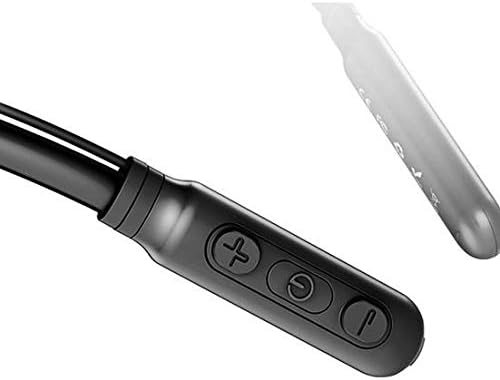
Image: Close-up of the Baseus Encok S16 earphone's inline control unit, showing the power/multi-function button, volume up, and volume down buttons.
| Tlačítko | Funkce |
|---|---|
| Tlačítko napájení (střední) |
|
| Zvýšení hlasitosti (+) |
|
| Snížit hlasitost (-) |
|
5.2 Nošení sluchátek
Place the neckband around your neck, ensuring the control unit is easily accessible. Insert the earbuds comfortably into your ears. Adjust the earphone line length using the sliding coils for a secure and comfortable fit.
6. Údržba
- Pravidelně čistěte sluchátka a ovládací jednotku měkkým, suchým hadříkem.
- Avoid exposing the earphones to extreme temperatures, humidity, or corrosive liquids.
- Store the earphones in a cool, dry place when not in use. The magnetic earbuds can help prevent tangling during storage.
- Do not attempt to disassemble or repair the earphones yourself, as this will void the warranty.
7. Řešení problémů
| Problém | Řešení |
|---|---|
| Nelze zapnout | Ensure the earphones are fully charged. Press and hold the Power button for 3 seconds. |
| Nelze spárovat se zařízením |
|
| Žádný zvuk nebo nízká hlasitost |
|
| Přerušované připojení |
|
8. Specifikace
| Funkce | Detail |
|---|---|
| Značka | Baseus |
| Číslo modelu | FWP-E-S16 |
| Technologie připojení | Bluetooth |
| Verze Bluetooth | 4.0 (compatible with devices enabling Bluetooth 4.0) |
| Form Factor | In Ear, Neck Hung |
| Typ ovládání | Hlasové ovládání, dotykové (pomocí tlačítek) |
| Kapacita baterie | 120 XNUMX mAh |
| Hmotnost | 30 gramů |
| Zahrnuté komponenty | Wireless Earphone, Charging Cable, User Manual, Warranty Card |
9. Záruka a podpora
This product comes with a Limited Warranty. Please refer to the included Warranty Card for detailed terms and conditions regarding coverage and duration.
For technical support or warranty claims, please contact your retailer or visit the official Baseus webstránky s informacemi o zákaznickém servisu.
Globální obchodní identifikační číslo (GTIN): 06953156264489