
Zavedení
The Actiontec SBWD100A is a Wireless HD Video Receiver designed to receive high-definition video and audio signals wirelessly from a compatible transmitter (sold separately) and output them to a display device. This device allows for flexible placement of your display without the need for long HDMI cables.
1. Nastavení
1.1 Obsah balení
- Actiontec SBWD100A Wireless HD Video Receiver
- Napájecí adaptér
- HDMI kabel
- Uživatelská příručka (tento dokument)
1.2 Připojení přijímače
- Připojení k displeji: Use the provided HDMI cable to connect the HDMI OUT port on the SBWD100A receiver to an available HDMI input port on your television or monitor.
- Připojte napájení: Plug the power adapter into the DC IN port on the SBWD100A receiver, then plug the other end into a standard electrical outlet. The receiver will power on automatically.
- Displej při zapnutí: Turn on your television or monitor and select the correct HDMI input source that the receiver is connected to.
- Párování (automatické): The SBWD100A receiver is designed to automatically detect and pair with a compatible Actiontec wireless HD video transmitter (sold separately) when both devices are powered on and within range. Look for a 'Waiting for Connection' or similar message on your display.
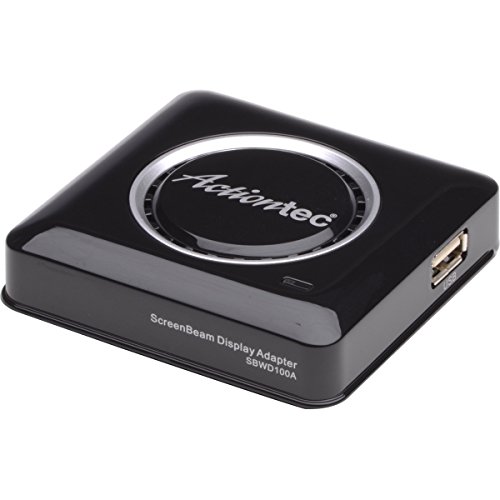
Obrázek 1: Přední strana view of the Actiontec SBWD100A Wireless HD Video Receiver, showing its compact design and connection ports.
2. Návod k obsluze
2.1 Zapnutí/vypnutí
- Zapnutí: The receiver powers on automatically when connected to a power source.
- Vypnout: Disconnect the power adapter from the electrical outlet to power off the receiver.
2.2 Receiving Video Signal
Once the receiver is powered on and connected to your display, and a compatible Actiontec wireless HD video transmitter (sold separately) is also powered on and transmitting, the receiver will automatically detect and display the video signal. The LED indicator on the receiver will typically change to a solid color (e.g., blue or green) to indicate a successful connection and active signal reception.
Ensure your display is set to the correct HDMI input where the SBWD100A is connected.
3. Údržba
3.1 Čištění
To clean the receiver, gently wipe the exterior with a soft, dry cloth. Do not use liquid cleaners, aerosols, or solvents, as these may damage the device. Ensure the device is powered off and unplugged before cleaning.
3.2 Skladování
When not in use for extended periods, store the receiver in a cool, dry place away from direct sunlight and extreme temperatures. Disconnect all cables before storing.
4. Řešení problémů
| Problém | Možná příčina | Řešení |
|---|---|---|
| No picture on display |
|
|
| Poor picture quality or flickering |
|
|
| Žádný zvuk |
|
|
5. Specifikace
| Funkce | Detail |
|---|---|
| Číslo modelu | SBWD100A |
| ASIN | B01KLQVZJC |
| Hmotnost položky | 7.3 unce |
| Rozměry balení | 6.1 x 6.1 x 2.36 palce |
| Výrobce | ACTIONTEC |
| Datum první dostupnosti | 6. října 2013 |
6. Informace o záruce
Actiontec products are covered by a limited warranty. For specific warranty terms and conditions, please refer to the warranty card included with your product or visit the official Actiontec webUschovejte si účtenku jako doklad o koupi pro případ reklamace.
7. Zákaznická podpora
If you encounter any issues not covered in this manual or require further assistance, please contact Actiontec customer support. Visit the official Actiontec webstránky s kontaktními informacemi, častými dotazy a dalšími zdroji.