
1. Úvod
This user manual provides comprehensive instructions for the installation, operation, and maintenance of the Chieftec CMR-425 Hard Drive/SSD Enclosure. This device is designed to house 2.5-inch SATA hard drives or solid-state drives, providing a secure and efficient storage solution for personal computers.
2. Konec produktuview
The Chieftec CMR-425 is a robust enclosure designed for multiple 2.5-inch SATA drives. It features a durable black metal construction and is compatible with SATA I, II, and III interfaces. The enclosure supports drives up to 9.5mm in height and offers a data transfer rate of up to 12 Gigabits per second.

Obrázek 2.1: Přední strana view of the Chieftec CMR-425 Hard Drive/SSD Enclosure, showing multiple drive bays.

Obrázek 2.2: Úhlové view of the enclosure, highlighting the individual drive bay design.

Obrázek 2.3: Detail view of an open drive bay, demonstrating the hot-swap mechanism.
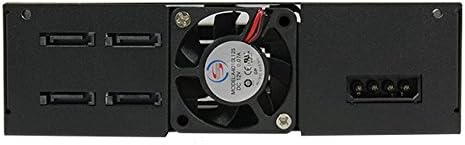
Obrázek 2.4: Zadní view of the enclosure, showing the cooling fan and power/data connectors.

Obrázek 2.5: Shora dolů view illustrating the process of inserting a 2.5-inch drive into a bay.
3. Obsah balení
Ověřte, zda jsou v balení přítomny všechny položky:
- Chieftec CMR-425 Hard Drive/SSD Enclosure
- Mounting screws (if applicable, typically included for installation)
- Uživatelská příručka (tento dokument)
Note: Specific accessories may vary. Refer to the product packaging for a complete list.
4. Pokyny k nastavení
Follow these steps to install your 2.5-inch SATA hard drives or SSDs into the CMR-425 enclosure:
- Připravte si kryt: Ensure the enclosure is powered off and disconnected from any computer.
- Open a Drive Bay: Gently press the release latch or mechanism on the desired drive bay and pull the tray out. Refer to Figure 2.3 for visual guidance.
- Nainstalujte disk: Place your 2.5-inch SATA HDD or SSD into the drive tray. Ensure the SATA data and power connectors on the drive align with the connectors on the tray. Secure the drive to the tray using the provided screws, if necessary.
- Insert the Drive Tray: Carefully slide the loaded drive tray back into the enclosure bay until it clicks securely into place.
- Připojení k PC: Connect the enclosure to your computer using appropriate SATA data cables and power cables. Ensure all connections are firm.
- Zapnutí: Power on the enclosure, then power on your computer. The operating system should detect the new drives.
- Initialize/Format Drives: For new drives, you may need to initialize and format them through your operating system's Disk Management (Windows) or Disk Utility (macOS) before use.
Důležité: Always handle drives with care to prevent damage from static electricity. Use an anti-static wrist strap if available.
5. Provoz
Once installed and recognized by your system, the drives within the CMR-425 enclosure operate like any internal storage device. You can access, read, and write data to them as needed.
- Funkce výměny za provozu: The CMR-425 supports hot-swapping of drives. This means you can remove and insert drives while the enclosure is powered on, provided your operating system and motherboard support this feature and the drives are safely ejected or unmounted first.
- LED indikátory: Each drive bay typically has an LED indicator. A solid light usually indicates power, while a blinking light indicates drive activity (read/write operations).
- Chlazení: The enclosure includes a cooling fan (refer to Figure 2.4) to maintain optimal operating temperatures for the installed drives. Ensure proper airflow around the enclosure.
6. Údržba
Regular maintenance ensures the longevity and optimal performance of your Chieftec CMR-425 enclosure:
- Čištění: Pravidelně čistěte vnější povrch krytu měkkým, suchým hadříkem. Nepoužívejte tekuté čisticí prostředky ani rozpouštědla.
- Odstranění prachu: Ensure the cooling fan and ventilation grilles are free from dust accumulation. Use compressed air to gently clear dust from these areas.
- Aktualizace firmwaru: Check the Chieftec official website periodically for any available firmware updates for the CMR-425, which may improve performance or compatibility.
- Podmínky prostředí: Operate the enclosure in a well-ventilated area, away from direct sunlight, excessive heat, humidity, and strong magnetic fields.
7. Řešení problémů
If you encounter issues with your CMR-425 enclosure, refer to the following common problems and solutions:
| Problém | Možná příčina | Řešení |
|---|---|---|
| Enclosure not detected by PC. | Loose cables, insufficient power, incorrect SATA port. |
|
| Drives not appearing in OS. | Drives not initialized/formatted, driver issues. |
|
| Pomalé rychlosti přenosu dat. | Cable quality, SATA port speed, drive health. |
|
| Enclosure overheating. | Poor ventilation, fan malfunction, excessive load. |
|
If the problem persists after attempting these solutions, please contact Chieftec customer support.
8. Specifikace
| Funkce | Detail |
|---|---|
| Značka | Chieftec |
| Číslo modelu | WRC-425 |
| Kompatibilní zařízení | Osobní počítač |
| Pevný disk Form Factor | 2.5 palce |
| Maximální počet podporovaných zařízení | 1 (per bay, total depends on enclosure configuration) |
| Rychlost přenosu dat | 12 Gigabit za sekundu |
| Rozměry produktu | 5.75 x 6.61 x 1.65 palce |
| Hmotnost položky | 1.68 libry (764 gramů) |
| Hardwarové rozhraní | Solid State Drive (SATA I/II/III compatible) |
| Barva | Černý |
| Materiál | Kov |
| Datum první dostupnosti | 22. července 2016 |
9. Záruka a podpora
The Chieftec CMR-425 Hard Drive/SSD Enclosure comes with a 2-letá záruka od data nákupu. Tato záruka se vztahuje na vady materiálu a zpracování při běžném používání.
For technical support, warranty claims, or further assistance, please visit the official Chieftec webnebo se obraťte na jejich zákaznický servis. Uschovejte si doklad o koupi pro ověření záruky.