
1. Úvod
This manual provides essential instructions for the safe and efficient operation, setup, and maintenance of your Elna eXpressive 920 Sewing, Quilting, and Embroidery Machine. Please read this manual thoroughly before using the machine to ensure proper function and to prevent damage.
2. Důležité bezpečnostní pokyny
Při používání elektrického spotřebiče je třeba vždy dodržovat základní bezpečnostní opatření, včetně následujících:
- Před použitím tohoto šicího stroje si přečtěte všechny pokyny.
- Držte prsty mimo všechny pohyblivé části. Jehla je obzvláště opatrná.
- Vždy používejte správnou stehovou desku. Nesprávná destička může způsobit zlomení jehly.
- Vypněte šicí stroj, když provádíte jakékoli úpravy v oblasti jehly, jako je navlékání jehly, výměna jehly, navlékání cívky nebo výměna přítlačné patky.
- Vždy odpojte šicí stroj od elektrické zásuvky, když odstraňujete kryty, mažete nebo když provádíte jakékoli jiné uživatelské servisní úpravy uvedené v návodu k použití.
- Nikdy nepoužívejte stroj, pokud má poškozený kabel nebo zástrčku, pokud nefunguje správně nebo pokud upadl či byl poškozen.
- Nepoužívejte venku.
3. Konec produktuview
The Elna eXpressive 920 is a versatile machine designed for sewing, quilting, and embroidery. It features a large workspace, an intuitive touch screen, and a wide array of built-in designs and stitches.

Figure 3.1: The Elna eXpressive 920 machine with its extension table attached, providing an expansive work surface for large projects like quilting.
Klíčové vlastnosti:
- 350 Embroidery Designs: Includes a wide variety of built-in embroidery patterns.
- 10 Embroidery Fonts and 2 Alphabets: Offers extensive customization for lettering.
- High Sewing Speed: Adjustable up to 1,060 stitches per minute (spm).
- Automatic Presser Foot Lifter: Enhances ease of use and efficiency.
- Extra-High Presser Foot Lifter: Accommodates thicker fabrics and multiple layers.
- Large Color Touch Screen: For intuitive navigation and design selection.
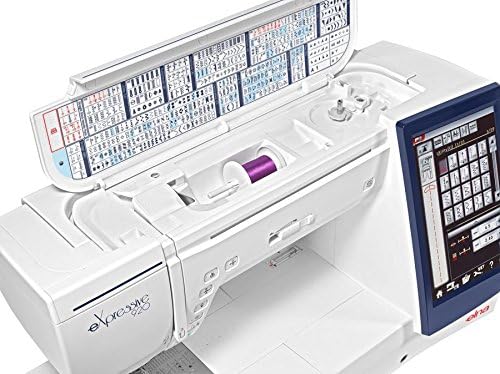
Obrázek 3.2: Nahoře view of the Elna eXpressive 920, illustrating the accessible thread spool compartment and the convenient stitch guide located on the inside of the top cover.
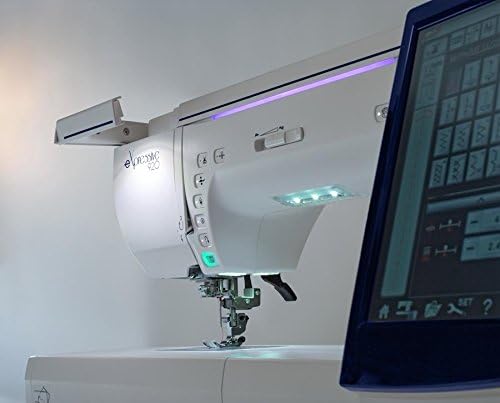
Obrázek 3.3: Detailní záběr ze strany view of the Elna eXpressive 920, highlighting the integrated LED lighting system and the easily accessible control buttons for various functions.
4. Nastavení
4.1 Vybalení a umístění
- Opatrně vyjměte stroj z obalu. Uschovejte si veškerý obalový materiál pro budoucí přepravu nebo skladování.
- Place the machine on a stable, level surface. Ensure there is adequate space around the machine for comfortable operation and fabric handling.
- Připojte napájecí kabel k zařízení a poté do vhodné elektrické zásuvky.
4.2 Připevnění rozšiřovacího stolu
For larger projects, such as quilting, attach the included extension table to expand your workspace.
- Align the pins on the extension table with the corresponding holes on the free arm of the machine.
- Gently push the table towards the machine until it clicks into place.
- Adjust the support legs on the extension table for stability.

Figure 4.1: The Elna eXpressive 920 with the extension table securely attached, demonstrating the expanded work area for larger sewing and quilting projects.
4.3 Navlékání nitě do stroje
Proper threading is crucial for optimal stitch quality. Refer to the on-screen guide or the detailed instructions in the full manual for specific threading paths.
- Nasaďte cívku nitě na kolík cívky.
- Follow the numbered threading guides on the machine, ensuring the thread is seated correctly in each tension disc and guide.
- Navlékněte nit do jehly pomocí automatického navlékače jehly nebo ručně.
4.4 Winding and Inserting the Bobbin
The bobbin provides the lower thread for stitching.
- Nasaďte prázdnou cívku na vřeteno navíječe cívky.
- Follow the bobbin winding path and start winding. The machine will automatically stop when the bobbin is full.
- Open the bobbin cover plate and insert the wound bobbin into the bobbin case, following the indicated thread path.
5. Návod k obsluze
5.1 Základy šití
- Turn on the machine using the power switch. The touch screen will illuminate.
- Select your desired stitch pattern from the touch screen. Adjust stitch length and width as needed.
- Place your fabric under the presser foot. Lower the presser foot using the lever or the automatic presser foot lifter.
- Begin sewing by pressing the foot controller or the Start/Stop button. Adjust sewing speed using the speed control slider.
- To finish, press the reverse stitch button for a few stitches, then press the thread cutter button or manually cut the threads.
5.2 Embroidery Functions
The Elna eXpressive 920 offers 350 built-in embroidery designs, 10 fonts, and 2 alphabets.
- Attach the embroidery unit and hoop to the machine.
- Select an embroidery design from the touch screen. You can resize, rotate, and combine designs.
- Hoop your fabric with stabilizer.
- Follow the on-screen prompts for thread color changes and other instructions.
- Start the embroidery process. The machine will automatically stitch the design.
5.3 Quilting
This machine is well-suited for quilting with its large workspace and various quilting stitches.
- Utilize the extension table for better support of large quilt projects.
- Select appropriate quilting stitches from the machine's menu.
- Consider using a walking foot (often included in accessories) for even feeding of multiple fabric layers.
- Adjust the presser foot pressure if necessary for different fabric thicknesses.
6. Údržba
Regular maintenance ensures the longevity and optimal performance of your Elna eXpressive 920.
6.1 Čištění
- Před čištěním stroj vždy odpojte.
- Sejměte stehovou desku a pouzdro cívky.
- Use the provided brush to remove lint and dust from the feed dogs, bobbin area, and tension discs.
- Vnější povrch přístroje otřete měkkým, suchým hadříkem. Nepoužívejte agresivní chemikálie.
6.2 Mazání
Your Elna eXpressive 920 is designed to require minimal lubrication. Refer to the full instruction manual for specific lubrication points and frequency, if any are required. Over-oiling can cause issues.
6.3 Výměna jehly
Jehlu pravidelně vyměňujte (po 8–10 hodinách šití nebo když se otupí/ohne), abyste zabránili vynechávání stehů a poškození látky.
- Vypněte a odpojte zařízení ze zásuvky.
- Povolte jehlu třamp šroub.
- Remove the old needle and insert a new one with the flat side facing the back of the machine, pushing it up as far as it will go.
- Utáhněte jehlu třamp pevně zašroubujte.
7. Řešení problémů
This section addresses common issues you might encounter. For more complex problems, consult the full service manual or contact customer support.
| Problém | Možná příčina | Řešení |
|---|---|---|
| Vynechané stehy | Nesprávná jehla, ohnutá jehla, nesprávné navlékání nitě, nesprávná velikost jehly pro danou látku. | Vyměňte jehlu, znovu navlékněte nit do stroje, použijte správný typ/velikost jehly. |
| Přetržení nitě | Improper threading, incorrect tension, burr on needle plate, poor quality thread. | Re-thread, adjust tension, check for burrs, use quality thread. |
| Zvrásnění látky | Incorrect tension, wrong stitch length, dull needle, no stabilizer for embroidery. | Adjust tension, increase stitch length, replace needle, use stabilizer. |
| Stroj se nespouští | Power cord not connected, foot controller not plugged in, bobbin winder engaged. | Check power connections, ensure bobbin winder is disengaged. |
8. Specifikace
| Funkce | Detail |
|---|---|
| Číslo modelu | 920 |
| Značka | Elno |
| Typ | Sewing, Quilting, and Embroidery Machine |
| Vyšívací vzory | 350 (including 10 fonts, 2 alphabets) |
| Maximální rychlost šití | 2 500 stehů za minutu (stpm) |
| Zvedák patky | Automatic and Extra-High |
| Zdroj napájení | Elektrický kabel |
| Hmotnost položky | 50 libry |
| Barva | Bílý |
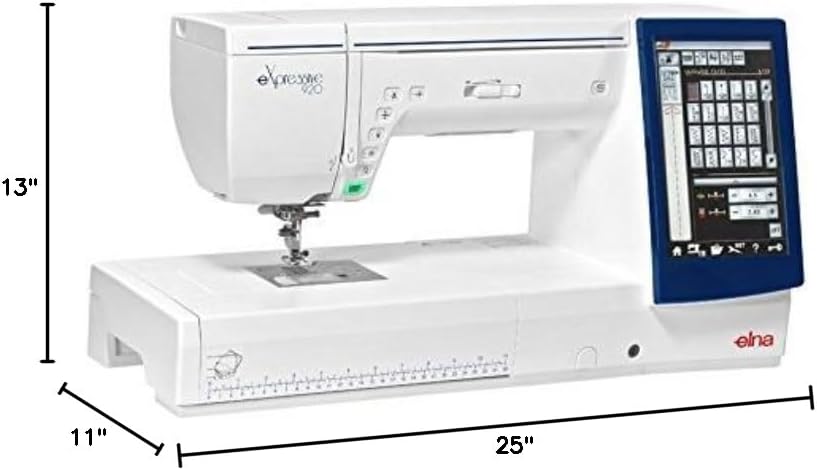
Figure 8.1: The Elna eXpressive 920 machine with its approximate dimensions: 25 inches in length, 11 inches in width, and 13 inches in height.

Obrázek 8.2: Komplexní view of the accessories included with the Elna eXpressive 920, featuring various presser feet, bobbins, needles, cleaning tools, and other essential components for diverse sewing and embroidery tasks.
9. Záruka a podpora
For warranty information, please refer to the warranty card included with your product or visit the official Elna webmísto.
For technical support, service, or to order replacement parts, please contact your authorized Elna dealer or Elna customer service. Keep your model number (eXpressive 920) and serial number (found on the machine's rating plate) ready when contacting support.
Online zdroje: For additional guides, FAQs, and software updates, visit the official Elna support portal.