
Zavedení
Thank you for choosing the Mitzu MC-202 Universal Battery Charger. This manual provides essential information for the safe and efficient operation of your charger. Please read it thoroughly before use and retain it for future reference.
Bezpečnostní informace
- Use this charger only with Ni-MH and Ni-CD rechargeable batteries. Do not attempt to charge alkaline, lithium, or other non-rechargeable battery types, as this may cause explosion, leakage, or personal injury.
- Nabíječku nerozebírejte, neupravujte ani neopravujte.
- Nevystavujte nabíječku vodě, vlhkosti nebo extrémním teplotám.
- Uchovávejte mimo dosah dětí.
- Odpojte nabíječku ze zásuvky, pokud ji nepoužíváte, nebo před čištěním.
- Ensure proper battery polarity (+/-) when inserting batteries into the charger.
- If the charger or batteries become excessively hot during charging, discontinue use immediately and unplug the device.
Obsah balení
- 1 x Mitzu MC-202 Universal Battery Charger
- Note: Some product bundles may include 2 x 1300 mAh AA Ni-MH rechargeable batteries. Please check your specific product packaging.
Konec produktuview
The Mitzu MC-202 is a compact and easy-to-use charger designed for Ni-MH and Ni-CD batteries. It features two charging slots for AA/AAA batteries and one slot for a 9V battery, along with a charging indicator.

Obraz: Přední view of the Mitzu MC-202 universal battery charger with two AA batteries inserted. The charger is white with red indicator lights above each AA slot.

Obraz: Zadní view of the Mitzu MC-202 battery charger, featuring a foldable power plug and a label detailing its specifications and model number.
Nastavení
- Vybalte nabíječku: Carefully remove the Mitzu MC-202 charger from its packaging.
- Kontrola poškození: Zkontrolujte nabíječku, zda není viditelně poškozená. Pokud je poškozená, nepoužívejte ji.
- Připravte si baterie: Ensure the batteries you intend to charge are Ni-MH or Ni-CD type.
Návod k obsluze
- Vložte baterie:
- For AA/AAA batteries: Insert up to two AA or AAA Ni-MH/Ni-CD batteries into the designated slots, ensuring correct polarity (+ and -). The positive (+) end of the battery should align with the positive (+) terminal in the charger, and the negative (-) end with the negative (-) terminal.
- For 9V battery: Insert one 9V Ni-MH/Ni-CD battery into the dedicated 9V slot, matching the polarity.
- Připojení k napájení: Fold out the charger's power plug and insert it into a standard electrical outlet (100-240V AC, 50-60Hz).
- Nabíjení monitoru: The charging indicator light(s) will illuminate to show that charging is in progress. The charger monitors the charging status for convenience.
- Vyjměte baterie: Once charging is complete (the indicator light may change or turn off, depending on the specific model's behavior), unplug the charger from the outlet and carefully remove the charged batteries.

Obraz: A hand inserting a Mitzu AA battery into a remote control, illustrating the correct orientation for battery placement. This principle applies to inserting batteries into the charger as well.
Údržba
- Čištění: Před čištěním odpojte nabíječku ze zásuvky. K otření vnější strany nabíječky použijte měkký, suchý hadřík. Nepoužívejte tekuté čisticí prostředky ani rozpouštědla.
- Skladování: Pokud nabíječku nepoužíváte, skladujte ji na chladném a suchém místě mimo dosah přímého slunečního záření a vlhkosti.
- Péče o baterie: For optimal battery life, avoid overcharging and completely discharging rechargeable batteries.
Odstraňování problémů
| Problém | Možná příčina | Řešení |
|---|---|---|
| Kontrolka nabíječky se nerozsvítí. |
|
|
| Baterie se nenabíjejí nebo se nabíjejí pomalu. |
|
|
| Charger or batteries become very hot. |
|
|
Specifikace
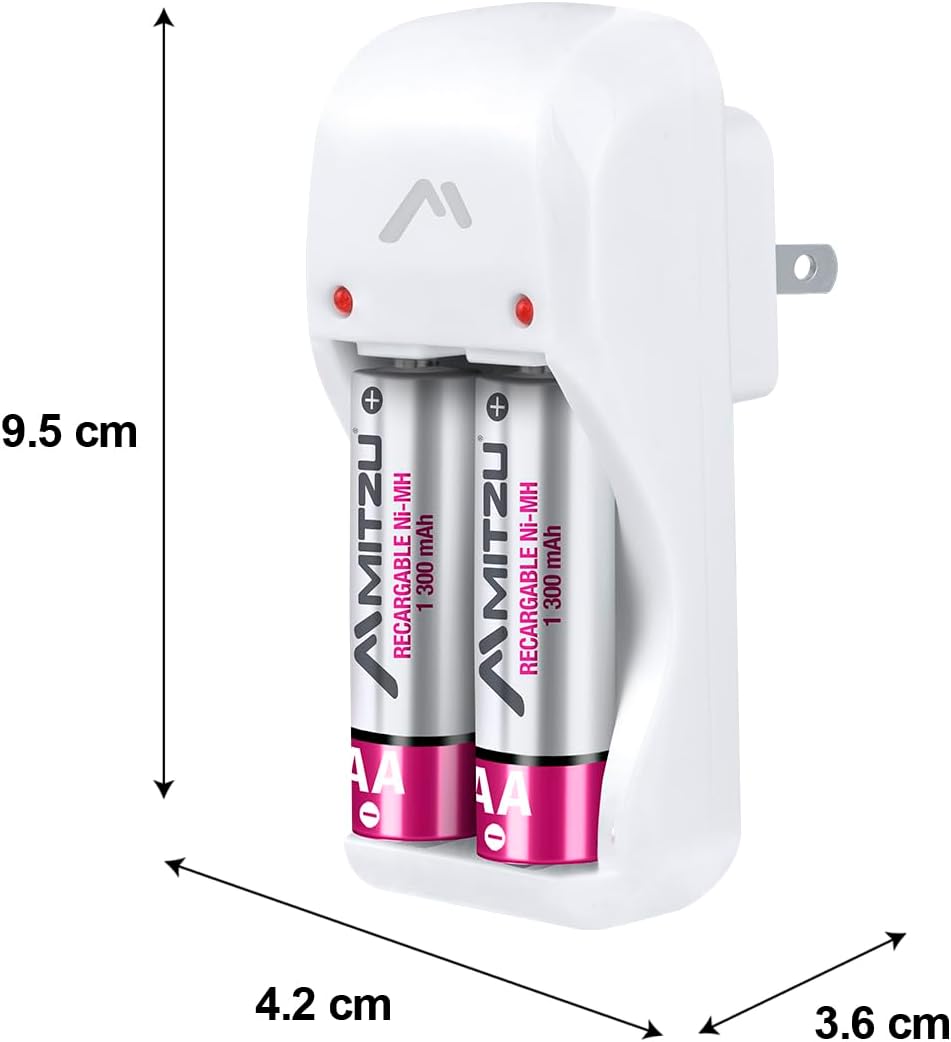
Obraz: Mitzu MC-202 charger with dimensions labeled: approximately 9.5 cm height, 4.2 cm width, and 3.6 cm depth.
| Funkce | Detail |
|---|---|
| Značka | Mitzu |
| Model | MC-202 |
| Číslo dílu | MC-202 |
| Vstup | 100-240V AC, 50-60Hz, 0.5W |
| Output 1 (AA/AAA) | 1.2V DC, 120mA x 2 |
| Output 2 (9V) | 8.4V DC, 35mA x 1 |
| Kompatibilní typy baterií | Ni-MH, Ni-CD |
| Kompatibilní velikosti baterií | AA, AAA, 9V |
| Product Dimensions (Charger Unit) | 9.5 cm (výška) x 4.2 cm (šířka) x 3.6 cm (hloubka) |
| Rozměry balení | 44 x 26 x 22.5 cm |
| Hmotnost produktu | 450 g |
| Battery Capacity (for included AA batteries, if applicable) | 1300 mAh (NiMH) |
| Baterie jsou součástí dodávky | No (for charger unit only; some product bundles may include batteries) |
Záruka a podpora
For warranty information or technical support, please refer to the contact details provided on your product packaging or visit the official Mitzu webwebu. Uschovejte si účtenku jako doklad o koupi.
Mitzu Official Store: Visit Mitzu Store on Amazon.com.mx