
AT&T EL52345
Uživatelská příručka k bezdrátovému telefonnímu systému AT&T EL52345
Model: EL52345 | Brand: AT&T
Konec produktuview
The AT&T EL52345 is an expandable cordless phone system featuring three handsets, an integrated digital answering system, and Caller ID/Call Waiting functionality. Designed for home or small office use, this system provides clear, interference-free communication using DECT 6.0 technology. The digital answering system offers up to 22 minutes of recording time, ensuring you never miss an important message. Each handset includes a backlit LCD screen for easy viewing of Caller ID entries and menu navigation.
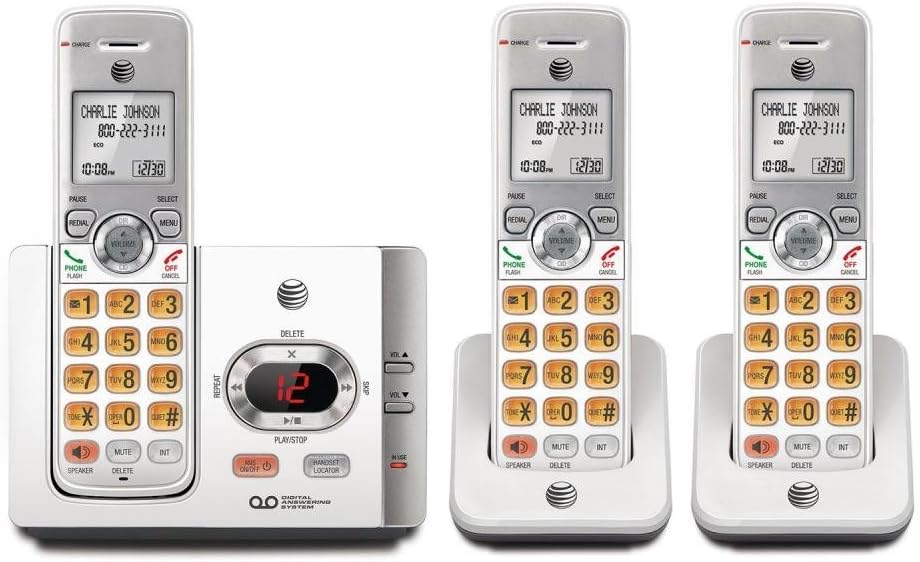
This image displays the complete AT&T EL52345 cordless phone system. It includes the main base unit with an integrated digital answering system, and three cordless handsets. Two of the handsets are shown in their individual charging cradles, while the third is docked in the main base unit. The handsets feature a backlit LCD screen, a full numeric keypad, and dedicated buttons for call functions, menu navigation, volume control, speakerphone, mute, and intercom. The main base unit has controls for the answering system, including message playback, skip, repeat, and volume adjustment, along with a message counter display.
Průvodce nastavením
Follow these steps to set up your AT&T EL52345 cordless phone system:
- Instalace baterie: Open the battery compartment on each handset. Insert the supplied AAA batteries, ensuring correct polarity. Close the compartment cover.
- Charging Handsets: Place each handset in its respective charging cradle or the main base unit. The CHARGE indicator on the handset will illuminate. Allow at least 16 hours for the initial charge before first use.
- Připojení základní jednotky:
- Připojte jeden konec telefonního kabelu do zdířky TEL LINE na zadní straně základní jednotky.
- Připojte druhý konec telefonního kabelu do telefonní zásuvky ve zdi.
- Zapojte větší konec napájecího adaptéru do elektrické zásuvky, která není ovládána vypínačem ve zdi.
- Zapojte menší konec napájecího adaptéru do zdířky POWER na zadní straně základní jednotky.
- Handset Registration: Handsets are pre-registered to the base unit. If a handset displays "To register HS..." or similar, refer to the troubleshooting section for manual registration instructions.
- Nastavit datum a čas: After the initial charge, the handset will prompt you to set the date and time. Follow the on-screen instructions using the MENU and SELECT buttons.
Návod k obsluze
Uskutečňování a přijímání hovorů
- Chcete-li zavolat: Stiskněte TELEFON / FLASH or REPRODUKTORa poté vytočte číslo.
- Chcete-li přijmout hovor: Stiskněte TELEFON / FLASH or REPRODUKTOR když zazvoní telefon.
- Ukončení hovoru: Stiskněte VYP/ZRUŠIT or place the handset in the charging cradle.
- Opakovaná volba: Stiskněte OPAKOVÁNÍ to call the last dialed number.
Odpovídací systém
The digital answering system records messages when you are away or unable to answer calls.
- Zapnout/Vypnout: Stiskněte ANS ON/OFF na základní jednotce.
- Přehrávání zpráv: Stiskněte PLAY/STOP on the base unit to listen to new messages.
- Skip Message: Během přehrávání stiskněte PŘESKOČIT (right arrow) to skip to the next message.
- Repeat Message: Během přehrávání stiskněte OPAKOVAT (left arrow) to repeat the current message. Press twice to go to the previous message.
- Delete Message: Během přehrávání stiskněte VYMAZAT na základní jednotce.
- Upravit hlasitost: Použití HLASITOST ▲ or VOL ▼ on the base unit to adjust playback volume.
ID volajícího
The Caller ID feature displays the caller's name and number (if available) on the handset screen.
- Review Telefonní záznam: Stiskněte CID on the handset to scroll through the call log.
- Zavolat zpět: Zatímco viewing a Caller ID entry, press TELEFON / FLASH zavolat na číslo.
Údržba
- Čištění: Clean the phone and base unit with a soft, slightly damp hadříkem. Nepoužívejte čisticí spreje ani agresivní chemikálie.
- Péče o baterie: To ensure optimal battery life, fully charge the handsets for 16 hours before first use. If the phone will not be used for an extended period, remove the batteries.
- Umístění: Place the base unit in a central location away from other electronic devices (e.g., microwaves, Wi-Fi routers) to minimize interference.
Odstraňování problémů
| Problém | Řešení |
|---|---|
| Žádný oznamovací tón. | Ensure the telephone line cord is securely plugged into the base unit and the wall jack. Check if the power adapter is properly connected to the base unit and a working electrical outlet. |
| Handset displays "To register HS..." | To manually register a handset: Place the handset in the base unit. Press and hold the Lokátor sluchátek button on the base unit for about 4 seconds until the IN USE light flashes. The handset will display "Registering..." and then "Handset Registered" when successful. |
| Špatná kvalita zvuku nebo statický šum. | Move the handset closer to the base unit. Ensure the base unit is not near other electronic devices that may cause interference. Check the telephone line cord for damage. |
| Handset battery does not hold a charge. | Ensure the handset is properly seated in the charging cradle. Clean the charging contacts on both the handset and cradle with a dry cloth. If the issue persists, the battery may need replacement. |
| Záznamník nezaznamenává zprávy. | Ensure the answering system is turned ON. Check if the memory is full; delete old messages if necessary. |
Specifikace
| Funkce | Detail |
|---|---|
| Číslo modelu | EL52345 |
| Typ telefonu | Bezdrátový |
| Počet sluchátek | 3 (rozbalitelné) |
| Typ systému odpovědí | Digitální |
| Kapacita záznamu | Až 22 minut |
| Caller ID / Call Waiting | Ano |
| Technologie | DECT 6.0 |
| Jsou vyžadovány baterie | 3 AAA batteries (per handset) |
| Barva | Stříbrná, bílá |
| Materiál | Plast |
| Product Dimensions (Base Unit) | 11.1 x 6.9 x 5.5 palce |
| Hmotnost položky | 1.3 libry |
| Kompatibilní zařízení | PSTN Networks |
Podpora a záruka
For further assistance, technical support, or warranty information regarding your AT&T EL52345 cordless phone system, please refer to the official AT&T product support channels. Typically, warranty details are provided with the product packaging or can be found on the manufacturer's official webmísto.
Note: No official product videos were provided in the source data for embedding in this manual.
Ask a question about this manual
Ask about setup, troubleshooting, compatibility, parts, safety, or missing instructions. Manuals+ will review the question and use this page’s manual context to help answer it.