
Zavedení
This manual provides instructions for the proper setup, operation, maintenance, and troubleshooting of your Excalibur Deluxe Virtual Casino 5-in-1 Video Game. Please read this manual thoroughly before using the device to ensure optimal performance and longevity.
The Excalibur Deluxe Virtual Casino is a handheld electronic gaming device featuring five classic casino games: Poker, Blackjack, Slots, Craps, and Roulette. It is designed for portable entertainment.
Nastavení
1. Instalace baterie
The Excalibur Deluxe Virtual Casino requires 3 AAA batteries (not included) for operation.
- Vyhledejte kryt přihrádky na baterie na zadní straně zařízení.
- Posuňte kryt ve směru šipky.
- Vložte 3 baterie typu AAA a dbejte na správnou polaritu (+ a -) vyznačenou uvnitř přihrádky.
- Nasaďte zpět kryt přihrádky na baterie a ujistěte se, že bezpečně zacvakne na místo.
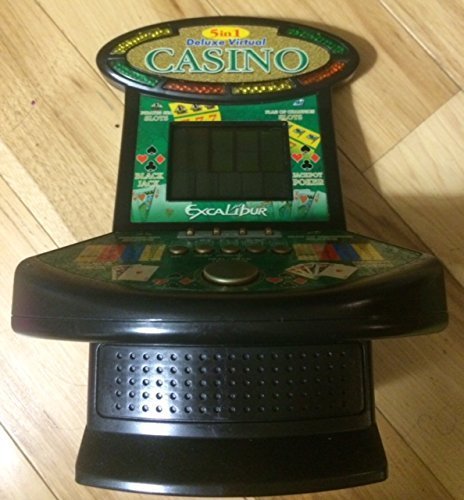
Obrázek 1: Excalibur Deluxe Virtual Casino handheld device. This image shows the front of the device, featuring the LED display and control buttons, which include a directional pad and action buttons.
2. Počáteční zapnutí
Po vložení baterií stiskněte tlačítko MOC button, usually located on the top or front of the device, to turn it on. The screen should illuminate, displaying the main menu or game selection screen.
Návod k obsluze
Ovládání je ukončenoview
- Směrový ovladač (D-Pad): Used for navigating menus and making selections within games.
- SELECT/MENU Button: Typically used to confirm selections or access in-game menus.
- ACTION Buttons (A, B, C, etc.): Used for specific game actions, such as dealing cards, spinning reels, or placing bets. Refer to individual game instructions for specific button functions.
- SOUND/VOLUME Button: Adjusts the device's sound level or mutes audio.
- Tlačítko napájení: Zapíná nebo vypíná zařízení.
Výběr hry
Z hlavní nabídky použijte D-Pad to highlight your desired game (Poker, Blackjack, Slots, Craps, or Roulette). Press the VYBRAT button to confirm your choice and start the game.
Basic Gameplay (General)
- Placing Bets: Použijte D-Pad to select bet amounts or areas on the table (for Craps/Roulette). Confirm with an AKCE tlačítko.
- Game Actions: Follow on-screen prompts. For example, in Poker/Blackjack, use AKCE buttons to "Hit," "Stand," "Deal," or "Fold." In Slots, press an AKCE button to "Spin."
- Viewing Rules: Some games may have an option to view rules within their respective menus. Access this via the MENU tlačítko, pokud je k dispozici.
Údržba
Čištění
To clean the device, gently wipe the exterior with a soft, dry cloth. Do not use abrasive cleaners, solvents, or immerse the device in water. For the screen, use a soft, lint-free cloth specifically designed for electronics displays.
Péče a skladování baterií
- Pokud zařízení nebudete delší dobu používat, vyjměte baterie, abyste zabránili jejich vytečení.
- Přístroj skladujte na chladném a suchém místě, mimo dosah přímého slunečního záření a extrémních teplot.
- Nekombinujte staré a nové baterie ani různé typy baterií.
Odstraňování problémů
| Problém | Možná příčina | Řešení |
|---|---|---|
| Zařízení se nezapne. | Vybité nebo nesprávně vložené baterie. | Zkontrolujte polaritu baterií. Vyměňte za nové baterie AAA. |
| Obrazovka je prázdná nebo bliká. | Low batteries or a temporary software glitch. | Vyměňte baterie. Vypněte a znovu zapněte zařízení. |
| Tlačítka nereagují. | Low batteries or a software issue. | Replace batteries. Turn the device off and on again. Ensure buttons are not stuck. |
| Žádný zvuk. | Volume is muted or set too low. | Stiskněte tlačítko SOUND/VOLUME tlačítko pro nastavení hlasitosti nebo zapnutí zvuku. |
Specifikace
- Model: B01GGZSPTA
- Značka: Excalibur
- Typ displeje: LED
- Form Factor: Ruční
- Zdroj napájení: 3 x AAA baterie (nejsou součástí balení)
- Zahrnuté hry: Poker, Blackjack, Slots, Craps, Roulette
Záruka a podpora
Excalibur products are designed for quality and reliability. For information regarding warranty coverage, please refer to the warranty card included with your purchase or visit the official Excalibur webmísto.
For technical support or customer service inquiries, please contact Excalibur customer support through their official channels. Contact details are typically available on the product packaging or the manufacturer's webmísto.