
1. Úvod
Thank you for choosing the Casio SL-310SV Solar Powered Standard Function Calculator. This manual provides essential information for the proper use and care of your calculator. The SL-310SV features a large 10-digit LCD display, solar power with battery backup, and a durable metal faceplate, making it suitable for everyday calculations.

Obrázek: Přední strana view of the Casio SL-310SV Solar Powered Calculator, displaying its 10-digit screen and key layout.
2. Nastavení
2.1 Unboxing and Initial Power
Po otevření balení se ujistěte, že jsou přítomny následující položky:
- Casio SL-310SV Calculator
- Pokyny k použití (tato příručka)
- Wallet-style case
The calculator is powered by solar energy and includes a battery backup. It will automatically power on when sufficient light is available. If the display is blank, expose the solar panel to light. The calculator is ready for use immediately after unboxing.
2.2 Automatické vypnutí
To conserve battery life, the calculator features an auto power-off function. It will automatically turn off after approximately 10 minutes of non-use. To reactivate, simply press any key.
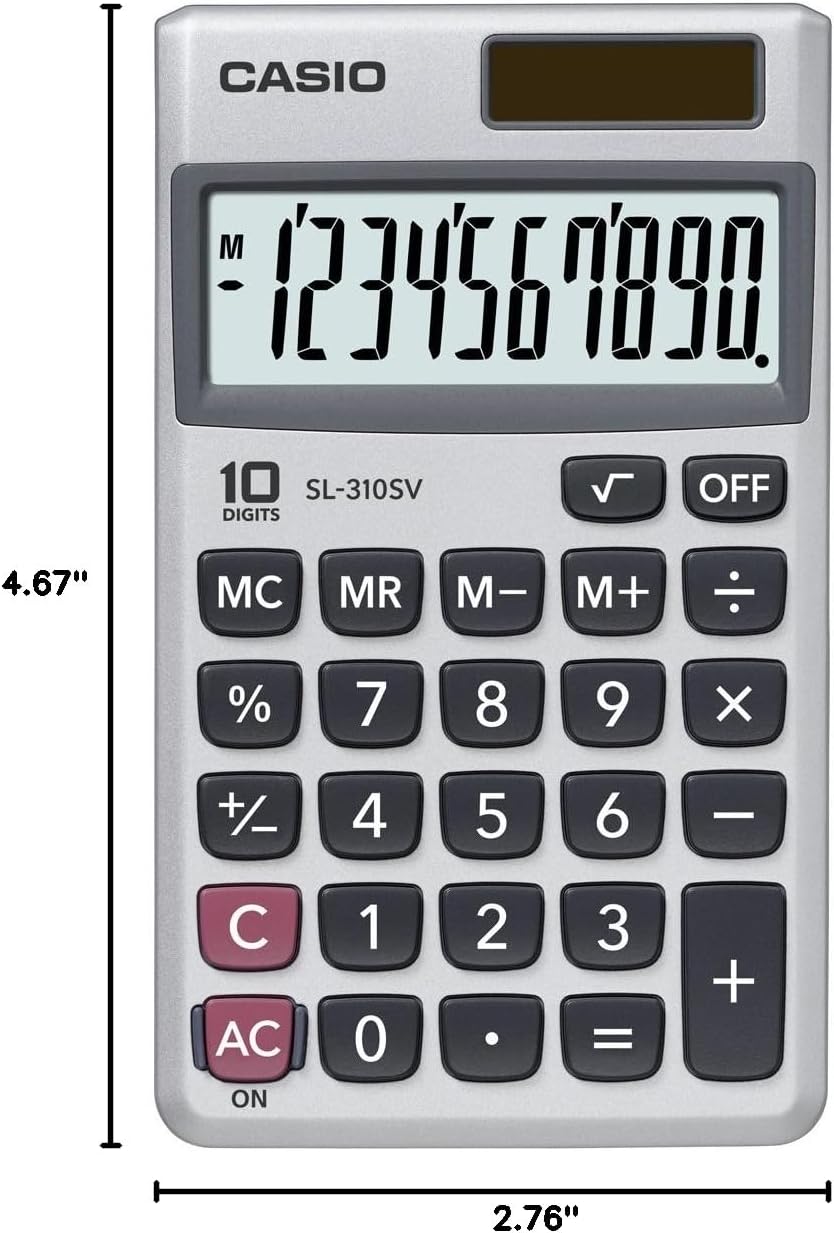
Image: Casio SL-310SV Calculator showing its dimensions: 4.67 inches in length and 2.76 inches in width.
3. Návod k obsluze
3.1 Základní aritmetické operace
Perform addition, subtraction, multiplication, and division using the respective keys: +, -, ×, ÷. Stiskněte = pro zobrazení výsledku.
3.2 Funkce paměti
The calculator includes memory functions for storing and recalling values:
- MC (vymazání paměti): Clears the memory content.
- MR (vyvolání paměti): Recalls the value currently stored in memory.
- M- (paměť mínus): Subtracts the displayed value from the memory content.
- M+ (Memory Plus): Adds the displayed value to the memory content.
3.3 procenttage Výpočty
Použijte % key for percentage výpočty. Napřampnapř. pro výpočet 10 % z 150 zadejte 150 × 10 %.
3.4 Square Root
Stiskněte tlačítko √ key to calculate the square root of the displayed number.
3.5 Clear Keys
- C (Clear): Clears the last entered number or operation.
- AC (vše jasné): Clears all entries and operations, resetting the calculator to zero.
3.6 Turning Off the Calculator
Stiskněte tlačítko VYPNUTO key to manually turn off the calculator. Alternatively, the auto power-off feature will activate after 10 minutes of inactivity.
4. Údržba
4.1 Čištění
To clean the calculator, wipe it with a soft, dry cloth. Do not use abrasive cleaners, solvents, or harsh chemicals, as these can damage the display or casing.
4.2 Skladování
When not in use, store the calculator in its provided wallet-style case to protect it from dust, scratches, and impacts. Avoid exposing the calculator to extreme temperatures, humidity, or direct sunlight for prolonged periods, as this can affect its performance and lifespan.
4.3 Informace o baterii
The Casio SL-310SV operates primarily on solar power. The built-in battery serves as a backup power source in low-light conditions. The battery is designed for long-term use and typically does not require user replacement. If the display becomes consistently dim even in adequate light, contact customer support.
5. Řešení problémů
5.1 Blank or Dim Display
- Příčina: Insufficient light for solar power, or low battery backup.
- Řešení: Move the calculator to a well-lit area. If the issue persists, the internal battery may be depleted. While not user-replaceable, prolonged exposure to bright light might help recharge it slightly, or indicate a need for service.
5.2 Nesprávné výsledky výpočtu
- Příčina: Incorrect key input, or a value stored in memory affecting calculations.
- Řešení: Stiskněte tlačítko AC key to clear all operations and memory. Re-enter the calculation carefully.
5.3 Klávesy nereagují
- Příčina: Dust or debris under the keys, or a temporary malfunction.
- Řešení: Gently clean around the keys. If the calculator is unresponsive, try moving it to a brighter area to ensure adequate power. If the problem continues, contact customer support.
6. Specifikace
| Funkce | Detail |
|---|---|
| Číslo modelu | SL-310SV |
| Typ zobrazení | Large 10-Digit LCD |
| Zdroj napájení | Solární baterie se zálohováním |
| Typ kalkulačky | Standardní funkce |
| Rozměry (D x Š) | 4.67" x 2.76" |
| Materiál pouzdra | Plastic with Metal Faceplate |
| Speciální funkce | Square Root Key, Percentage Key, Memory Functions, Auto Power Off, Wallet Style Case |
7. Záruka a podpora
7.1 Informace o záruce
The Casio SL-310SV calculator comes with a 1letá omezená záruka od data nákupu. Tato záruka se vztahuje na výrobní vady vzniklé běžným používáním. Nevztahuje se na škody způsobené nesprávným použitím, nehodami, neoprávněnými opravami nebo běžným opotřebením. Uschovejte si prosím doklad o koupi pro případné reklamace.
7.2 Zákaznická podpora
For technical assistance, warranty service, or general inquiries, please visit the official Casio website or contact their customer service department. Refer to the contact information provided on the Casio packaging or website for the most up-to-date details.
Více informací a podpůrných zdrojů naleznete na Obchod Casio na Amazonu.