
Showtec Q4
Showtec Compact Par 7 Q4 7 x 3W RGBW LED podlahové PAR reflektorové světlo Uživatelská příručka
Model: Q4
1. Úvod
This user manual provides comprehensive instructions for the safe and efficient operation of the Showtec Compact Par 7 Q4 7 x 3W RGBW LED Floor PAR Spot. Please read this manual thoroughly before installation, operation, or maintenance to ensure proper use and to prevent damage to the unit or injury to personnel.
The Showtec Compact Par 7 Q4 is a compact RGBW PAR can designed for various lighting applications, offering versatile color mixing and robust performance.
2. Bezpečnostní pokyny
Vždy dodržujte následující bezpečnostní opatření, abyste snížili riziko úrazu elektrickým proudem, požáru nebo zranění:
- Zajistěte napájení objtage odpovídá zvtage specifikováno na jednotce.
- Vždy připojujte přístroj k uzemněné elektrické zásuvce.
- Nepoužívejte jednotku, pokud je napájecí kabel poškozený.
- Před čištěním nebo servisem odpojte od elektrické sítě.
- Nevystavujte jednotku dešti nebo vlhkosti.
- Zajistěte dostatečné větrání kolem jednotky, aby nedošlo k přehřátí.
- Vyhněte se přímému vystavení očí světelnému zdroji.
- Tato jednotka je určena pouze pro vnitřní použití.
3. Konec produktuview
The Showtec Compact Par 7 Q4 features seven 3W RGBW LEDs, providing a wide spectrum of colors. Its compact design makes it suitable for floor standing or truss mounting.

Obrázek 3.1: Přední strana view of the Showtec Compact Par 7 Q4 with red light output, showcasing its seven powerful RGBW LEDs.

Figure 3.2: The PAR spot emitting a bright white light, demonstrating its full spectrum capabilities.

Figure 3.3: The PAR spot displaying a vibrant blue light, highlighting its color mixing versatility.

Obrázek 3.4: Detail view of the LED array when the unit is off, showing the individual lenses.
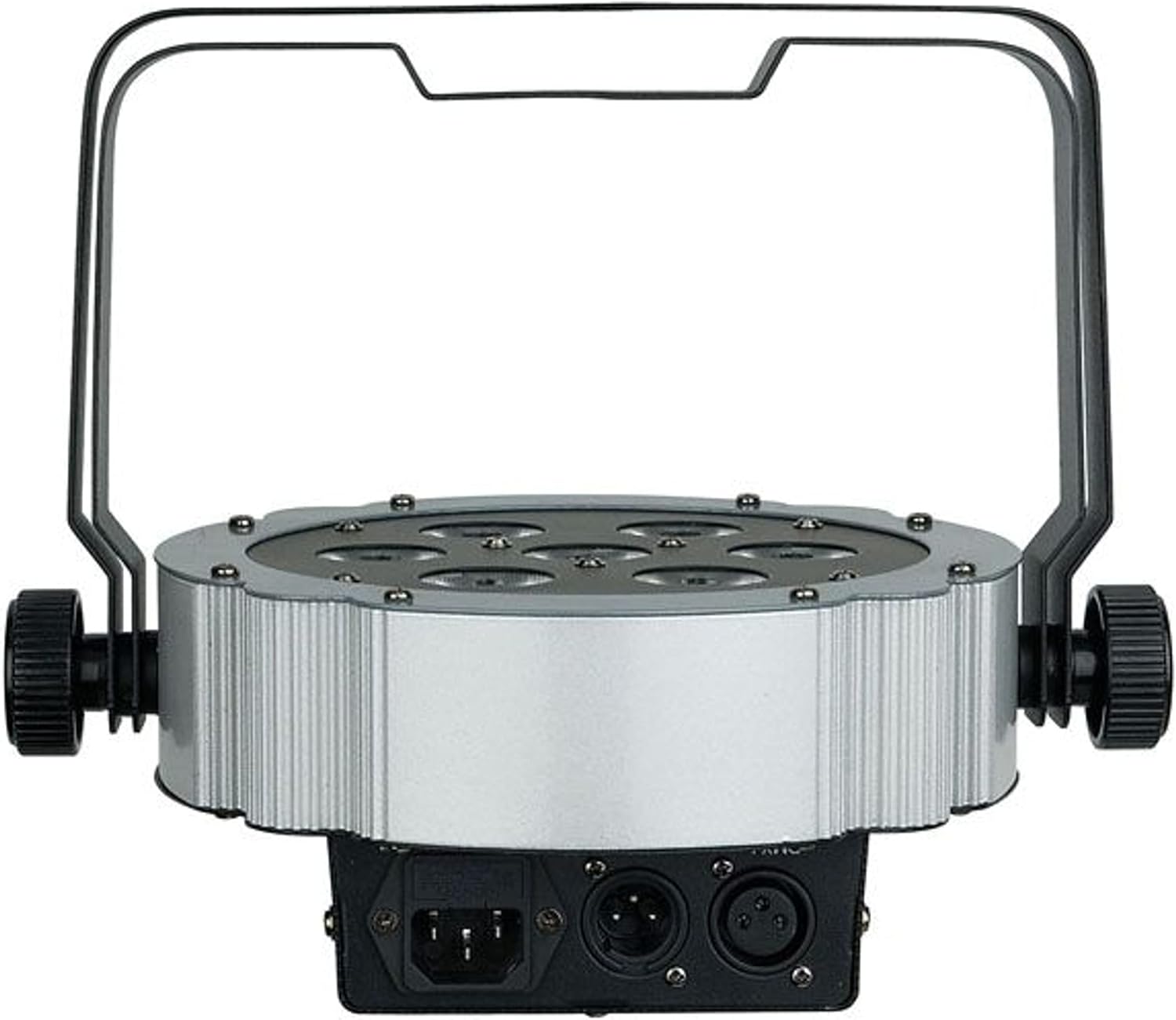
Obrázek 3.5: Zadní view of the unit, showing the power input and DMX connections (XLR 3-pin).

Obrázek 3.6: Úhlové view of the PAR spot, demonstrating the adjustable mounting bracket for floor or truss applications.
4. Nastavení
4.1 Vybalení
Carefully unpack the unit and check for any damage during transit. Retain the packaging material for future transport or storage.
4.2 Montáž
The Compact Par 7 Q4 can be used as a floor spot or mounted to a truss using the integrated bracket. Ensure the mounting surface or truss can support the weight of the fixture. Use appropriate clampa bezpečnostní lana při montáži nad hlavou.
4.3 Připojení napájení
Connect the power cable to the unit's power input and then to a grounded electrical outlet. Verify that the local voltage odpovídá požadavkům jednotky (240 voltů).
4.4 DMX připojení (volitelné)
For DMX control, connect a DMX cable from your DMX controller to the DMX IN port of the fixture. If connecting multiple units, daisy-chain them by connecting the DMX OUT of the first unit to the DMX IN of the next.
5. Provoz
5.1 Ovládací panel
The unit features a digital display and control buttons (Menu, Up, Down, Enter) on the rear for setting modes and DMX addresses.
5.2 Provozní režimy
The Showtec Compact Par 7 Q4 typically offers several operating modes:
- DMX režim: Allows control via an external DMX controller. Set the DMX address using the control panel.
- Automatický režim: Předprogramované světelné show, které se spouštějí automaticky.
- Zvukově aktivní režim: The light reacts to sound via a built-in microphone.
- Režim Master/Slave: Link multiple units where one acts as the master and others as slaves, synchronizing their operation.
- Statický barevný režim: Select and display a single static color.
5.3 Tabulka kanálů DMX
Refer to the specific DMX channel chart in the full product manual for detailed information on controlling each function via DMX. Common channels include Dimmer, Red, Green, Blue, White, Strobe, and Program selection.
6. Údržba
6.1 Čištění
Regular cleaning of the lenses and housing is recommended to maintain optimal light output and extend the unit's lifespan. Use a soft, lint-free cloth and a mild glass cleaner. Do not use abrasive materials.
6.2 Výměna pojistky
If the unit does not power on, check the fuse located near the power input. Replace it with a fuse of the same type and rating only.
6.3 Skladování
When not in use, store the unit in its original packaging or a suitable flight case in a dry, dust-free environment.
7. Řešení problémů
| Problém | Možná příčina | Řešení |
|---|---|---|
| Jednotka se nezapne | No power supply; Blown fuse; Damaged power cable | Check power connection; Replace fuse; Replace cable |
| Žádné DMX ovládání | Incorrect DMX address; Faulty DMX cable; DMX controller issue | Verify DMX address; Check/replace DMX cable; Test controller |
| Světla blikají nebo se chovají nepravidelně | Poor DMX signal; Overheating; Internal fault | Check DMX connections; Ensure proper ventilation; Contact support |
| Barvy jsou nesprávné | Incorrect DMX channel values; Internal calibration issue | Adjust DMX values; Perform factory reset if available; Contact support |
8. Specifikace
| Funkce | Detail |
|---|---|
| Značka | Showtec |
| Model | Q4 |
| Referenční číslo | LIG0013729-000 |
| Světelný zdroj | 7 x 3W RGBW LED |
| Moc | 3 Watts (per LED) |
| svtage | 240 voltů |
| Zdroj napájení | Elektrický kabel |
| Rozměry (D x Š x V) | 31.5 x 31 x 15.5 cm |
| Hmotnost | 2.73 kg |
| ASIN | B01F04U758 |
9. Záruka a podpora
Information regarding specific warranty terms and conditions for the Showtec Compact Par 7 Q4 is not available in the provided product details. Please refer to the retailer or manufacturer's official webstránky, kde najdete nejaktuálnější informace o záruce.
For technical support, service, or spare parts inquiries, please contact your authorized Showtec dealer or the manufacturer directly. Always provide the model number (Q4) and reference number (LIG0013729-000) when seeking support.
Ask a question about this manual
Ask about setup, troubleshooting, compatibility, parts, safety, or missing instructions. Manuals+ will review the question and use this page’s manual context to help answer it.