
Zavedení
The DJI Ronin-MX is a professional 3-axis gimbal stabilizer designed to provide smooth, stable footage for a variety of camera setups. Engineered for demanding environments, it offers precise control and adaptability for professional videography and filmmaking.
Konec produktuview
The Ronin-MX gimbal system is built for stability in high G-force environments, making it suitable for mounting on vehicles or aerial platforms like the DJI M600 (requires SRW-60G for video transmission, sold separately). It supports a wide range of cameras, including RED EPIC and ARRI ALEXA Mini, with a maximum weight recommendation of 9.92 pounds.
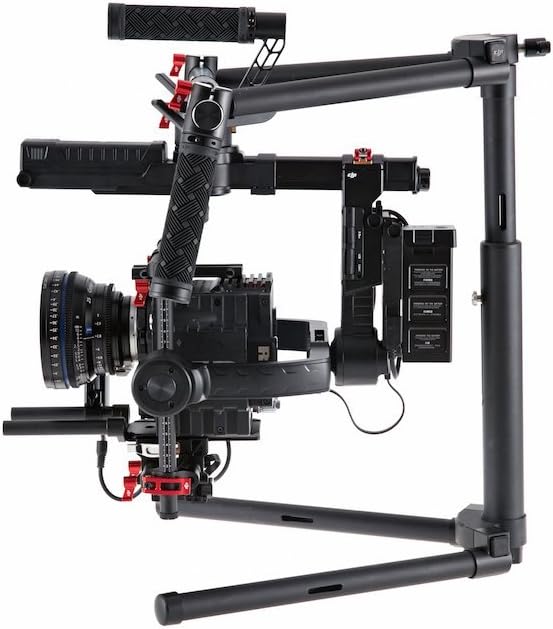
Image: DJI Ronin-MX 3-Axis Gimbal Stabilizer with a camera attached, showcasing its robust design and stabilization capabilities.
Klíčové vlastnosti:
- 3osá stabilizace: Provides professional-grade smooth footage.
- High G-Force Stability: Designed for use in dynamic environments.
- Široká kompatibilita s fotoaparáty: Supports various professional cameras like RED EPIC and ARRI ALEXA Mini.
- Wireless Control and Transmission: Allows for remote operation and adjustments.
- Komplexní ovládání aplikace: Enables fine-tuning and mode selection via a dedicated application.
- Více provozních režimů: Includes Upright, Underslung, and Briefcase modes for versatile shooting.
- Auto Tune Stability (ATS): Facilitates rapid balancing of the gimbal.
- SmoothTrack™: Ensures fluid and controlled camera movements.
Co je v krabici
The DJI Ronin-MX package includes the following components:
- Gimbal
- Rukojeť Bar
- Dálkové ovládání
- Tuningový stojan
- Nabíječka
- DJI Intelligent Battery (x2)
- Sada kabelů
- Micro USB kabel
- Kabel CAN
- Deska pro montáž kamery
- Camera Upper Mounting Plate
- Tlumič vibrací
- Balíček příslušenství

Image: Various components of the DJI Ronin-MX Gimbal Stabilizer, including the main unit, handles, and remote control.
Nastavení
Proper setup and balancing are crucial for optimal performance of the Ronin-MX. The system is designed for a quick setup, often achievable within 5 minutes for experienced users.
Počáteční montáž:
- Attach the handle bar to the gimbal frame.
- Mount the camera onto the Camera Mounting Plate and secure it with the Camera Upper Mounting Plate.
- Insert the DJI Intelligent Batteries into their designated slots.
- Place the gimbal on the Tuning Stand for balancing.
Vyvažování gimbalu:
Achieving perfect balance is essential for smooth operation and to prevent motor strain. Use the Auto Tune Stability (ATS) feature via the comprehensive app control for rapid and precise balancing. Adjust the camera's position on the mounting plate until it remains level in all axes when powered off.

Image: The DJI Ronin-MX Gimbal Stabilizer resting on its tuning stand, ready for camera mounting and balancing.
Operace
The Ronin-MX offers flexible operation modes and precise control for capturing dynamic shots.
Provozní režimy:
- Vzpřímený režim: For standard handheld operation.
- Underslung Mode: Ideal for low-angle shots, holding the gimbal below the operator.
- Briefcase Mode: Allows for compact carrying and shooting in narrow spaces.
Bezdrátové ovládání:
The included remote control provides wireless access to gimbal movements, allowing a second operator to control pan, tilt, and roll independently while the primary operator focuses on movement. This enhances shot precision and creative flexibility.

Image: The DJI Ronin-MX Gimbal Stabilizer configured for two-handed operation, demonstrating its ergonomic design.
Ovládání aplikace:
Utilize the DJI Assistant app for comprehensive control over gimbal settings, including motor parameters, SmoothTrack tuning, and firmware updates. This app provides a detailed interface for customizing the gimbal's behavior to suit specific shooting requirements.
Specifikace
| Funkce | Detail |
|---|---|
| Název modelu | Ronin-MX |
| Číslo dílu výrobce | CP.ZM.000377 |
| Hmotnost položky | 6.1 liber (2.77 kg) |
| Doporučená maximální hmotnost | 9.92 liber (4.5 kg) |
| Skládaná velikost (D x Š x V) | 300 mm x 180 mm x 120 mm |
| Stabilizace obrazu | 3-axis image stabilization |
| Kompatibilní zařízení | Camera (Supports RED EPIC, ARRI ALEXA Mini, etc.) |
| Režimy fotografování | Upright, Underslung, Briefcase |
| Bezdrátové ovládání | Yes, via included remote and app |
| Barva | Černý |
Údržba
Regular maintenance ensures the longevity and optimal performance of your DJI Ronin-MX.
- Čištění: Use a soft, dry cloth to clean the gimbal body and motors. Avoid using liquid cleaners directly on electronic components.
- Skladování: Store the gimbal in a dry, dust-free environment. When not in use for extended periods, remove the batteries.
- Péče o baterie: Charge batteries fully before storage and periodically recharge them every three months to maintain battery health. Avoid over-discharging or over-charging.
- Aktualizace firmwaru: Regularly check for and install the latest firmware updates via the DJI Assistant app to ensure compatibility and access to new features.
Odstraňování problémů
This section addresses common issues you might encounter with your Ronin-MX.
- Gimbal Not Activating/Balancing Issues:
- Ensure the camera is correctly mounted and balanced. Re-run the Auto Tune Stability (ATS) process.
- Zkontrolujte, zda se nevyskytují překážky, které by bránily volnému pohybu os závěsu.
- Verify that the firmware is up to date.
- Remote Control Disconnection:
- Ensure the remote control batteries are charged.
- Re-pair the remote control with the gimbal according to the pairing instructions in the full manual.
- Minimalizujte rušení od jiných bezdrátových zařízení.
- Baterie se nenabíjí:
- Ensure the charger is properly connected to a power source and the battery.
- Zkontrolujte, zda baterie nebo nabíječka nejsou viditelně poškozené.
- If issues persist, contact DJI Support for assistance.
Záruka a podpora
Podrobné informace o záruce a technickou podporu získáte na oficiálních stránkách DJI. webnebo se obraťte na jejich zákaznický servis. Uschovejte si doklad o koupi pro případ reklamace.
Online zdroje: Navštivte Oficiální DJI Webmísto for product registration, FAQs, and the latest software downloads.