
1. Úvod
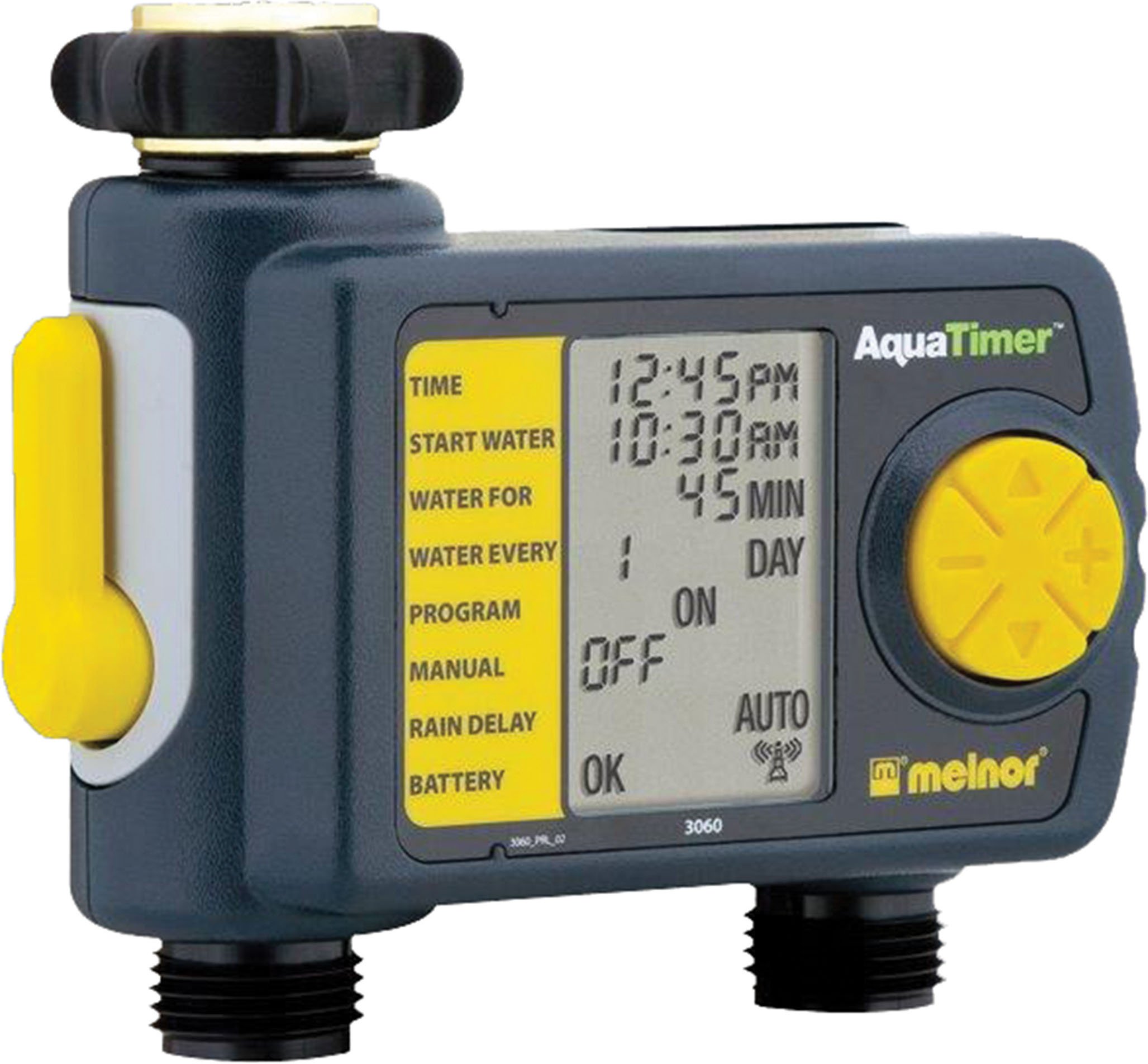
Thank you for choosing the Melnor 53100 2-Outlet Digital Water Timer. This device is designed to automate your watering schedule, providing convenience and efficiency for your garden or lawn. It features independent programming for two zones, a large LCD screen for clear information, and an easy-to-use interface for setting up your watering cycles.
2. Bezpečnostní informace
- Tento produkt je určen pro pouze pro venkovní použití. Do not use indoors or with potable water systems unless specifically approved.
- Ujistěte se, že všechna připojení jsou bezpečná, abyste zabránili únikům a poškození vodou.
- Do not expose the timer to freezing temperatures. Remove batteries and store indoors during winter months to prevent damage.
- Use only 1.5V AA alkaline batteries. Do not mix old and new batteries, or different types of batteries.
- Upozornění Kalifornie Proposition 65: This product can expose you to chemicals including styrene, which is known to the State of California to cause cancer. For more information, please visit www.P65Warnings.ca.gov.
3. Obsah balení
The Melnor 53100 package includes:
- 1 x Melnor 53100 2-Outlet Digital Water Timer
4. Vlastnosti produktu
- Duální výstupy: Independently program two watering zones.
- Velký LCD displej: Provides clear, easy-to-read information on current settings and next watering cycle.
- Flexibilní programování: Set watering schedules up to 24 times per day for individual days of the week.
- Ruční ovládání: Easily start or stop watering manually without affecting programmed schedules.
- Odolná konstrukce: Features a zinc connection nut with a non-slip rubberized grip for secure attachment.
- Soil Moisture Sensor Compatibility: Can be used with the HydroLogic soil moisture sensor (sold separately, SKU 15339).
5. Instalace
- Připojení k vodovodnímu kohoutku: Screw the timer onto your outdoor faucet. Ensure the zinc connection nut is tightened securely by hand to prevent leaks. Do not overtighten with tools.
- Připojte hadice: Attach your garden hoses to the two outlets at the bottom of the timer. Tighten connections firmly.
6. Instalace baterie
- Vyhledejte přihrádku na baterie na zadní straně časovače.
- Posunutím otevřete kryt baterie.
- Insert two (2) fresh 1.5V AA alkaline batteries, observing the correct polarity (+/-) as indicated inside the compartment.
- Close the battery cover securely. The LCD screen should illuminate, and a battery status indicator will be visible.
- Poznámka: Use only 1.5V AA alkaline batteries. Do not use 1.2V NiMH or NiCad rechargeable batteries, as they may not provide sufficient power for optimal operation.
7. Nastavení hodin
- Turn the large dial to the NASTAVTE ČAS pozice.
- Použijte NAHORU/DOLŮ arrow buttons to adjust the current hour (AM/PM). Press OK potvrdit.
- Použijte NAHORU/DOLŮ arrow buttons to adjust the current minute. Press OK potvrdit.
- Použijte NAHORU/DOLŮ arrow buttons to set the current day of the week. Press OK potvrdit.
- Otočte volič zpět na AUTOMATICKÉ VYPNUTÍ or any other desired setting to save the time.
8. Programování zavlažovacích plánů
The Melnor 53100 allows independent programming for two zones. Follow these steps for each zone:
8.1. Vyberte Zóna
- Stiskněte tlačítko ZÓNA 1 2 button to toggle between Zone 1 and Zone 2. Ensure the desired zone is selected before proceeding.
8.2. Set Start Time (START WATER)
- Otočte voličem na ZAČNĚTE VODU.
- Použijte NAHORU/DOLŮ arrow buttons to set the desired start time for watering (AM/PM). Press OK potvrdit.
- You can set multiple start times for each zone if needed.
8.3. Set Watering Duration (HOW LONG)
- Otočte voličem na JAK DLOUHO.
- Použijte NAHORU/DOLŮ arrow buttons to set the watering duration in minutes or hours. Press OK potvrdit.
8.4. Set Watering Frequency (HOW OFTEN)
- Otočte voličem na JAK ČASTO.
- Použijte NAHORU/DOLŮ arrow buttons to select the watering frequency:
- Every X hours (e.g., every 6 hours)
- Every X days (e.g., every 2 days)
- Specific days of the week (e.g., Mon, Wed, Fri)
- Stiskněte OK pro potvrzení vašeho výběru.
After programming, turn the dial to AUTOMATICKÉ VYPNUTÍ to activate the schedule. The display will show the next scheduled watering time.
9. Ruční provoz
To manually water without affecting your programmed schedule:
- Ujistěte se, že je volič v poloze AUTOMATICKÉ VYPNUTÍ pozice.
- Stiskněte tlačítko ON/OFF MANUAL tlačítko.
- Použijte ZÓNA 1 2 button to select the desired zone (1 or 2).
- Použijte NAHORU/DOLŮ arrow buttons to set the desired manual watering duration.
- Stiskněte OK to start manual watering. The timer will water for the set duration and then automatically turn off.
- To stop manual watering prematurely, press the ON/OFF MANUAL znovu tlačítko.
10. Funkce zpoždění deště
The rain delay function allows you to pause your watering schedule for a set period, conserving water after rainfall.
- Ujistěte se, že je volič v poloze AUTOMATICKÉ VYPNUTÍ pozice.
- Stiskněte a podržte + (UP arrow) button for a few seconds. The display will show a rain delay duration.
- Použijte NAHORU/DOLŮ arrow buttons to select the desired delay duration (e.g., 24, 48, 72 hours).
- Stiskněte OK to confirm. The timer will pause all programmed watering cycles for the selected duration and resume automatically afterward.
- To cancel rain delay, press and hold the + (UP arrow) button again until the delay is cleared.
11. Údržba
- Čištění: Otřete časovač reklamouamp cloth as needed. Do not use abrasive cleaners or submerge the unit in water.
- Zima: Before the first frost, disconnect the timer from the faucet and hoses. Remove the batteries. Store the timer in a dry, frost-free location indoors.
- Výměna baterie: Vyměňte baterie, jakmile se na LCD displeji zobrazí indikátor slabé baterie, abyste zajistili nepřetržitý provoz.
12. Řešení problémů
| Problém | Možná příčina | Řešení |
|---|---|---|
| Časovač nezavlažuje | Baterie jsou vybité nebo vybité Kohoutek je vypnutý Program not set or activated Rain delay is active | Vyměňte baterie Turn on the faucet Ensure dial is on AUTO OFF and program is set Cancel rain delay |
| Voda unikající z přípojek | Uvolněné spojení Damaged washer | Tighten connections by hand Check and replace rubber washers if damaged |
| LCD displej je prázdný nebo tmavý | Nízké nebo vybité baterie | Replace batteries with fresh 1.5V AA alkaline batteries |
| Timer not keeping correct time/settings reset | Extremely low batteries Vnitřní porucha | Vyměňte baterie. Pokud problém přetrvává, kontaktujte zákaznickou podporu. |
13. Specifikace
- Model: 53100
- Prodejny: 2
- Zdroj napájení: 2 x 1.5V AA Alkaline Batteries (not included)
- Materiál: Pevná konstrukce
- Hmotnost položky: Přibližně 11.98 unce
- Počet nastavení: 8 (s odkazem na programovací možnosti)
- Barva: Černá/šedá
14. Záruka a podpora
Melnor products are designed for durability and performance. For warranty information or technical support, please refer to the warranty card included with your purchase or visit the official Melnor webweb. Při kontaktování podpory mějte prosím k dispozici číslo modelu (53100) a datum zakoupení.