
1. Úvod
Thank you for choosing the MaxiAids EZ See Large Print Keyboard. This keyboard is designed to enhance visibility and typing efficiency for users who benefit from larger characters. It features extra-large, high-contrast legends on low-profile keys, making it an ideal solution for individuals with low vision or those who prefer easier-to-read keys. This manual provides essential information for setting up, operating, maintaining, and troubleshooting your new keyboard.
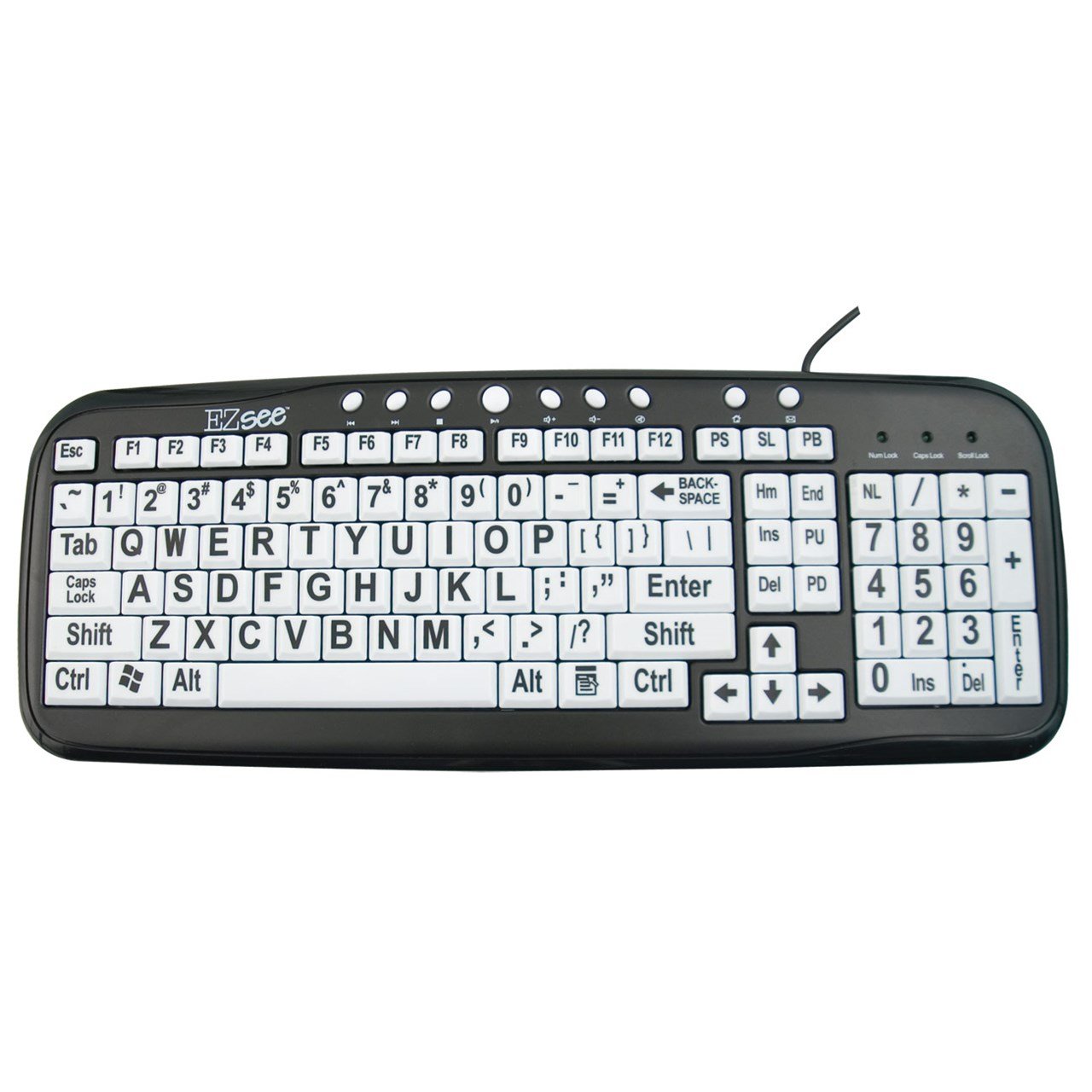
This image shows the MaxiAids EZ See Large Print Keyboard. It features white keys with oversized black characters for enhanced visibility, designed to assist users with low vision.
2. Nastavení
The MaxiAids EZ See Large Print Keyboard is a plug-and-play device, requiring no special drivers for most operating systems. Follow these simple steps to connect your keyboard:
- Rozbalte klávesnici: Opatrně vyjměte klávesnici z obalu.
- Vyhledejte USB port: Identify an available USB port on your computer (desktop or laptop).
- Připojte kabel USB: Insert the USB connector from the keyboard cable firmly into the USB port on your computer.
- Rozpoznávání systému: Váš operační systém by měl automaticky detekovat a nainstalovat potřebné ovladače pro klávesnici. Tento proces může chvíli trvat.
- Otestujte klávesnici: Otevřete textový editor nebo jakoukoli aplikaci, která přijímá textový vstup, a zadejte několik znaků, abyste se ujistili, že klávesnice funguje správně.
If the keyboard does not respond, try connecting it to a different USB port or restarting your computer.
3. Ovládání klávesnice
The EZ See Large Print Keyboard functions like a standard 104-key QWERTY keyboard, with the primary difference being the enhanced visibility of its keys.
- Standardní rozložení: The keyboard features a familiar QWERTY layout, including a numeric keypad, function keys (F1-F12), and navigation keys.
- Klávesy s velkým písmem: Each keycap is designed with oversized, high-contrast characters to reduce eye strain and improve typing accuracy for users with visual impairments.
- Low Profile Klíče: The keys have a low-profile design, which can contribute to a comfortable typing experience.
- Indikátory Caps Lock, Num Lock, Scroll Lock: Standard LED indicators are present to show the status of Caps Lock, Num Lock, and Scroll Lock functions.
Simply use the keyboard as you would any other, benefiting from the improved readability of the key legends.
4. Údržba
Proper care and maintenance will ensure the longevity and optimal performance of your MaxiAids EZ See Large Print Keyboard.
- Čištění: Chcete-li vyčistit klávesnici, odpojte ji od počítače. Použijte měkký hadřík, který nepouští vlákna, lehce navlhčený.ampened with water or a mild, non-abrasive cleaning solution. Avoid spraying liquids directly onto the keyboard or allowing moisture to seep between the keys.
- Odstranění prachu: K odstranění prachu a nečistot z prostoru mezi klávesami použijte stlačený vzduch.
- Vyvarujte se rozlití: Keep liquids away from the keyboard to prevent damage. In case of a spill, immediately disconnect the keyboard and allow it to dry completely before reconnecting.
- Skladování: Pokud klávesnici delší dobu nepoužíváte, skladujte ji v čistém a suchém prostředí mimo dosah extrémních teplot.
5. Řešení problémů
Pokud narazíte na problémy s klávesnicí, postupujte podle následujících běžných kroků pro řešení problémů:
- Klávesnice nereaguje:
- Ujistěte se, že je kabel USB bezpečně připojen k klávesnici i k počítači.
- Zkuste připojit klávesnici k jinému USB portu na počítači.
- Restartujte počítač.
- Pokud je k dispozici, otestujte klávesnici na jiném počítači, abyste zjistili, zda je problém s klávesnicí nebo s počítačem.
- Nefunkční konkrétní klávesy:
- Check for any debris or obstructions under the non-functioning keys. Use compressed air to clear any particles.
- Ujistěte se, že klávesnice je čistá a suchá.
- Numeric Keypad Not Working:
- Verify that the Num Lock indicator light is on. Press the 'Num Lock' key to toggle it on or off.
- Some older operating systems or specific software configurations might require additional settings for the numeric keypad. Consult your computer's operating system documentation.
- Pomalý nebo zpožděný vstup:
- This could be a system performance issue. Close unnecessary applications and check your computer's resource usage.
- Ujistěte se, že operační systém vašeho počítače je aktuální.
If these steps do not resolve the issue, please contact MaxiAids customer support for further assistance.
6. Specifikace
| Značka | MaxiAids |
| Číslo modelu | 23570 |
| Technologie připojení | USB |
| Kompatibilní zařízení | Laptop (and Desktop Computers) |
| Popis klávesnice | USB klávesnice |
| Speciální funkce | Ergonomic, Large Print |
| Barva | Černá Bílá |
| Styl | Klasický |
| Materiál | Plast |
| Zahrnuté komponenty | Klávesnice |
| Množství tlačítek | 104 |
7. Záruka a podpora
For information regarding the warranty period and terms for your MaxiAids EZ See Large Print Keyboard, please refer to the documentation included with your purchase or visit the official MaxiAids webZáruční podmínky se mohou lišit v závislosti na regionu a prodejci.
If you require technical support, have questions about product functionality, or need assistance with troubleshooting beyond what is covered in this manual, please contact MaxiAids customer service directly. Contact information can typically be found on the manufacturer's webwebu nebo na obalu vašeho produktu.