
1. Úvod
This manual provides detailed instructions for the setup, operation, and maintenance of your Enover TS18 7-Day Programmable Digital Timer. This device is designed to automate the control of electrical appliances by setting specific ON/OFF times throughout the week, offering convenience and energy management.
2. Vlastnosti produktu
- Flexibilní plánování: Program up to 10 distinct ON/OFF cycles within a 7-day period. Each program repeats weekly.
- Energetický management: Automatically controls lamps, holiday lights, humidifiers, and other electrical devices. Includes a feature to protect devices from overcharge.
- Security Function: Features a random ON/OFF option to vary lighting times, simulating occupancy when away from home.
- Uživatelsky přívětivé rozhraní: Equipped with a large LCD display for clear visibility and a manual override switch for immediate control adjustments.
- Bateriová záloha: An integrated battery retains programmed settings during power outages, čímž se eliminuje potřeba přeprogramování.

Image: Enover TS18 Digital Timer highlighting key features for easy home automation.
3. Obsah balení
Balíček obsahuje následující položky:
- 1 x Enover Digital Timer Switch (Model TS18)
- 1 x Uživatelská příručka

Image: Contents of the Enover TS18 Digital Timer package, including the timer and manual.
4. Konec produktuview
The Enover TS18 Digital Timer features a clear LCD display and intuitive buttons for easy programming. It plugs directly into a standard electrical outlet.

Obrázek: Přední strana view of the Enover TS18 Digital Timer, displaying the time and control buttons.
Funkce tlačítek:
- TÝDEN: Sets the day(s) for programs.
- HODINA: Adjusts the hour for time and program settings.
- MINUTA: Adjusts the minute for time and program settings.
- RES/RCL: Resets or recalls settings.
- HODINY: Vstupuje do režimu nastavení hodin nebo jej ukončuje.
- ČASOVAČ: Cycles through program settings (P1 ON, P1 OFF, P2 ON, etc.).
- ON/AUTO/OFF: Volí provozní režim (Vždy ZAP, Automaticky, Vždy VYP).
- NÁHODNÝ: Activates or deactivates the random ON/OFF function.
- RESETOVÁNÍ: Small button (requires a pointed object) to clear all settings and reset the device.
Video: A brief demonstration of the Enover Digital Timer's basic functions and display.
5. Nastavení
5.1 Počáteční poplatek
Before first use, plug the timer into an electrical outlet for approximately 5-10 minutes to charge the internal battery. This ensures the display is active and settings can be retained.
5.2 Nastavení aktuálního času a dne
- Stiskněte a podržte HODINY tlačítko.
- Při držení HODINY, stiskněte tlačítko TÝDEN button repeatedly to set the current day of the week.
- Při držení HODINY, stiskněte tlačítko HODINA button repeatedly to set the current hour (AM/PM will display).
- Při držení HODINY, stiskněte tlačítko MINUTA button repeatedly to set the current minute.
- Uvolněte HODINY pro uložení nastavení.
6. Návod k obsluze
6.1 Programování cyklů ZAP/VYP
The timer allows for up to 10 ON/OFF programs. Follow these steps to set a program:
- Stiskněte tlačítko ČASOVAČ jednou stiskněte tlačítko. Na displeji se zobrazí „1 ON“.
- Stiskněte TÝDEN to select the day(s) for this program (e.g., MO, TU, WE, TH, FR, SA, SU, MO TU WE TH FR, SA SU, MO TU WE TH FR SA SU, etc.).
- Stiskněte HODINA pro nastavení požadované hodiny zapnutí.
- Stiskněte MINUTA pro nastavení požadované minuty zapnutí.
- Stiskněte tlačítko ČASOVAČ stiskněte znovu. Na displeji se zobrazí „1 VYP“.
- Repeat steps 2-4 to set the desired OFF time for Program 1. Ensure the correct day(s) are selected for the OFF time.
- Pokračujte v stisknutí ČASOVAČ to cycle through and set additional programs (2 ON, 2 OFF, up to 10 ON, 10 OFF).
- Po nastavení všech požadovaných programů stiskněte tlačítko HODINY tlačítko pro návrat k zobrazení aktuálního času.
- Ujistěte se, že je časovač zapnutý AUTO mode for programs to execute. Press ON/AUTO/OFF jezdit na kole AUTO.
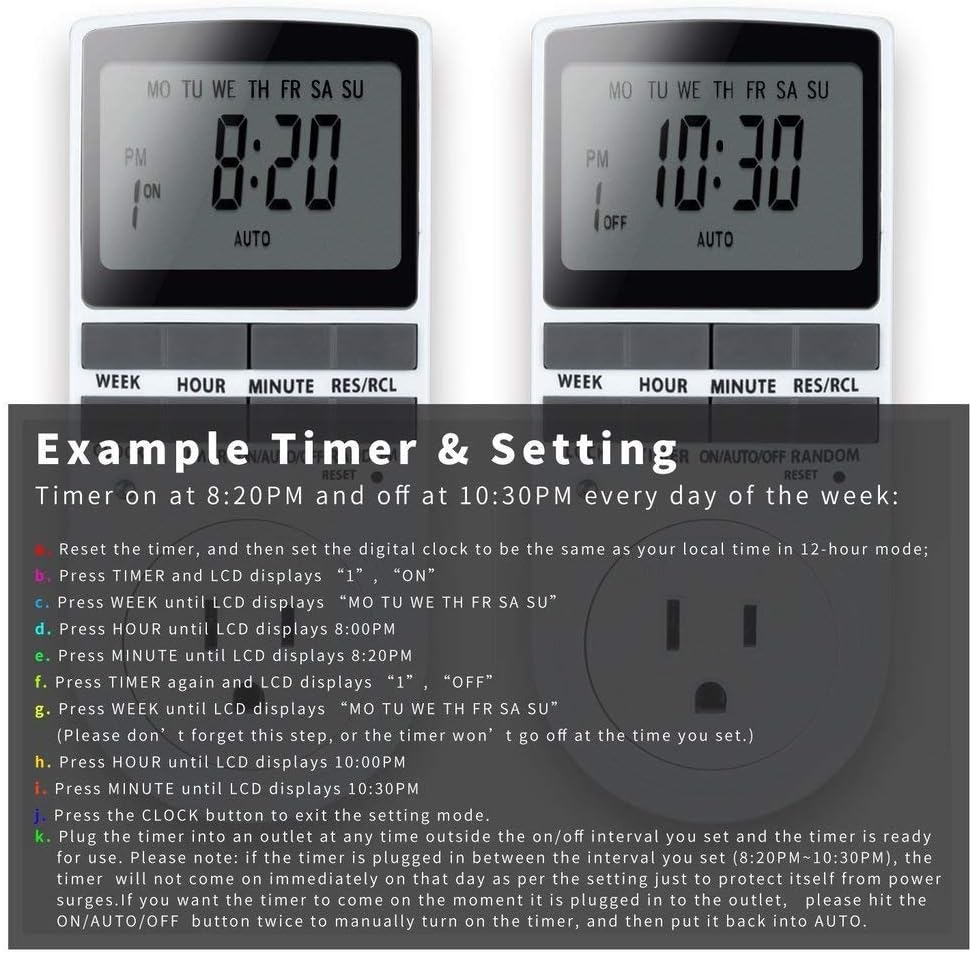
Image: Visual guide for setting an example timer program (ON at 8:20 PM, OFF at 10:30 PM daily).
6.2 Random Function (Anti-theft)
To activate the random ON/OFF feature:
- Stiskněte tlačítko NÁHODNÝ button. The word "RANDOM" will appear on the display.
- In random mode, the timer will turn ON and OFF at varying times within a set period, typically around the programmed ON/OFF times, to simulate occupancy.
- Pro deaktivaci stiskněte tlačítko NÁHODNÝ znovu tlačítko.

Image: The anti-theft random feature of the Enover TS18 Digital Timer, designed to deter intruders.
6.3 Ruční ovládání
To manually switch the timer's output without affecting programmed settings:
- Stiskněte tlačítko ON/AUTO/OFF tlačítko pro procházení režimů: ON (always on), AUTO (follows programs), VYPNUTO (always off).
- Select the desired temporary mode. The timer will revert to AUTO mode at the next programmed ON/OFF event.
Video: A detailed demonstration of setting programs and using the manual override function on the Enover Digital Timer.
7. Aplikace
The Enover TS18 Digital Timer can be used to automate various household devices, enhancing convenience and energy efficiency.
- Coffee Makers: Program your coffee maker to start brewing before you wake up.
- Aquarium Lights/Pumps: Automate the lighting and filtration cycles for your aquarium.
- Indoor Grow Lights: Maintain consistent light schedules for plants.
- Sváteční dekorace: Set festive lights to turn on and off automatically.
- Fans/Humidifiers: Control environmental devices to operate only when needed.
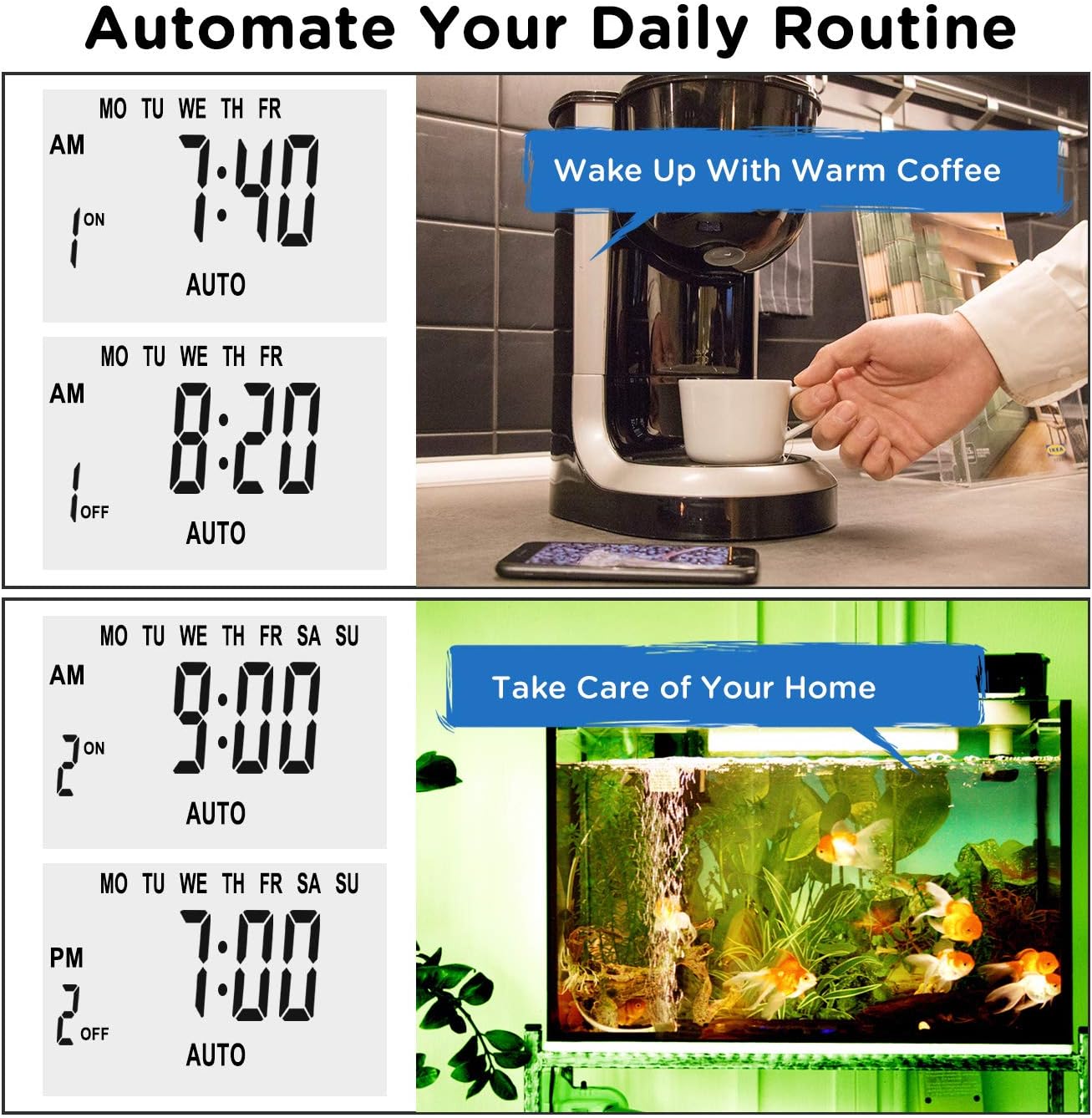
Obrázek: Přamples of automating daily routines with the Enover TS18 Digital Timer, such as a coffee maker and aquarium.
8. Specifikace
| Číslo modelu | TS18 |
| Značka | Enover |
| Barva | Bílý |
| Materiál | Plast |
| Počet nastavení | 10 (programy ZAP/VYP) |
| svtage | 120 voltů |
| Wattage | 1800 wattů |
| Amperage Kapacita | 15 Amps |
| Způsob instalace | Plug-in |
| Typ montáže | Plug In Mount |
| Plug formát | B - americký typ s uzemňovací zástrčkou |
| Speciální funkce | 3-wire grounded plug and 3-prong grounded outlet |
| Používání | Pouze pro vnitřní použití |
| Hmotnost položky | 6.4 unce |
| Rozměry balení | 5.67 x 3.31 x 2.6 palce |
| Typ baterie | NiMH |
| Životnost baterie | 100 days (backup) |
9. Řešení problémů
- Časovač se nezapíná/nevypíná podle programování:
- Ujistěte se, že je časovač zapnutý AUTO režimu.
- Verify that the current time and day are set correctly.
- Check that the ON and OFF times for the specific program are correctly entered and assigned to the desired days.
- Confirm the appliance connected to the timer is switched ON.
- Displej je prázdný nebo tmavý:
- Plug the timer into an active electrical outlet for 5-10 minutes to charge the internal battery.
- Všechna nastavení se po výpadku napájení ztratítage:
- The internal battery may not be sufficiently charged. Ensure the timer is regularly plugged in to maintain battery charge.
- To clear all settings:
- Pomocí špičatého předmětu (například hrotu pera) stiskněte RESETOVAT button. This will clear all programs and reset the clock. You will need to re-enter all settings.
10. Záruka a podpora
For warranty information or technical support, please refer to the contact details provided on the product packaging or the official Enover webmísto. Uschovejte si doklad o koupi pro případ záručních reklamací.