
Zavedení
Děkuji za nákupasing the Mitzu Kaiser PAK-8915 Dual Audio System. This system includes an amplified speaker and a passive speaker, designed to deliver powerful and clear sound. This manual provides essential information for the safe and efficient operation of your new audio system. Please read it thoroughly before use and retain it for future reference.
Bezpečnostní pokyny
- Zdroj napájení: Ujistěte se, že napájecí zdroj odpovídá objtage specifikováno na jednotce.
- Větrání: Neblokujte větrací otvory. Kolem jednotky ponechte dostatečný prostor pro správné proudění vzduchu.
- Voda a vlhkost: Nevystavujte jednotku dešti, vlhkosti ani kapalinám. Uchovávejte mimo dosah vodních zdrojů.
- Teplo: Do not place the unit near heat sources such as radiators, heat registers, stoves, or other heat-producing appliances.
- Čištění: Unplug the unit before cleaning. Use a dry cloth. Do not use liquid cleaners or aerosol cleaners.
- Servis: Nepokoušejte se tento výrobek opravit sami. Veškerý servis svěřte kvalifikovanému servisnímu personálu.
- Umístění: Place the speakers on a stable, level surface. The amplified speaker features a rear knob for stand mounting.
- Kabely: Use only the provided cables and ensure they are not damaged or pinched.
Obsah balení
Zkontrolujte prosím, zda jsou v balení obsaženy všechny následující položky:
- 1 XNUMX x Amplified Speaker (with 15-inch woofer)
- 1 x Passive Speaker (with 15-inch woofer)
- 1 x Dálkové ovládání
- Connection Cables (10 meters in length for speaker connection)
- Napájecí kabel
Konec produktuview
Amplified Speaker Rear Panel
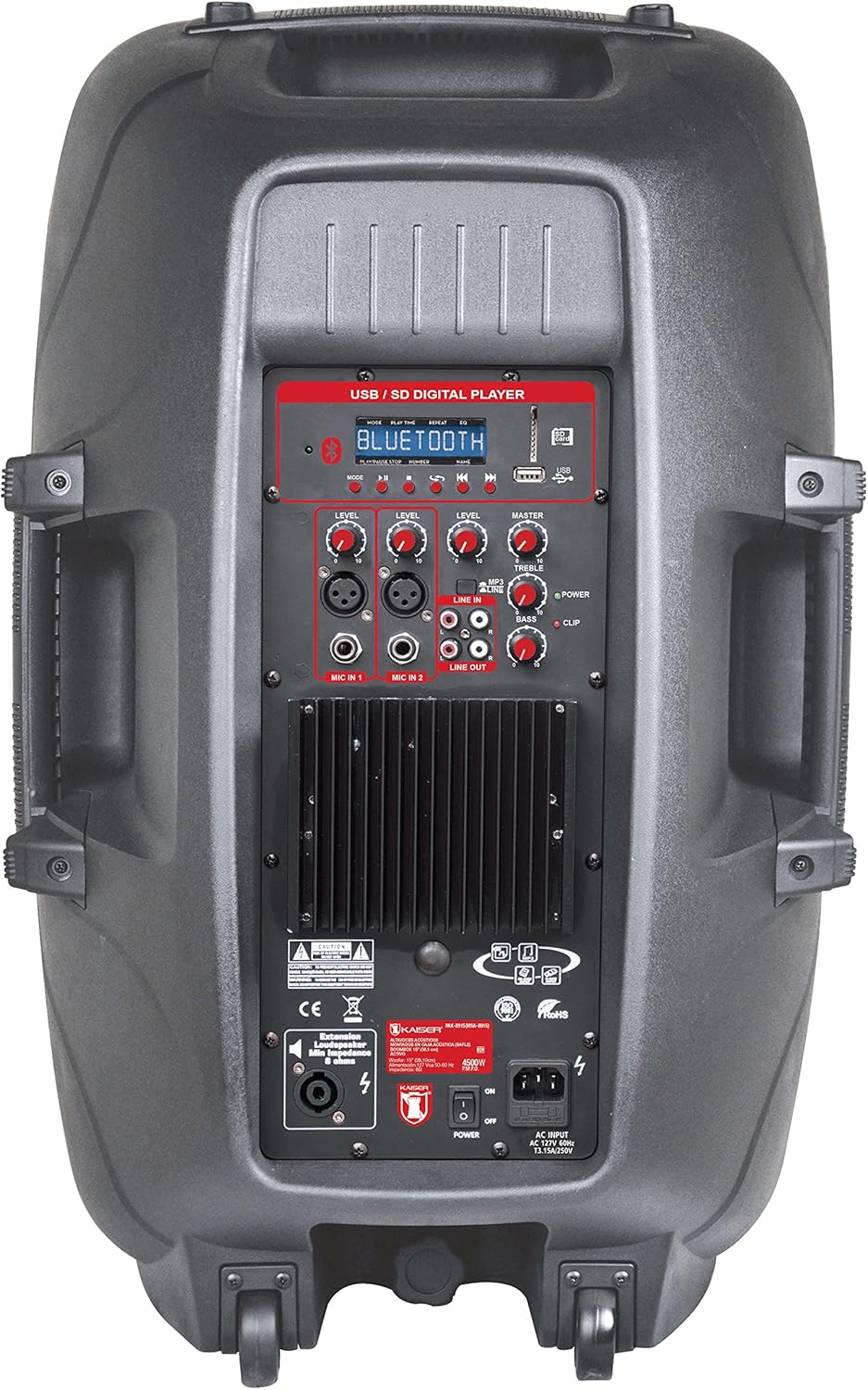
Obrázek 1: Amplified Speaker Rear Control Panel
The amplified speaker's rear panel houses all primary controls and connection ports:
- USB / SD Digital Player: Ports for USB drives and SD cards, along with a display and playback controls.
- Modul Bluetooth: Pro bezdrátové streamování zvuku.
- Knoflíky úrovně: Adjust input levels for MIC 1, MIC 2, LINE IN, and MASTER volume.
- Ovládání tónů: Knobs for TREBLE and BASS adjustment.
- Vstupy mikrofonu: Two inputs (Cannon and 6.3mm) for connecting microphones.
- Line In (RCA): Stereo RCA inputs for connecting external audio devices.
- Linkový výstup: RCA output to connect to another amplified speaker or audio system.
- Výstup reproduktoru: Speakon connector for connecting the passive speaker.
- Vypínač: Zapínací/vypínací vypínač jednotky.
- AC vstup: Pro připojení napájecího kabelu.
- Indikátor klipu: Lights up when the audio signal is clipping (distorting).
Passive Speaker Rear Panel

Obrázek 2: Passive Speaker Rear Panel
The passive speaker features simple input and output connections:
- Vstup: Speakon input for connection from the ampkvalifikovaný mluvčí.
- výstup: Speakon output for daisy-chaining to another passive speaker (if applicable).
Dálkové ovládání
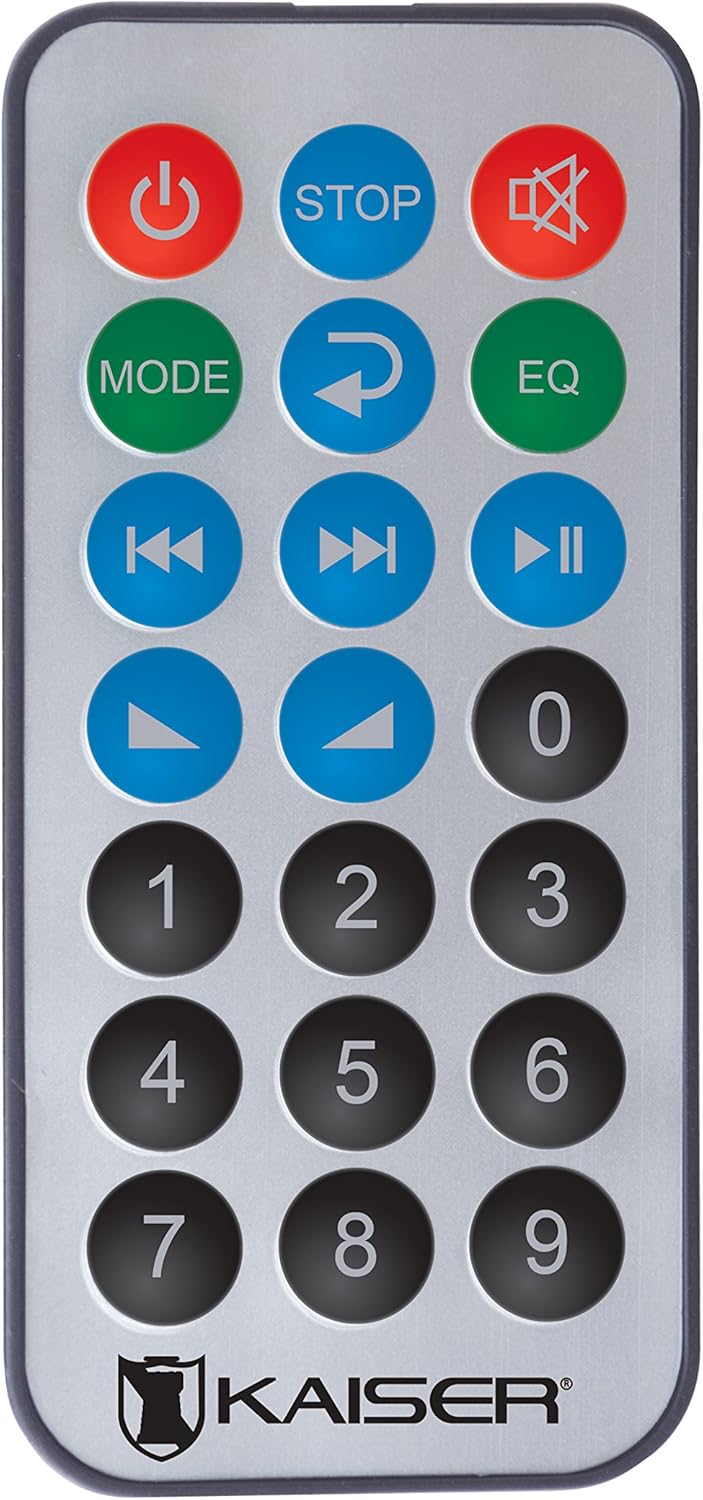
Obrázek 3: Dálkové ovládání
Dálkové ovládání umožňuje pohodlný přístup k různým funkcím:
- Vypínač: Zapíná/vypíná jednotku.
- ZASTÁVKA: Zastaví přehrávání.
- Ztlumit: Ztlumí/zapne zvuk.
- REŽIM: Switches between input modes (Bluetooth, USB, SD, FM, RCA).
- Opakovat: Opakuje aktuální skladbu nebo seznam skladeb.
- EQ: Vybere předvolby ekvalizéru.
- Předchozí/následující skladba: Přeskočí na předchozí nebo další skladbu.
- Přehrát/pozastavit: Spustí nebo pozastaví přehrávání.
- Zvýšení/Snížení hlasitosti: Upravuje hlavní hlasitost.
- Numerická klávesnice: For direct track selection or FM station tuning.
Nastavení
- Umístění: Umístěte amplified and passive speakers in your desired location. The amplified speaker has handles and wheels for transport. Both speakers can be mounted on a stand using the rear knob on the ampkvalifikovaný mluvčí.
- Připojení pasivního reproduktoru: Use the provided speaker cable to connect the "Speaker Output" on the amplified speaker's rear panel to the "Input" on the passive speaker's rear panel. Ensure a secure connection.
- Připojení napájení: Connect the power cable to the AC input on the amplified speaker and then plug it into a suitable power outlet.
- Počáteční zapnutí: Ensure all volume knobs are set to minimum before turning on the power switch.
Návod k obsluze
Zapnutí/vypnutí
Flip the "POWER" switch on the rear panel of the amplified speaker to turn the system on or off. You can also use the power button on the remote control.
Výběr vstupního režimu
Press the "MODE" button on the control panel or remote control to cycle through available input sources: Bluetooth, USB, SD, FM Radio, and RCA Line In.
Bluetooth připojení
- Switch the speaker system to Bluetooth mode using the "MODE" button. The display will show "Bluetooth" or a similar indicator.
- Na svém mobilním zařízení (chytrém telefonu, tabletu atd.) povolte Bluetooth a vyhledejte dostupná zařízení.
- Select "Kaiser PAK-8915" or a similar name from the list of devices.
- Once paired, you will hear a confirmation sound, and your device will show a connected status. You can now stream audio wirelessly from up to 30 meters away.
Přehrávání USB/SD
- Vložte USB flash disk nebo SD kartu se zvukovým souborem files into the respective port on the amplified speaker's rear panel.
- The system should automatically switch to USB or SD mode and begin playback. If not, press the "MODE" button to select the correct source.
- Use the playback controls (Play/Pause, Previous/Next, Stop) on the speaker panel or remote control to manage your music.
Připojení linkového vstupu RCA
Connect an external audio device (e.g., DVD player, TV, computer) to the "LINE IN" RCA ports on the amplified speaker using an RCA cable. Select "LINE IN" mode using the "MODE" button.
Použití mikrofonu
Plug your microphone(s) into the "MIC IN 1" (Cannon) or "MIC IN 2" (6.3mm) ports. Adjust the individual "MIC LEVEL" knobs to control the microphone volume. Ensure the MASTER volume is also adjusted appropriately.
FM rádio
Switch to FM Radio mode using the "MODE" button. The system will automatically scan and store available stations. Use the Previous/Next track buttons to navigate between stations or the numeric keypad on the remote for direct tuning.
Volume and Tone Adjustment
Use the "MASTER" volume knob to control the overall output volume. Adjust the "BASS" and "TREBLE" knobs to fine-tune the audio's low and high frequencies. Individual input levels (MIC 1, MIC 2, LINE IN) can also be adjusted.
Údržba
- Čištění: Disconnect the power before cleaning. Use a soft, dry cloth to wipe the exterior surfaces. Do not use abrasive cleaners, waxes, or solvents.
- Skladování: If not in use for an extended period, store the speakers in a cool, dry place, away from direct sunlight and extreme temperatures.
- Větrání: Pravidelně kontrolujte, zda jsou větrací mřížky bez prachu a nečistot, abyste zabránili jejich přehřátí.
Odstraňování problémů
| Problém | Možná příčina | Řešení |
|---|---|---|
| Žádná síla | Napájecí kabel není připojen; Vypínač je vypnutý; Vadná zásuvka. | Ensure power cable is securely connected. Turn the power switch ON. Test the power outlet with another device. |
| Žádný zvukový výstup | Volume too low; Incorrect input mode selected; Audio source not playing; Passive speaker not connected. | Increase MASTER volume. Select the correct input mode. Ensure the audio source is playing. Verify the passive speaker is correctly connected to the ampkvalifikovaný mluvčí. |
| Bluetooth se nepřipojuje | Speaker not in Bluetooth mode; Device too far; Device already connected to another speaker. | Ensure the speaker is in Bluetooth mode. Move your device closer to the speaker (within 30m). Disconnect from other Bluetooth devices. |
| USB/SD karta se nepřehrává | Nesprávný file format; USB/SD card corrupted; Speaker not in USB/SD mode. | Zajistěte zvuk files are in a compatible format. Try another USB/SD card. Select USB/SD mode. |
| Zkreslení zvuku | Volume too high (clipping); Input level too high. | Reduce MASTER volume. Adjust individual input levels (MIC, LINE IN) to prevent the CLIP indicator from lighting up. |
Specifikace
| Značka | Mitzu |
| Model | PAK-8915 |
| Amplified Speaker Power | 3500W PMPO |
| Passive Speaker Power | 3000W PMPO |
| Velikost wooferu | 15 palců (38.1 cm) |
| Impedance | 8 Ω |
| Technologie připojení | Bluetooth, RCA, USB |
| Bezdrátová technologie | Bluetooth |
| Dosah Bluetooth | Až 30 metrů |
| Režim zvukového výstupu | Stereo |
| Frekvenční odezva | 4 kHz |
| Kontrolní metoda | Tlačítka, Dálkové ovládání |
| Zdroj napájení | Elektrický kabel |
| Hmotnost položky | 34 kg |
| Doporučená použití | Smartphones, Tablets, Computers, DVD Players, TVs, Surround Sound Systems, Microphones |
Záruka a podpora
Specific warranty information for the Mitzu Kaiser PAK-8915 is not provided in this manual. Please refer to the warranty card included with your purchase or contact your retailer for details regarding warranty coverage and terms.
For technical support or service inquiries, please contact the Mitzu customer service department or your authorized dealer. Keep your purchase receipt as proof of purchase.