
Zavedení
This manual provides detailed instructions for the setup, operation, and maintenance of your Audiovox RCR3273R 3-Device Universal Remote Control. Please read this guide thoroughly to ensure proper use and to maximize the functionality of your remote control.
Konec produktuview
The Audiovox RCR3273R is a universal remote control designed to operate up to three different audio/video devices, such as TVs, VCRs, DVD players, and cable boxes. Its ergonomic design and clearly labeled buttons provide intuitive control over your home entertainment system.
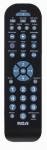
An image of the Audiovox RCR3273R universal remote control, featuring a black casing with various gray and blue buttons for device selection, channel control, volume, and number input.
Nastavení
1. Instalace baterie
- Otevřete kryt prostoru pro baterie na zadní straně dálkového ovládání.
- Vložte dvě (2) baterie typu AAA a ujistěte se, že kladný (+) a záporný (-) pól správně odpovídají označením uvnitř přihrádky.
- Bezpečně zavřete kryt bateriového prostoru.
2. Programming Your Devices
To program the remote control to operate your devices, you will need to enter specific codes. Refer to the code list provided with your remote (if applicable) or search for codes online for your specific device brands. The general programming steps are as follows:
- Zapněte zařízení, které chcete naprogramovat (např. televizor, DVD přehrávač).
- Stiskněte a podržte požadované tlačítko zařízení na dálkovém ovladači (např. TV, DVD) přibližně 3 sekund, dokud se kontrolka nerozsvítí.
- While holding the device button, enter the 4-digit code for your device brand using the number buttons.
- Release the device button. The indicator light should turn off.
- Otestujte dálkový ovladač stisknutím tlačítka Moc tlačítko. Pokud se zařízení vypne, programování proběhlo úspěšně.
- If the device does not respond, repeat the steps using a different code from the list for your brand.
Note: If no code works, some universal remotes offer an auto-search feature. Consult your remote's specific instructions for this advanced programming method.
Návod k obsluze
Once programmed, operating your devices with the Audiovox RCR3273R is straightforward:
- Výběr zařízení: Stiskněte příslušné tlačítko zařízení (TV, DVD, VCR/AUX) to select the device you wish to control. The indicator light may briefly flash to confirm selection.
- Moc: Stiskněte tlačítko Moc tlačítko pro zapnutí nebo vypnutí vybraného zařízení.
- Ovládání hlasitosti: Použijte VOL+ a VOL- tlačítka pro nastavení hlasitosti.
- Ovládání kanálů: Použijte CH+ a CH- tlačítka pro změnu kanálů.
- Číselná klávesnice: Pomocí číselných tlačítek (0–9) můžete přímo zadávat čísla kanálů nebo jiné číselné údaje.
- Ztlumit: Stiskněte tlačítko ZTLUMIT tlačítko pro ztlumení zvuku.
- Ovládání přehrávání: Tlačítka jako např HRÁT, ZASTÁVKA, PAUZA, REWa FF control playback functions for devices like DVD players or VCRs.
Údržba
- Čištění: K čištění dálkového ovladače používejte měkký, suchý hadřík. Nepoužívejte tekuté čisticí prostředky ani abrazivní materiály.
- Výměna baterie: Replace batteries when the remote's performance diminishes or if the indicator light does not illuminate during operation. Always replace both batteries at the same time with new AAA batteries.
- Skladování: Dálkový ovladač skladujte na chladném a suchém místě mimo dosah přímého slunečního záření a extrémních teplot.
Odstraňování problémů
- Dálkové ovládání nefunguje:
- Zkontrolujte, zda jsou baterie správně vloženy a nejsou vybité. V případě potřeby je vyměňte.
- Ensure you have selected the correct device button (e.g., TV for your television).
- Verify that the remote is pointed directly at the device's infrared sensor.
- Confirm that the device is powered on.
- Device not responding after programming:
- Re-attempt programming using a different code for your device brand.
- Ensure the device is turned on before starting the programming process.
- Některá tlačítka nefungují:
- This may indicate an incorrect or partially compatible code. Try reprogramming with an alternative code.
Specifikace
| Značka | Audiovox |
| Model | RCR3273R |
| Technologie připojení | Infračervený |
| Typ ovladače | Ovládání tlačítkem |
| Speciální funkce | Univerzální |
| Typ baterie | AAA (vyžadováno 2) |
Záruka a podpora
For warranty information and technical support, please refer to the documentation included with your purchase or visit the official Audiovox webUschovejte si účtenku jako doklad o koupi pro případné reklamace.