
1. Úvod
The GAMDIAS Hermes GKB3000 is a mechanical gaming keyboard designed for enhanced durability and performance. It features GAMDIAS Certified Blue Switches with a 50 million actuation lifecycle, a 7-color spectrum backlight with 14 lighting effects, and various functional keys for an optimized gaming and typing experience. This manual provides instructions for setting up, operating, and maintaining your keyboard.
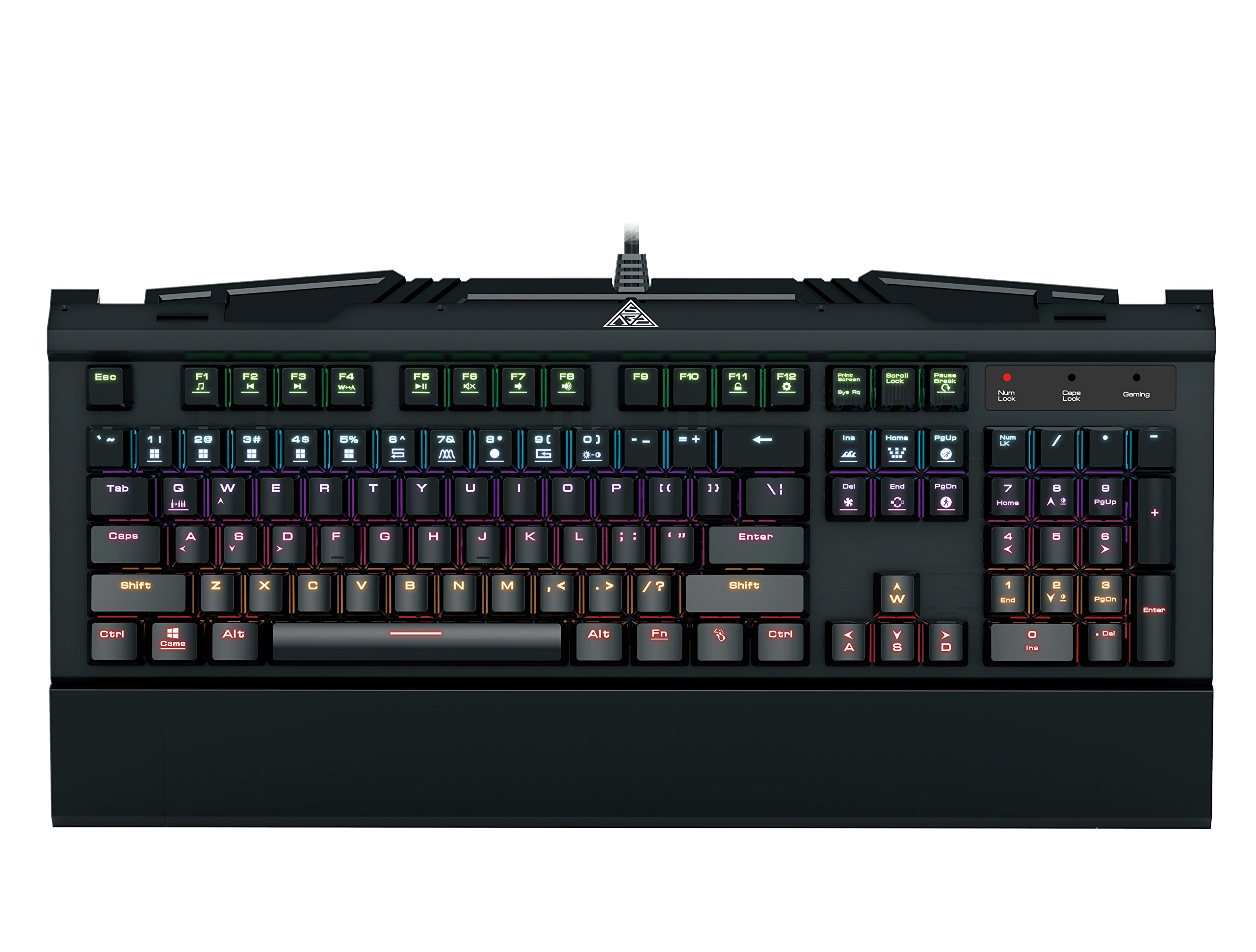
Image 1.1: The GAMDIAS Hermes GKB3000 Mechanical Gaming Keyboard. This image displays the full keyboard with its key layout and design, highlighting its compact yet robust build.
2. Obsah balení
Po vybalení zkontrolujte prosím obsah balení, abyste se ujistili, že jsou všechny položky přítomny a nepoškozené.
- GAMDIAS Hermes GKB3000 Mechanical Gaming Keyboard
- Uživatelská příručka (tento dokument)
3. Nastavení
Follow these steps to set up your GAMDIAS Hermes GKB3000 keyboard:
- Rozbalte klávesnici: Opatrně vyjměte klávesnici z obalu.
- Připojení k počítači: Plug the USB-A connector of the keyboard cable into an available USB port on your computer.
- Instalace ovladače: The keyboard is plug-and-play. Your operating system (e.g., Windows) will automatically detect and install the necessary drivers. No additional software installation is typically required for basic functionality.
- Umístění: Place the keyboard on a stable, flat surface for comfortable use.
4. Návod k obsluze
4.1. Světelné efekty
The Hermes GKB3000 features a 7-color spectrum backlight with 14 sets of lighting effects. These include 9 preset effects and 5 customizable patterns.
- Přepínání efektů: Use the dedicated function keys (often combined with the Fn key) to cycle through the preset lighting effects. Refer to the keyboard's keycap legends for specific combinations.
- Přizpůsobení efektů: The keyboard supports 5 customizable lighting patterns. Instructions for programming these patterns are typically found in the full software suite available for download from the GAMDIAS website, if applicable.
- Nastavení jasu: Adjust backlight brightness using designated function key combinations.
4.2. Multimedia Control Keys
Access multimedia functions quickly using the dedicated multimedia control keys, often activated by holding the Fn key in combination with the F-keys (F1-F12).
- Ovládání hlasitosti: Increase, decrease, or mute audio.
- Přehrávání médií: Play/pause, stop, previous track, next track.
- Další funkce: May include opening default browser, email client, or calculator.
4.3. Special Gaming Functions
- WASD-Arrow Key Swap: This feature allows you to swap the functionality of the WASD keys with the arrow keys. This is useful for certain games or user preferences. Activate this function using a specific Fn key combination (e.g., Fn + W).
- Consecutive Attack Mode: This mode enhances rapid key input for gaming. Refer to the keyboard's specific documentation or GAMDIAS software for activation and configuration details.
- Zámek klávesnice: Temporarily disable the keyboard input to prevent accidental presses. Activate using a Fn kombinace kláves.
- Zakázání klávesy Windows: Prevent accidental presses of the Windows key during gaming, which can minimize your game. Activate using a Fn key combination (e.g., Fn + Win key).
- N-Key Rollover: The GKB3000 supports N-key rollover, meaning multiple keys can be pressed simultaneously without ghosting or missed inputs. This ensures accurate and responsive commands during intense gaming sessions.
5. Údržba
Správná údržba zajistí dlouhou životnost a optimální výkon vaší klávesnice.
- Čištění:
- Před čištěním odpojte klávesnici od počítače.
- Použijte měkký hadřík, který nepouští vlákna dampPovrch otřete vodou nebo jemným čisticím roztokem.
- Pro odstranění prachu a nečistot mezi klávesami použijte stlačený vzduch.
- Vyhněte se používání agresivních chemikálií, abrazivních čisticích prostředků nebo rozpouštědel.
- Skladování: Pokud klávesnici delší dobu nepoužíváte, skladujte ji na chladném a suchém místě mimo dosah přímého slunečního záření a extrémních teplot.
- Zacházení: Avoid dropping the keyboard or exposing it to excessive force, as this can damage the mechanical switches or internal components.
6. Řešení problémů
If you encounter issues with your GAMDIAS Hermes GKB3000 keyboard, refer to the following common solutions:
| Problém | Možné řešení |
|---|---|
| Klávesnice nereaguje. |
|
| Podsvícení nefunguje nebo je slabé. |
|
| Některé klávesy nefungují. |
|
| WASD keys are acting as arrow keys. |
|
If the problem persists after trying these solutions, please contact GAMDIAS customer support for further assistance.
7. Specifikace
The following are the technical specifications for the GAMDIAS Hermes GKB3000 Mechanical Gaming Keyboard:
| Funkce | Detail |
|---|---|
| Značka | GAMDIAS |
| Číslo modelu | 3000 GKB |
| Typ přepínače | GAMDIAS Certified Mechanical Blue Switches |
| Actuation Lifecycle | 50 milionů úhozů |
| Podsvícení | 7-Color Spectrum, 14 Lighting Effects (9 preset, 5 customizable) |
| Anti-Ghosting | N-Key Rollover |
| Konektivita | USB-A |
| Operační systém | Windows |
| Hmotnost položky | 2.42 libry (přibližně 1.1 kg) |
| Rozměry produktu (DxŠxV) | 18.8 x 10.5 x 2 palců (přibližně 47.75 x 26.67 x 5.08 cm) |
| Materiál | Plastic with Elegant Metal Plate Design |
8. Záruka a podpora
GAMDIAS products are manufactured to the highest quality standards. For information regarding warranty coverage, terms, and conditions, please refer to the warranty card included with your product or visit the official GAMDIAS webmísto.
For technical support, troubleshooting assistance, or any product-related inquiries, please contact GAMDIAS customer support through their official webwebu nebo kontaktních informací uvedených na obalu produktu.
GAMDIAS Official Webmísto: www.gamdias.com