
1. Úvod
The INIM ELECTRONICS BD-D060 Optical Barrier is a sophisticated security device designed for perimeter protection. It utilizes double radii optical technology to detect intrusions over a 60-meter range. This manual provides essential information for the proper installation, operation, and maintenance of your BD-D060 optical barrier.
Před instalací nebo provozem zařízení si prosím pečlivě přečtěte tento návod. Uschovejte si tento návod pro budoucí použití.
2. Bezpečnostní informace
- Instalaci a servis smí provádět pouze kvalifikovaný personál.
- Disconnect power before performing any installation or maintenance procedures.
- Ujistěte se, že veškeré zapojení splňuje místní elektrotechnické předpisy a předpisy.
- Do not expose the device to extreme temperatures or direct water spray beyond its IP54 rating.
- This device is designed for security detection and should not be used for life safety applications unless explicitly certified for such use.
3. Obsah balení
Po vybalení ověřte, zda jsou všechny součásti přítomny a nepoškozené:
- BD-D060 Optical Barrier Transmitter Unit
- BD-D060 Optical Barrier Receiver Unit
- Montážní konzoly a hardware
- Zarovnávací nástroje (pokud jsou součástí dodávky)
- Uživatelská příručka (tento dokument)
4. Konec produktuview
The BD-D060 Optical Barrier consists of a transmitter and a receiver unit that create an invisible infrared beam. When this beam is interrupted, an alarm signal is generated.
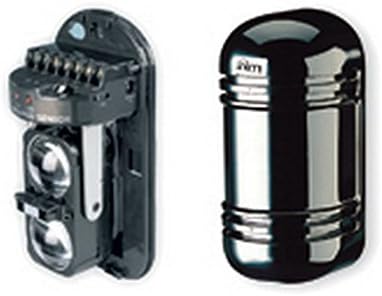
Figure 1: BD-D060 Optical Barrier Components. The image displays two main components of the BD-D060 Optical Barrier. On the left is the internal assembly of the barrier, showing the optical lenses and terminal connections. On the right is the external casing, a sleek, dark, cylindrical unit designed to protect the internal components.
Mezi klíčové vlastnosti patří:
- 60m double radii optical barrier for enhanced detection.
- Horizontal and vertical spoke adjustment for precise alignment.
- IP54 rated enclosure for protection against dust and splashing water.
- Programmable intervention time to customize alarm response.
5. Nastavení a instalace
Správná instalace je klíčová pro optimální výkon. Postupujte podle těchto obecných kroků:
- Výběr webu: Choose a location free from obstructions that could block the beam. Ensure stable mounting surfaces.
- Montáž: Securely mount the transmitter and receiver units facing each other, ensuring they are at the same height and within the 60m range. Use the provided mounting brackets.
- Zapojení: Connect power and alarm output wires to the respective terminals on both units. Refer to the wiring diagram provided with the product for specific connections.
- Zarovnání: Power on the units. Use the horizontal and vertical adjustment mechanisms to precisely align the transmitter and receiver beams. Most units include visual indicators (e.g., LEDs) or audible tones to assist with alignment.
- Konfigurace: Set the desired intervention time and other parameters using the internal jumpers or dip switches as per the detailed product sheet.
6. Obsluha zařízení
Once installed and aligned, the BD-D060 operates automatically. The system is active when powered on and properly aligned.
- Normální provoz: When the beam is clear, the alarm output remains in its normal state (e.g., closed contact).
- Stav alarmu: If the infrared beam is interrupted for the programmed intervention time, the alarm output will change state (e.g., open contact), signaling an intrusion to the connected alarm panel.
- Indikátory stavu: Observe the status LEDs on the units for operational status (e.g., power, alignment, alarm). Consult the detailed product sheet for LED indicator meanings.
7. Údržba
Regular maintenance ensures the longevity and reliability of your optical barrier.
- Čištění: Periodically clean the optical lenses of both the transmitter and receiver units using a soft, lint-free cloth. Dust, dirt, or spiderwebs can obstruct the beam and cause false alarms.
- Kontrola zarovnání: Verify the alignment of the units periodically, especially after strong winds or physical disturbances. Re-align if necessary.
- Kontrola napájení: Ujistěte se, že napájecí zdroj je stabilní a v rámci specifikovaného objemutage rozsah.
- Inspekce životního prostředí: Check for any new obstructions (e.g., growing vegetation) that might interfere with the beam path.
8. Řešení problémů
If you experience issues with your BD-D060, refer to the following common problems and solutions:
| Problém | Možná příčina | Řešení |
|---|---|---|
| Falešné poplachy | Misalignment, dirty lenses, beam obstruction (e.g., vegetation, insects), strong sunlight interference. | Re-align units, clean lenses, remove obstructions, check for proper shielding from direct sunlight. |
| No Alarm on Intrusion | Units not powered, severe misalignment, faulty wiring, damaged unit. | Check power supply, re-align units, inspect wiring connections, test units individually. |
| Stavová LED nesvítí | Žádné napájení, vadná jednotka. | Verify power connection and supply, contact technical support if power is present. |
For persistent issues, contact INIM ELECTRONICS technical support.
9. Specifikace
| Funkce | Detail |
|---|---|
| Model | BD-D060 |
| Výrobce | Inim |
| Rozsah detekce | 60 meters (double radii) |
| Nastavení | Horizontal and vertical spoke adjustment |
| Hodnocení ochrany proti vniknutí (IP). | IP54 |
| Doba zásahu | Programovatelné |
| Baterie jsou součástí dodávky | Žádný |
| Jsou vyžadovány baterie | Žádný |
| ASIN | B01CNOY16Y |
| Datum první dostupnosti | 6. března 2016 |
10. Záruka a podpora
This product is covered by a standard manufacturer's warranty. For specific warranty terms and conditions, please refer to the documentation provided with your purchase or visit the official INIM ELECTRONICS webmísto.
For technical support, service, or replacement parts, please contact your authorized INIM ELECTRONICS dealer or distributor. Ensure you have your product model number (BD-D060) and purchase details available when seeking support.