
Zavedení
This manual provides detailed instructions for the installation, operation, and maintenance of your INIM Alien/SN Touchscreen User Interface. Please read this manual thoroughly before using the device to ensure proper functionality and to prevent damage. Keep this manual for future reference.
Konec produktuview
The INIM Alien/SN is a 4.3-inch touchscreen user interface designed for i-bus systems. It integrates several features for enhanced control and monitoring within your environment.
Klíčové vlastnosti:
- 4.3-inch Touchscreen Display
- Senzor přiblížení
- Snímač okolní teploty
- Integrated Microphone and Speaker
- Rozhraní USB
- Slot pro SD kartu
- Designed for i-bus systems
Komponenty:
- INIM Alien/SN Touchscreen User Interface
- SD karta (součástí balení)
- Mounting hardware (not specified, typically included with wall-mount devices)
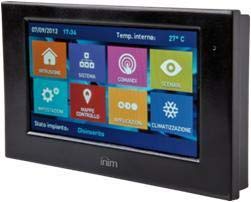
Tento obrázek ukazuje přední stranu view of the INIM Alien/SN Touchscreen User Interface, featuring its sleek black design and the 4.3-inch display.
Nastavení
Follow these steps for the initial setup of your INIM Alien/SN Touchscreen User Interface.
1. Montáž zařízení:
- Vyberte umístění: Choose a suitable wall location, ensuring it is within reach of the necessary electrical cabling and i-bus connection.
- Příprava zapojení: Ensure all power and i-bus wiring is safely routed to the mounting location.
- Bezpečná montáž: Use appropriate wall-mounting hardware to securely attach the device's backplate or mounting bracket to the wall.
- Připojení kabeláže: Connect the electrical power cable and i-bus communication cables to the designated terminals on the device. Refer to the wiring diagram provided with your i-bus system documentation for specific connections.
- Připojit zařízení: Carefully attach the touchscreen unit to the mounted backplate, ensuring it clicks securely into place.
2. Počáteční zapnutí:
- Once mounted and wired, apply power to the device. The touchscreen should illuminate.
- Follow any on-screen prompts for initial configuration, such as language selection or network settings.
3. SD Card and USB:
- The included SD card is typically used for firmware updates, configuration backups, or data logging. Insert it into the designated slot if not already pre-installed.
- The USB interface can be used for direct connection to a computer for advanced configuration or diagnostics using INIM software.
Návod k obsluze
The INIM Alien/SN features an intuitive touchscreen interface for easy navigation and control.
1. Touchscreen Navigation:
- Klepněte na: Lightly touch the screen to select icons, buttons, or menu items.
- Výpad: Drag your finger across the screen to scroll through lists or switch between screens.
- Senzor přiblížení: The screen may automatically activate or adjust brightness when you approach it.
2. Ovládání systému:
- Access various functions of your i-bus system, such as arming/disarming security zones, viewing system status, or controlling connected devices.
- Specific menu structures and options will depend on your i-bus system configuration.
3. Audio Functions:
- The integrated microphone and speaker allow for two-way audio communication, typically used for intercom functions or alarm verification within the i-bus system.
- Adjust volume settings through the on-screen menu.
4. Monitorování teploty:
- The ambient temperature sensor displays the current room temperature.
- If configured as a thermostat, you can view and adjust temperature setpoints for HVAC systems directly from the interface.
Údržba
Regular maintenance ensures the longevity and optimal performance of your touchscreen user interface.
Čištění:
- Obrazovka: Použijte měkký hadřík, který nepouští vlákna dampOmyjte vodou nebo neabrazivním čističem obrazovek. Nestříkejte čistič přímo na obrazovku.
- Casing: Otřete plastové casinměkkým, suchým hadříkem. Nepoužívejte agresivní chemikálie ani abrazivní materiály.
Aktualizace softwaru:
- Periodically check the INIM Electronics website or consult your system installer for available firmware updates.
- Updates can be applied via the USB interface or by loading files onto the SD card, as per specific instructions provided with the update.
Odstraňování problémů
If you encounter issues with your INIM Alien/SN, refer to the following common problems and solutions.
Zařízení se nezapíná:
- Zkontrolujte připojení napájení: Ensure the electrical cable is securely connected and receiving power.
- Verify i-bus Connection: Confirm the i-bus communication cable is properly connected, as some systems draw power through this connection.
- Jistič: Check your building's circuit breaker for any tripped circuits.
Dotyková obrazovka nereaguje:
- Restartovat zařízení: If possible, power cycle the device by temporarily disconnecting and reconnecting its power source.
- Čistá obrazovka: Ensure the screen is clean and free of dirt or moisture that might interfere with touch detection.
Žádný zvuk z reproduktoru/mikrofonu:
- Nastavení hlasitosti: Check the on-screen volume settings to ensure they are not muted or set too low.
- Konfigurace systému: Verify that audio functions are enabled and correctly configured within your i-bus system settings.
For persistent issues, contact your system installer or INIM Electronics technical support.
Specifikace
| Funkce | Specifikace |
|---|---|
| Výrobce | INIM Electronics |
| Číslo modelu | 8050617014619 |
| Typ zobrazení | 4.3palcový dotykový displej |
| Barva | Černý |
| Materiál | Plast |
| Zdroj napájení | Elektrický kabel |
| Konektivita | USB |
| Speciální funkce | Integrated Microphone, Ambient Temperature Sensor, Proximity Sensor |
| Zahrnuté komponenty | SD karta |
| Typ montáže | Držák na zeď |
| Rozměry produktu | 15 x 10 x 3 cm |
| Hmotnost produktu | 250 gramů |
Záruka a podpora
For warranty information, please refer to the documentation provided by your retailer or visit the official INIM Electronics webZáruční podmínky se mohou lišit v závislosti na regionu a místě nákupu.
For technical support, assistance with installation, or troubleshooting beyond the scope of this manual, please contact your authorized INIM Electronics dealer or system installer. You may also find additional resources and contact information on the official INIM Electronics webmísto.
Webmísto: www.inim.biz (Please note: This is a generic placeholder for the manufacturer's website. Verify the correct URL if available.)