
Zavedení
This manual provides comprehensive instructions for the AT&T CL80115 DECT 6.0 Cordless Expansion Handset. This accessory handset is designed to extend the functionality of compatible AT&T cordless phone base systems, offering enhanced audio calls and additional communication features. It is not a standalone device and requires connection to a compatible base unit for operation.
Co je v krabici
- AT&T CL80115 Cordless Handset
- Nabíječka pro sluchátka
- Napájecí adaptér pro nabíječku
- Dobíjecí baterie

Image: The AT&T CL80115 Cordless Handset resting in its charging cradle. The handset features a large display, backlit keys, and an AT&T logo.
Kompatibilita
The AT&T CL80115 accessory handset requires one of the following AT&T cordless phone base systems to operate:
- CL82115
- CL82215
- CL82315
- CL82415
- CL82465
- CL82515
- CL83215
- CL83315
- CL83365
- CL83415
- CL83465
- CL83565
- CL84115
- CL84215
- CL84265
- CL84365
Nastavení
1. Instalace baterie
- Najděte přihrádku na baterie na zadní straně sluchátka.
- Vložte dobíjecí baterii a dbejte na správnou polaritu.
- Bezpečně zavřete kryt bateriového prostoru.
2. Nabíjení sluchátka
- Connect the power adapter to the handset charger and plug it into an electrical outlet.
- Place the handset in the charger with the display facing forward.
- Allow the handset to charge for at least 10 hours before initial use to ensure optimal battery performance. The "CHARGE" indicator on the handset will illuminate.

Obrázek: Úhlové view of the AT&T CL80115 Cordless Handset in its charging cradle, highlighting the display and keypad.
3. Registrace sluchátka k základní jednotce
This accessory handset must be registered to a compatible AT&T cordless phone base unit before it can be used.
- Ensure the base unit is powered on and not in use.
- Na základní jednotce stiskněte a podržte tlačítko STRANA button (or equivalent registration button) for approximately 4 seconds until the V POUŽÍVÁNÍ light on the base unit turns on.
- On the CL80115 handset, press the # key. The handset will display "Registering..."
- Once registered, the handset will display "Handset X Registered" (where X is the handset number) and emit a confirmation tone.
- If registration fails, repeat the steps. If it continues to fail, refer to the troubleshooting section or the base unit's manual.
Ovládání sluchátka
Uskutečňování a přijímání hovorů
- Chcete-li zavolat: Stiskněte TELEFONa poté vytočte číslo.
- Chcete-li přijmout hovor: Stiskněte TELEFON when the handset rings.
- Ukončení hovoru: Stiskněte VYPNUTO nebo vložte sluchátko zpět do nabíječky.
Nastavení hlasitosti
Během hovoru stiskněte OBJEM up or down buttons on the side of the handset to adjust the earpiece volume.
Funkce ztlumení
Během hovoru stiskněte MUTE/DELETE button to mute the microphone. Press it again to unmute.
Intercom (Walkie-Talkie)
If multiple handsets are registered to the same base, you can use the intercom feature for internal communication. This handset supports communication with up to 4 individuals simultaneously.
- Stiskněte MENU/SELECT.
- Scroll to "Intercom" and press MENU/SELECT.
- Select the desired handset to call or choose "Broadcast" to call all other handsets.
Vlastnosti
- Enlarged Font and Backlit Keys: The handset features an extra-large display with enlarged font and backlit keys for improved visibility and ease of use, particularly beneficial for individuals with visual impairments.
- Nastavitelný ekvalizér: Enhance audio call quality with the adjustable equalizer, allowing customization of sound profiles for clearer conversations.
- Režim ECO: This mode intelligently manages power consumption, optimizing battery life and reducing energy usage.
- Ringer Silence: Temporarily or permanently silence the ringer on both the handset and the base unit as needed.
- Zobrazení ID volajícího: The extra-large display clearly shows caller ID information for incoming calls, provided by the compatible base unit.
Údržba
- Čištění: Wipe the handset and charger with a soft, damp tkanina. Vyhněte se používání agresivních chemikálií nebo abrazivních čisticích prostředků.
- Péče o baterie: Ensure the handset is placed in the charger when not in use to maintain battery charge. Replace the battery pack when its performance significantly degrades.
- Skladování: If storing the handset for an extended period, remove the battery pack. Store in a cool, dry place.
Odstraňování problémů
| Problém | Řešení |
|---|---|
| Sluchátko se nezapne nebo není napájeno. |
|
| Nelze uskutečňovat ani přijímat hovory. |
|
| Špatná kvalita zvuku nebo statický šum. |
|
| Handset displays "Not Registered". |
|
Specifikace
- Model: CL80115
- Značka: AT&T (Manufactured by VTech)
- Typ telefonu: Bezdrátový
- Technologie: DECT 6.0
- Barva: Šedá
- Materiál: Plast
- Hmotnost položky: 11.7 unce (přibližně 331 gramů)
- Rozměry produktu (D x Š x V): 4.9 x 2 x 7 palce (přibližně 12.4 x 5.1 x 17.8 cm)
- Baterie: 2 dobíjecí baterie AA (součástí balení)
- Zdroj napájení: Elektrický s kabelem (pro nabíječku)
- Víceřádkový provoz: Ano
- Zobrazení ID volajícího: Supported (via compatible base unit)
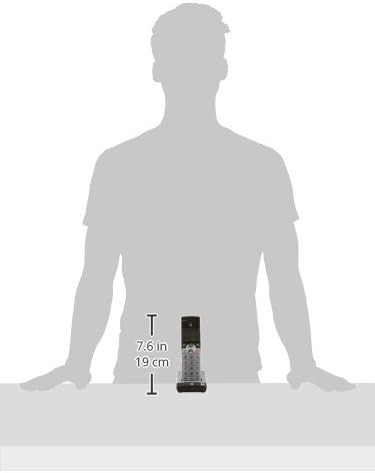
Image: A diagram illustrating the dimensions of the AT&T CL80115 Cordless Handset, showing a height of 7.6 inches (19 cm).
Důležité bezpečnostní informace
VAROVÁNÍ:
Tento produkt obsahuje chemikálie, o kterých je ve státě Kalifornie známo, že způsobují rakovinu a vrozené vady nebo jiná poškození reprodukce.
Při používání tohoto výrobku vždy dodržujte základní bezpečnostní opatření, abyste snížili riziko požáru, úrazu elektrickým proudem a zranění osob.
Záruka a podpora
For warranty information, technical support, or customer service inquiries, please refer to the documentation included with your primary AT&T cordless phone base system or visit the official AT&T/VTech support webwebu. Uschovejte si účtenku jako doklad o koupi.