
Zavedení
The Goodmans Heritage HP1WHT is a versatile portable digital radio designed to provide a rich audio experience through multiple connectivity options. This manual provides essential information for setting up, operating, maintaining, and troubleshooting your device. It supports DAB+, FM, Internet Radio, Bluetooth streaming, Spotify Connect, and features built-in Wi-Fi and NFC for seamless connectivity.
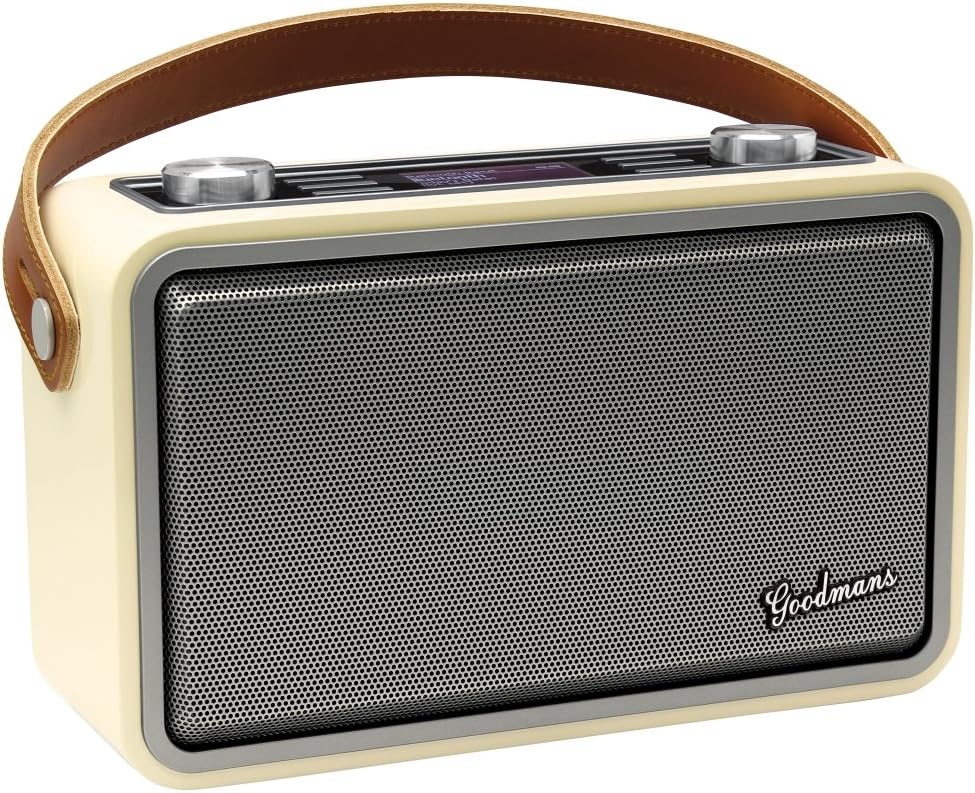
Přední view of the Goodmans Heritage HP1WHT Portable Digital Radio, showcasing its classic design and front speaker grille.
Nastavení
1. Vybalování
Carefully remove the radio and all accessories from the packaging. Ensure the following items are present:
- Goodmans Heritage HP1WHT Digital Radio
- Napájecí adaptér
- Built-in Battery (pre-installed)
2. Zapnutí a nabíjení
Connect the supplied power adapter to the DC IN port on the rear of the radio and plug it into a wall outlet. For the first use, it is recommended to charge the radio for approximately 12 hours. Subsequent charges will typically take around 6 hours. A fully charged battery provides approximately 10 hours of playback or 2-3 days of standby time.
3. Umístění antény
For optimal DAB+ and FM radio reception, fully extend the telescopic antenna located at the rear of the unit. Adjust its position to achieve the clearest signal.
4. Počáteční konfigurace
Upon first power-on, the radio will guide you through an initial setup process. This typically includes selecting your preferred language and connecting to your Wi-Fi network. Use the control dials and buttons to navigate the on-screen menus.
Provozní
1. Ovládací prvky Overview
The radio features intuitive controls for easy navigation and operation:

Detailní záběr view of the control panel, showing the volume/navigation dial, display, and function buttons.
- Left Dial (Volume/Select): Rotate to adjust volume or scroll through menus. Press to select an option.
- Right Dial (Tune/Preset): Rotate to tune radio frequencies or navigate through lists. Press to access presets.
- INFO/BACK/MENU Button: Displays information, goes back in menus, or accesses the main menu.
- Tlačítko MODE: Switches between different audio sources (DAB+, FM, Internet Radio, Bluetooth, Spotify Connect).
- Tlačítko PRESET: Accesses saved radio station presets.
2. Výběr režimu
Stiskněte tlačítko MODE button repeatedly to cycle through the available listening modes: DAB+ Digital Radio, FM Radio, Internet Radio, Bluetooth, and Spotify Connect.
3. DAB+ / FM Radio
In DAB+ or FM mode, use the Right Dial to tune to stations. The radio can perform an automatic scan to find available stations. To save a station as a preset, tune to the desired station, then press and hold the PRESET button, select a preset number, and confirm.
4. Internetové rádio
Once connected to Wi-Fi, select Internet Radio mode. You can browse thousands of stations by genre, location, or search. Use the dials to navigate and select stations. Favorite stations can be saved for quick access.
5. Připojení Bluetooth
Spárování zařízení Bluetooth:
- Select Bluetooth mode on the radio. The radio will enter pairing mode.
- Enable Bluetooth on your smartphone or audio device and search for 'Goodmans HP1WHT'.
- Select the radio from the list to pair.
The radio also supports NFC (Near Field Communication) Tap & Pair. Simply tap your NFC-enabled device against the NFC tag on the side of the radio to initiate pairing.

Strana view of the radio highlighting the NFC tap area for quick Bluetooth pairing.
6. Spotify Connect
With a Spotify Premium account, select Spotify Connect mode on the radio. Open the Spotify app on your device, play music, and select the Goodmans HP1WHT from the 'Devices Available' list to stream directly to the radio.
7. UNDOK App Control
For enhanced control, download the UNDOK app (available for Android and Apple devices). This app allows you to control the radio, set presets, and adjust settings from your smartphone or tablet when both devices are on the same network.
Údržba
1. Čištění
To clean the radio, gently wipe the surfaces with a soft, dry, or slightly damp cloth. Do not use abrasive cleaners, waxes, or solvents as they may damage the finish. Ensure no liquids enter the unit.
2. Péče o baterie
The built-in Lithium-Ion battery has a finite lifespan. To maximize its longevity, avoid fully discharging the battery frequently and store the radio in a cool, dry place when not in use for extended periods. If the battery performance significantly degrades over time, it may indicate the end of its useful life.
Odstraňování problémů
If you encounter issues with your Goodmans Heritage HP1WHT radio, refer to the following common problems and solutions:
| Problém | Možná příčina / řešení |
|---|---|
| Radio does not power on or charge. | Ensure the power adapter is securely connected to both the radio and a working power outlet. Check if the outlet is active. Allow sufficient charging time for the built-in battery. |
| Špatný příjem DAB+ nebo FM. | Fully extend and adjust the telescopic antenna. Try repositioning the radio to a location with better signal strength, away from other electronic devices that may cause interference. |
| Cannot connect to Wi-Fi or Internet Radio. | Ensure your Wi-Fi network is active and the password entered is correct. Check the radio's proximity to your Wi-Fi router. Restart both the radio and your router. |
| Problémy s párováním Bluetooth. | Ensure the radio is in Bluetooth pairing mode. Make sure your device's Bluetooth is enabled and it is within range. Try unpairing and re-pairing the device. |
| Žádný zvuk. | Check the volume level on both the radio and your connected device (if using Bluetooth). Ensure the correct audio source mode is selected. |
| Výdrž baterie je kratší, než se očekávalo. | Battery performance can degrade over time with usage. Ensure the battery is fully charged. High volume levels or continuous Wi-Fi usage can reduce battery life. |
If problems persist after attempting these solutions, a factory reset may resolve some software-related issues. Refer to the radio's menu for the factory reset option. Note that this will erase all saved settings and presets.
Specifikace
| Funkce | Detail |
|---|---|
| Značka | Goodmans |
| Číslo modelu | HP1WHT |
| Barva | Ivory/White |
| Rozměry produktu | 29.8 x 18.9 x 18.5 cm |
| Hmotnost položky | 2.2 kg |
| Zdroj napájení | Battery Powered (Built-in Lithium-Ion) |
| Technologie připojení | Wi-Fi, Bluetooth, NFC |
| Podporovaná rádiová pásma | DAB+, FM, internetové rádio |
| Speciální funkce | Portable, Spotify Connect |
| Zahrnuté komponenty | Radio unit, Power Adapter, Built-in Battery |
| První dostupný termín | 26. února 2016 |
Záruka a podpora
Your Goodmans Heritage HP1WHT Portable Digital Radio comes with a standard manufacturer's warranty. Please refer to the warranty card included with your purchase for specific terms and conditions, including the warranty period and coverage details.
For technical support, troubleshooting assistance beyond this manual, or warranty claims, please contact Goodmans customer service. Contact information can typically be found on the Goodmans official webmístě nebo na obalu produktu.