
1. Úvod
This manual provides detailed instructions for the setup, operation, and maintenance of your Sangean HDR-18 HD Radio. The HDR-18 is a high-quality table top radio featuring HD Digital Radio, FM-Stereo, and AM reception, housed in an acoustically tuned wooden cabinet. It includes 20 memory presets, a real-time clock with alarm and sleep functions, and a comprehensive information display.
2. Bezpečnostní pokyny
- Před použitím jednotky si přečtěte všechny pokyny.
- Udržujte jednotku mimo dosah vody nebo vlhkosti.
- Neumisťujte přístroj do blízkosti zdrojů tepla, jako jsou radiátory, topná tělesa, kamna nebo jiná zařízení (včetně amplifikátory), které produkují teplo.
- Používejte pouze nástavce/příslušenství určené výrobcem.
- Odpojte toto zařízení během bouřky s blesky nebo když se delší dobu nepoužívá.
- Veškeré opravy svěřte kvalifikovanému servisnímu personálu. Servis je nutný v případě, že byla jednotka jakýmkoli způsobem poškozena, například je poškozen napájecí kabel nebo zástrčka, pokud do jednotky vnikla kapalina nebo do jednotky spadly předměty, jednotka byla vystavena dešti nebo vlhkosti, nefunguje normálně. , nebo byla vypuštěna.
3. Obsah balení
Zkontrolujte prosím, zda jsou v balení obsaženy následující položky:
- Sangean HDR-18 HD Radio Unit
- Dálkové ovládání
- FM Telescoping Antenna
- AC napájecí kabel
4. Konec produktuview
4.1 Ovládací prvky a displej na předním panelu

Figure 4.1: Front Panel of the Sangean HDR-18
The front panel of the HDR-18 features a clear LCD display, a speaker grille, and various control buttons and knobs for easy operation. Key elements include:
- Reproduktor: Located on the left, providing audio output.
- LCD displej: Shows frequency, station information, time, and settings.
- Power Button (Blue LED): Turns the radio on or off. The blue LED indicates power status.
- Tlačítko BAND: Switches between FM, HD Radio, and AM bands.
- Tlačítka PŘEDNASTAVENÍ (1–10): For storing and recalling favorite stations.
- TUNE Knob: Used for manual tuning of radio frequencies.
- SEEK/SELECT Button: Initiates automatic station seeking or confirms selections in menus.
- Knoflík VOLUME: Nastavuje výstupní úroveň zvuku.
- Tlačítko TÓN: Accesses bass and treble adjustment settings.
- Tlačítko FREQ: Toggles display between frequency and station name.
- NAP/T Button: Activates the nap timer or sets the time.
- MONO/S Button: Switches between mono and stereo audio output for FM.
- MENU/D Button: Accesses the system menu or sets the date.
- HD/A/S Button: Toggles HD Radio sub-channels or accesses alarm/sleep settings.
- Sluchátkový jack: Pro soukromý poslech s 3.5mm sluchátky.
- Aux-in Jack: Pro připojení externích audio zdrojů.
4.2 Internal Design Highlights

Obrázek 4.2: Rozložené View of HDR-18 Internal Components
The HDR-18 is engineered with several features to enhance performance and sound quality:
- Acoustically Tuned Wooden Cabinet: Designed to minimize resonance and enhance audio fidelity.
- Reception Optimization: Fine-tuning and impedance matching between the RF amplifier and antenna for optimal reception.
- Systém reproduktorů: Features a high-quality one-way speaker with a neodymium magnet and Kapton coil for clear sound production.
- Electronic Circuit: Incorporates Dual DRC (Dynamic Range Compression), Digital Signal Processor (DSP), and unique noise reduction technologies for superior audio processing and signal quality.
- Passive Cooling System (PCS): Utilizes aluminum base materials for efficient heat dissipation.

Figure 4.3: Speaker System Details

Figure 4.4: Electronic Circuit Details
5. Nastavení
5.1 Připojení napájení
- Ensure the radio is placed on a stable, flat surface.
- Connect the AC power cord to the power input jack on the rear of the radio.
- Zapojte druhý konec napájecího kabelu do standardní zásuvky ve zdi.
5.2 Připojení antény
For optimal reception, connect the supplied FM telescoping antenna to the FM antenna jack on the rear of the unit. Extend the antenna fully and adjust its position for the best FM signal. For AM reception, the radio has a built-in AM antenna. If AM reception is weak, try rotating the radio or consider using an external AM loop antenna (not included) if available.
5.3 Počáteční zapnutí
Stiskněte tlačítko Moc button (with the blue LED) on the front panel to turn on the radio. The display will illuminate, and the radio will power on to the last selected band and station.
6. Návod k obsluze
6.1 Zapnutí/vypnutí
Stiskněte tlačítko Moc button once to turn the radio on. Press it again to turn the radio off.
6.2 Mode Selection (Band)
Stiskněte tlačítko KAPELA button repeatedly to cycle through FM, HD Radio (if available), and AM bands.
6.3 Ladění
- Ruční ladění: Otočte NALADIT knoflík pro ruční nastavení frekvence.
- Hledat ladění: Stiskněte tlačítko SEEK/SELECT button to automatically scan for the next available strong station.
- HD Radio Sub-channels: When tuned to an HD Radio station, press the HD/A/S button to cycle through available HD1, HD2, HD3 sub-channels.
6.4 přednastavených stanic
The radio allows you to store 10 FM and 10 AM preset stations.
- Ukládání předvoleb: Tune to the desired station. Press and hold one of the PRESET buttons (1-10) until the display confirms the station has been saved.
- Vyvolání předvoleb: Krátce stiskněte požadované PRESET button (1-10) to recall a stored station.
6.5 Funkce hodin a budíku
- Nastavení času a data: Stiskněte a podržte NAP/T button for time settings or MENU/D for date settings. Use the NALADIT knob to adjust values and SEEK/SELECT to confirm. The radio can also attempt to synchronize time from RDS (Radio Data System) broadcasts if available.
- Nastavení budíků: Stiskněte tlačítko HD/A/S button to access alarm settings. Follow the on-screen prompts to set alarm time and source.
- Časovač vypnutí: Stiskněte tlačítko HD/A/S button repeatedly to cycle through sleep timer options (e.g., 15, 30, 60 minutes).
6.6 Zobrazení informací
The LCD display provides various information depending on the selected mode:
- Frekvence kanálu: The current tuning frequency.
- Call Sign / Station Name: Identifies the broadcast station.
- Text rádia: Scrolling text messages from the broadcaster (e.g., song title, artist).
- Režim zvuku: Indicates Stereo or Mono reception.
- Servisní režim: For HD Radio, indicates the current sub-channel (HD1, HD2, etc.).
- Kvalita signálu: A visual indicator of reception strength.
- Hodiny: Aktuální čas a datum.
Stiskněte tlačítko FREKV button to toggle between frequency and station name display.
6.7 Nastavení zvuku
- Ovládání hlasitosti: Otočte OBJEM knoflík pro zvýšení nebo snížení hlasitosti.
- Basy a výšky: Stiskněte tlačítko TÓN button to enter bass adjustment mode. Rotate the NALADIT knob to adjust bass. Press TÓN again to enter treble adjustment mode, then rotate NALADIT. Stiskněte TÓN a third time to exit.
- Mono/Stereo: For FM broadcasts, press the MONO/S button to switch between stereo and mono reception. Mono can improve reception quality for weak stereo signals.
6.8 Používání dálkového ovladače
The included remote control provides convenient access to most radio functions from a distance. Refer to the remote control diagram (not pictured) for specific button layouts. Functions typically include power, band selection, tuning, presets, volume, mute, and menu navigation.
6.9 Pomocný vstup
Připojte externí audio zařízení (např. MP3 přehrávač, chytrý telefon) k Aux-in jack on the front panel using a 3.5mm audio cable. Select the AUX input mode (usually via the BAND button or a dedicated input button) to play audio from the connected device through the radio's speaker.
6.10 Sluchátkový výstup
Zapojte 3.5mm sluchátka do Sluchátka jack on the front panel for private listening. The radio's speaker will automatically mute when headphones are connected.
7. Údržba
7.1 Čištění jednotky
Wipe the radio's surface with a soft, dry cloth. Do not use abrasive cleaners, waxes, or solvents as they may damage the finish. For stubborn marks, a slightly damp Lze použít hadřík a poté suchý hadřík.
7.2 Care for the Wooden Cabinet
The wooden cabinet is a natural material. Avoid placing the radio in direct sunlight or near extreme heat sources, which can cause the wood to fade or warp. Regular dusting is recommended.
8. Řešení problémů
If you experience issues with your HDR-18, please consult the following common problems and solutions:
| Problém | Možná příčina | Řešení |
|---|---|---|
| Žádná síla | Napájecí kabel není připojen; zásuvka není aktivní. | Ensure power cord is securely plugged into the radio and a working wall outlet. |
| Poor FM/HD Radio reception | FM antenna not extended or positioned correctly; Weak signal. | Fully extend and adjust the telescoping FM antenna. Try repositioning the radio. Switch to mono mode for weak FM stereo signals. |
| Špatný příjem AM | Radio orientation; Interference. | Rotate the radio for better AM signal. Move the radio away from electronic devices that may cause interference. Consider an external AM antenna. |
| Clock loses time after power loss | No internal battery backup for clock; RDS time signal inaccurate. | Manually set the time. If using RDS time synchronization, ensure the broadcasting station transmits accurate time. Consider a UPS for power backup if frequent outages vyskytují. |
| Žádný zvuk | Hlasitost je příliš nízká; Připojena sluchátka; Aktivováno ztlumení. | Increase volume. Disconnect headphones. Check if mute is active (via remote). |
| Dálkové ovládání nefunguje | Vybité baterie; Překážka; Dálkový ovladač mimo dosah. | Replace remote control batteries. Ensure no obstructions between remote and radio. Operate remote within effective range. |
9. Specifikace
- Značka: Sangean
- Model: HDR-18
- Typ tuneru: AM, FM, HD Radio
- Zdroj napájení: Elektrický kabel
- Podporovaná rádiová pásma: AM, FM
- Typ displeje: LCD
- Hmotnost položky: Přibližně 5.1 libry (2.3 kg)
- Rozměry (Š x V x H): Přibližně 24 cm x 11.2 cm x 19.33 cm
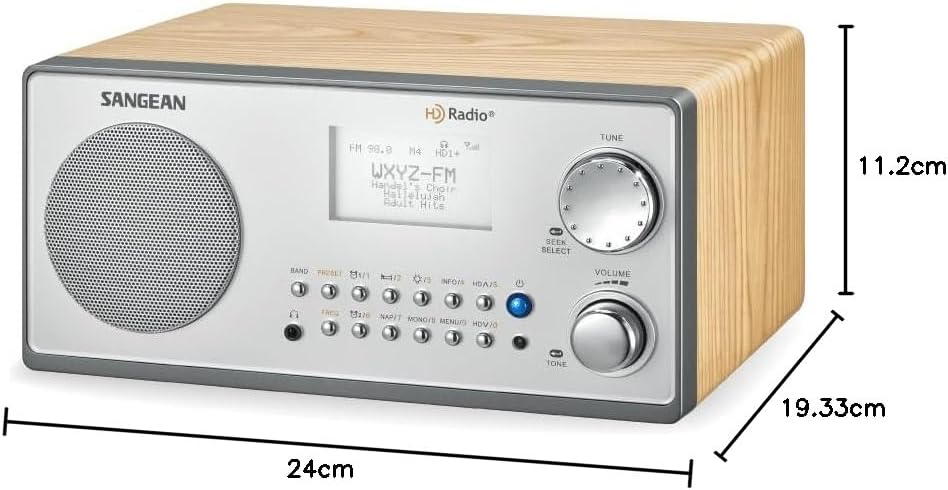
Figure 9.1: Sangean HDR-18 Dimensions
10. Záruka a podpora
For warranty information or technical support, please refer to the warranty card included with your product or visit the official Sangean webUschovejte si účtenku jako doklad o koupi pro případ reklamace.