
Naztech N750
Uživatelská příručka k bezdrátovému Bluetooth headsetu Naztech N750 Emerge
Model: N750
Zavedení
Thank you for choosing the Naztech N750 Emerge Wireless Bluetooth Headset. This manual provides detailed instructions on how to set up, operate, and maintain your headset to ensure optimal performance and longevity. The N750 Emerge is designed for clear communication and media playback, featuring advanced noise cancellation and versatile connectivity.
Obsah balení

Image: Contents of the Naztech N750 Emerge package.
- Naztech N750 Emerge Wireless Headset
- Nabíječka do auta
- Ear Gels (S/M/L)
- Uživatelská příručka
- Flat Micro USB Cable
Konec produktuview
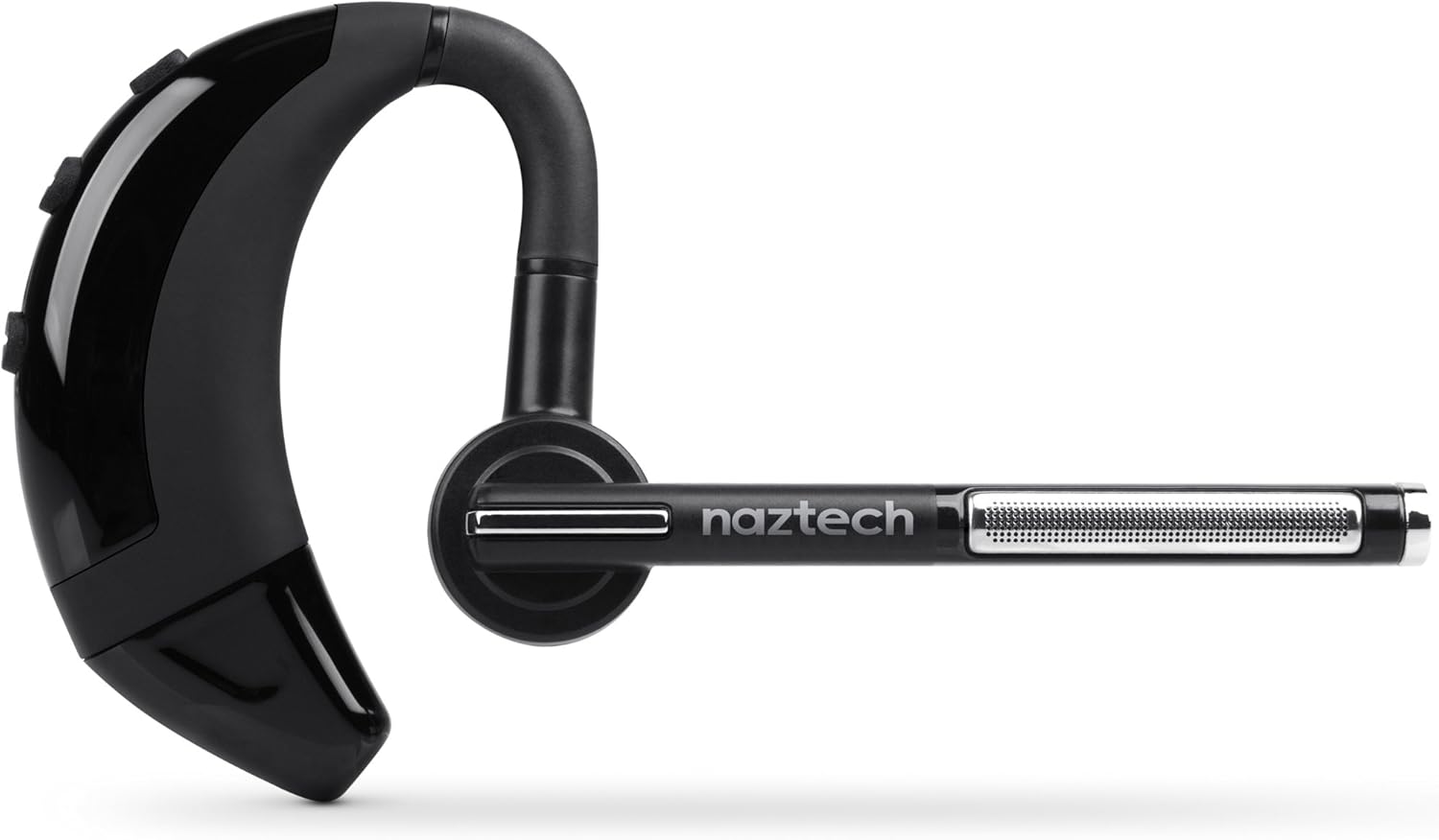
Image: The Naztech N750 Emerge Wireless Bluetooth Headset.
The Naztech N750 Emerge features an ergonomic design for comfortable wear and intuitive controls for easy operation. Key components include the ear hook, main body with control buttons, microphone boom, and ear tip.
Nastavení
1. Nabíjení náhlavní soupravy
Before first use, fully charge the N750 Emerge headset. Connect the provided Micro USB cable to the charging port on the headset and the other end to a USB power source (e.g., the included car charger, a computer USB port, or a wall adapter). The LED indicator will show charging status and turn off or change color when fully charged.
2. Spárování se zařízením Bluetooth
- Zkontrolujte, zda je náhlavní souprava vypnutá.
- Press and hold the Multi-function Button (MFB) on the headset until the LED indicator flashes blue and red alternately, indicating pairing mode.
- On your smartphone or Bluetooth-enabled device, go to the Bluetooth settings and enable Bluetooth.
- Hledat available devices. Select "Naztech N750" from the list.
- Pokud se zobrazí výzva k zadání hesla, zadejte „0000“ (čtyři nuly).
- Po úspěšném spárování bude LED indikátor pomalu modře blikat a můžete uslyšet potvrzovací tón.
3. Nošení headsetu

Image: The Naztech N750 Emerge headset demonstrating its 180-degree swivel for left or right ear use.
The N750 Emerge is designed for comfortable wear on either the left or right ear. The ear hook swivels 180 degrees to accommodate your preference. Adjust the ear hook and select the appropriate ear gel size (S/M/L) for a secure and comfortable fit. The microphone boom should be positioned towards your mouth for optimal voice pickup.
Návod k obsluze
Zapnutí/vypnutí
- Zapnutí: Press and hold the MFB for approximately 3 seconds until the LED flashes blue.
- Vypnout: Press and hold the MFB for approximately 5 seconds until the LED flashes red and then turns off.
Správa hovorů

Image: The headset's advanced call technology automatically pauses music and routes incoming calls.
- Přijmout hovor: Press the MFB once when a call comes in.
- Ukončit hovor: Během hovoru stiskněte jednou multifunkční tlačítko.
- Odmítnout hovor: Press and hold the MFB for approximately 2 seconds when a call comes in.
- Znovu vytočit poslední číslo: Dvojitým stisknutím multifunkčního tlačítka se sluchátka pozastavíte.
- Hlasové vytáčení: Press the MFB once when the headset is idle to activate your phone's voice assistant (if supported).
Ovládání hlasitosti
Use the Volume Up (+) and Volume Down (-) buttons on the headset to adjust the call or media volume.
GPS & Voice Prompt / Caller ID Announcement

Image: The headset provides GPS voice prompts and announces caller ID for incoming calls.
The N750 Emerge supports voice prompts for GPS navigation and announces the caller ID for incoming calls, allowing for hands-free information and call management.
Přehrávání hudby
When connected to a device, the headset can play audio. Use your device's controls for play/pause, skip track, etc. Incoming calls will automatically pause music playback.
Technologie Multipoint

Image: The headset supports Multipoint Technology for connecting to two devices simultaneously.
The N750 Emerge supports multipoint technology, allowing it to be connected to two Bluetooth devices simultaneously. This enables seamless switching between calls or audio from two different paired devices.
Potlačení hluku

Image: The headset utilizes Noisehush Technology for crystal clear conversations with noise cancellation.
The integrated Noisehush® Technology provides ultimate HD clarity and noise cancellation, ensuring crystal clear conversations for both you and your callers by reducing distracting ambient sound.
Údržba
- Clean the headset regularly with a soft, dry cloth. Do not use harsh chemicals or abrasive cleaners.
- Nevystavujte sluchátka extrémním teplotám, vlhkosti nebo přímému slunečnímu záření.
- Pokud sluchátka nepoužíváte, skladujte je na chladném a suchém místě.
- Do not attempt to disassemble or modify the headset, as this will void the warranty and may cause damage.
Odstraňování problémů
| Problém | Možná příčina | Řešení |
|---|---|---|
| Sluchátka se nezapínají. | Baterie je slabá nebo vybitá. | Plně nabijte sluchátka. |
| Nelze spárovat se zařízením. | Sluchátka nejsou v režimu párování; Bluetooth na zařízení vypnutý; zařízení je příliš daleko. | Ujistěte se, že jsou sluchátka v režimu párování (bliká modře/červeně). Zapněte Bluetooth na zařízení. Přesuňte sluchátka blíže k zařízení (do 10 metrů). |
| Žádný zvuk nebo nízká hlasitost. | Příliš nízká hlasitost; sluchátka nejsou připojena; zvolen nesprávný zvukový výstup. | Increase volume on headset and device. Reconnect headset. Ensure audio is routed to the headset on your device. |
| Poor call quality / Noise. | Weak signal; environmental interference; microphone not positioned correctly. | Move closer to the paired device. Avoid strong electromagnetic interference. Adjust microphone boom towards your mouth. |
Specifikace
- Model: N750 Emerge
- Verze Bluetooth: v4.1
- Technologie bezdrátové komunikace: Bluetooth
- Technologie připojení: Bezdrátový
- Zrušení hluku: Noisehush® Technology
- Vícebodová technologie: Ano
- iOS Battery Tracker: Ano
- Doba hovoru: Až 8 hodin
- Pohotovostní doba: Až 140 hodin
- Baterie: Je vyžadována 1 lithium-iontová baterie
- Rozměry produktu: 10.16 x 10.16 x 2.54 cm
- Hmotnost položky: 22.7 g
- Barva: Černý
Záruka a podpora
Naztech products are designed and manufactured to the highest quality standards. For warranty information and technical support, please refer to the warranty card included with your product or visit the official Naztech webUschovejte si účtenku jako doklad o koupi pro případ reklamace.
Ask a question about this manual
Ask about setup, troubleshooting, compatibility, parts, safety, or missing instructions. Manuals+ will review the question and use this page’s manual context to help answer it.