
Zavedení
This manual provides detailed instructions for the setup, operation, and maintenance of your A4tech Bloody Light Strike B314 Gaming Keyboard. Please read this manual thoroughly before using the product to ensure optimal performance and longevity.
Klíčové vlastnosti
- Bloody 4 Light Strike Mechanical Switches: Experience ultra-fast response times of 0.2ms with infrared optic switches, providing a competitive edge in gaming.
- Zvýšená odolnost: Designed for intensive use, featuring A,S,D,W silicon keys with a convex shape for improved control and longevity.
- Neon Glare System LED Backlighting: Customize your gaming environment with vibrant LED backlighting, making keys easy to locate in low-light conditions.
- 9 programovatelných kláves: Personalize your gaming experience by assigning custom functions to 9 individually programmable keys.
- Double Secure Water-Resistance: The keyboard is electronically sealed with a water drain hole, protecting it from accidental spills and extending its lifespan.
Obsah balení
Ověřte, zda jsou v balení přítomny všechny položky:
- Bloody Light Strike B314 Gaming Keyboard
- Uživatelská příručka (tento dokument)

Image: The retail packaging for the Bloody Light Strike B314 Gaming Keyboard, showing the keyboard with LED backlighting and key features highlighted.
Průvodce nastavením
- Připojení klávesnice: Zapojte USB konektor klávesnice do volného USB portu na vašem počítači.
- Instalace ovladače: The keyboard is typically plug-and-play. Your operating system should automatically detect and install the necessary drivers. If prompted, follow the on-screen instructions.
- Instalace softwaru (volitelné): For advanced customization, including programming keys and managing backlighting, download and install the official Bloody software from the A4tech webmísto.
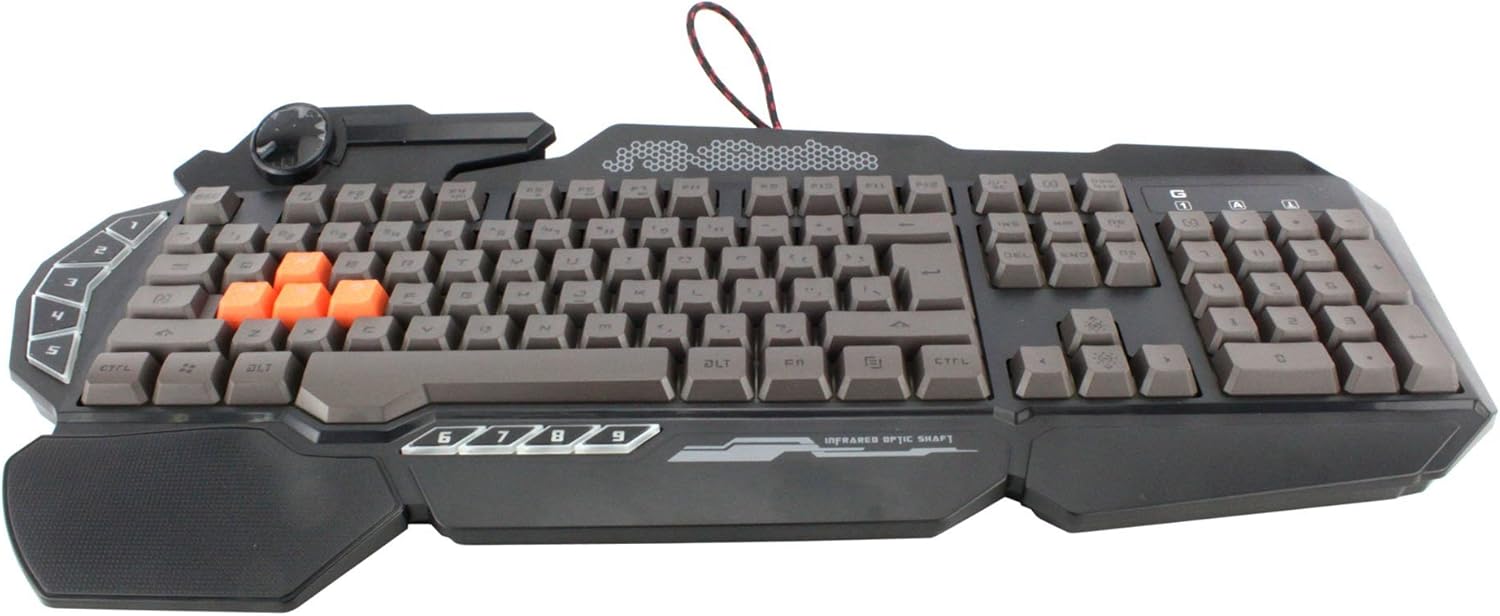
Obrázek: Pohled shora dolů view of the Bloody Light Strike B314 Gaming Keyboard, showcasing the full QWERTY layout with orange WASD keys and dedicated macro keys on the left.
Návod k obsluze
Základní použití
The Bloody B314 functions as a standard QWERTY keyboard for everyday typing and gaming. Its infrared mechanical switches provide a fast and responsive typing experience.
Programovatelné klávesy
The keyboard features 9 programmable keys, typically located on the left side. To customize these keys:
- Install the official Bloody software from the A4tech webmísto.
- Launch the software and navigate to the key customization section.
- Select the desired programmable key (e.g., G1-G9 or similar).
- Assign macros, key functions, or multimedia controls as needed.
- Save your profile aplikujte změny.
Ovládání podsvícení LED
The Neon Glare System LED backlighting can be adjusted using function key combinations:
- Fn+F12: Cycle through different backlighting modes (e.g., static, breathing, off).
- Fn + šipka nahoru/dolů: Upravte jas podsvícení.
- Fn + šipka vlevo/vpravo: Adjust backlight speed or direction (if applicable to the mode).
Herní režim
Activate Game Mode to disable the Windows key and prevent accidental interruptions during gameplay.
- Fn+F8: Zapněte/vypněte herní režim.

Obrázek: Úhlové view of the Bloody Light Strike B314 Gaming Keyboard, highlighting the ergonomic wrist rest and the distinct orange WASD keys.
Údržba
Čištění
- Před čištěním odpojte klávesnici od počítače.
- Použijte měkký, damp cloth to wipe the surface of the keyboard. Avoid harsh chemicals or abrasive materials.
- Pro odstranění prachu a nečistot mezi klávesami použijte stlačený vzduch.
- The water-resistant design helps protect against spills, but it is still recommended to clean up liquids promptly.
Skladování
Pokud klávesnici delší dobu nepoužíváte, skladujte ji na chladném a suchém místě mimo dosah přímého slunečního záření a extrémních teplot.
Odstraňování problémů
Klávesnice nereaguje
- Ujistěte se, že je kabel USB bezpečně zapojený do klávesnice i do počítače.
- Zkuste zapojit klávesnici do jiného USB portu.
- Restartujte počítač.
- Check if the keyboard is recognized in your computer's Device Manager (Windows) or System Information (macOS).
Podsvícení nefunguje
- Ensure the backlighting is not turned off using the Fn + F12 combination.
- Adjust brightness using Fn + Up Arrow.
- Pokud používáte vlastní profesionályfiles, ensure the backlighting settings are correctly configured in the Bloody software.
Programmable Keys Not Working
- Verify that the Bloody software is installed and running.
- Ensure your custom profiles are loaded and active within the software.
- Check for any software updates for the Bloody keyboard utility.
Specifikace
| Funkce | Detail |
|---|---|
| Značka | A4tech |
| Číslo modelu | A4TKLA45173 |
| Technologie připojení | Infračervený |
| Popis klávesnice | Mechanické |
| Typ přepínače | Mechanical (Light Strike Optic) |
| Speciální funkce | Backlit, Programmable Keys, Water Resistant |
| Barva | Černý |
| Podpora barev podsvícení klávesnice | RGB (Neon Glare System) |
| Počet klíčů | 104 |
| Programovatelná tlačítka | 9 |
| Úroveň odolnosti proti vodě | Vodě odolný |
| Hmotnost položky | 2.9 libry |
Záruka a podpora
For warranty information and technical support, please refer to the official A4tech webnebo se obraťte přímo na jejich zákaznický servis. Uschovejte si účtenku jako doklad o koupi pro případ reklamace.
Official A4tech Webmísto: www.a4tech.com