
1. Úvod a konecview
The PXN 6603 is a wireless Bluetooth gamepad designed to enhance your gaming experience on various devices. This MFi (Made for iPhone/iPad/iPod) certified controller offers precise control and broad compatibility, primarily with Apple iOS devices, but also supports Windows and Android TV platforms. This manual provides essential information for setting up, operating, and maintaining your gamepad.

Image 1.1: PXN 6603 Wireless Bluetooth Gamepad, highlighting compatibility with iPod, iPhone, and iPad, supporting iOS 7.0+ devices.
2. Obsah balení
Ověřte prosím, zda jsou ve vašem balení obsaženy všechny níže uvedené položky:
- PXN 6603 Wireless Bluetooth Gamepad
- USB nabíjecí kabel
- Micro USB adaptér
- Uživatelská příručka
- Thumb Grips (2 pieces)

Image 2.1: Contents of the PXN 6603 package, showing the gamepad, detachable phone clamp, USB charging cable, user manual, and two thumb grips.
3. Vlastnosti produktu
The PXN 6603 Gamepad incorporates several features for an optimized gaming experience:
- Bezdrátové připojení Bluetooth: Provides a stable and responsive connection to your devices.
- Certifikace MFi: Ensures full compatibility and optimal performance with Apple iOS devices.
- Dobíjecí baterie: Equipped with a 500mAh lithium-polymer battery, offering over 30 hours of play time on a 2-3 hour charge.
- Duální analogové joysticky: Features 360-degree rotation for precise control.
- Responsive Trigger Buttons: Includes fast-response R1/R2 and L1/L2 trigger buttons.
- 8-Direction D-Pad: Pro přesné směrové zadávání.
- Durable ABXY Buttons: Designed for comfort and longevity.
- Nastavitelný telefonní cívkaamp: An extendable stand that can hold phones up to 6 inches, with an adjustable angle from 90 to 160 degrees.
- Pressure-Sensitive Buttons: Offers precise control and accurate response in supported games.

Image 3.1: 360-degree rotation joystick.

Image 3.2: Fast response trigger buttons.

Image 3.3: 8-direction D-Pad.

Image 3.4: Comfortable and durable ABXY buttons.

Image 3.5: Adjustable and extendable phone clamp.

Obrázek 3.6: Podrobnosti o výdrži baterie a nabíjení.
4. Nastavení
4.1. Nabíjení gamepadu
Before first use, fully charge the gamepad. Connect the provided USB charging cable to the gamepad's USB interface and plug the other end into a USB power source (e.g., computer USB port, USB wall adapter). The charging indicator light will illuminate during charging and turn off when fully charged. A full charge typically takes 2-3 hours.
4.2. Pairing with iOS Devices
- Ensure your iOS device (iPhone, iPad, iPod Touch, Apple TV) has Bluetooth enabled. You can do this through the device's Settings menu.
- Press and hold the Power Key on the PXN 6603 Gamepad until the Bluetooth indicator light begins to flash, indicating it is in pairing mode.
- On your iOS device, navigate to the Bluetooth settings and search for available devices.
- Select "PXN 6603" from the list of found devices to initiate the pairing process.
- Once successfully paired, the Bluetooth indicator light on the gamepad will become solid.
For Apple TV, ensure the Apple TV is updated to the latest software version for optimal compatibility.
5. Návod k obsluze
5.1. Rozložení a funkce tlačítek
Familiarize yourself with the gamepad's button layout:
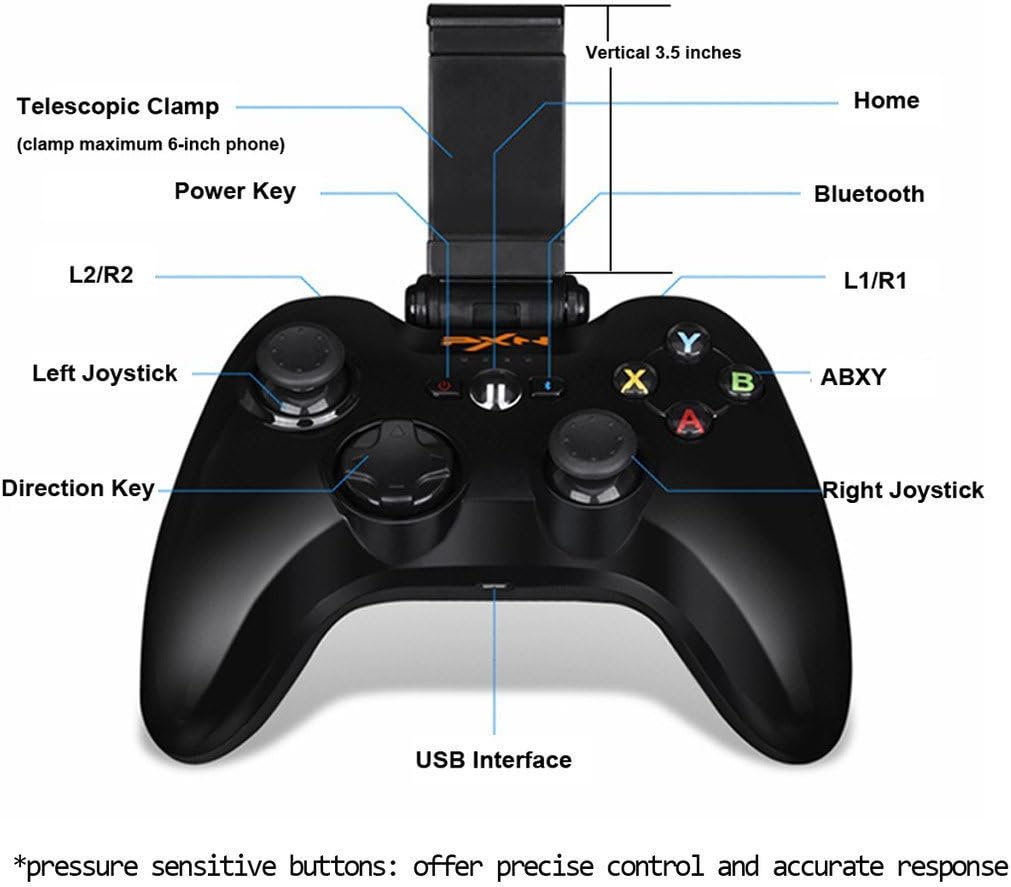
Image 5.1: PXN 6603 Gamepad button layout with labels.
- Vypínač: Turns the gamepad on/off.
- Tlačítko Domů: Returns to the home screen on connected devices.
- Indikátor Bluetooth: Ukazuje stav připojení.
- Tlačítka L1/R1: Levé a pravé ramenní knoflíky.
- Spouštěče L2/R2: Left and Right analog triggers.
- Levý joystick: Analogová páčka pro ovládání pohybu a kamery.
- Pravý joystick: Analogová páčka pro ovládání pohybu a kamery.
- Směrová klávesa (D-Pad): Digitální směrový vstup.
- Tlačítka ABXY: Akční tlačítka, obvykle barevně odlišená.
- USB rozhraní: Pro nabíjení gamepadu.
- Telescopic Clamp: Holds mobile devices.
5.2. Using the Phone Clamp
The PXN 6603 includes an integrated telescopic clamp to securely hold your smartphone, transforming your device into a portable gaming console. To use:
- Gently pull the top part of the clamp upwards to extend it.
- Opatrně vložte smartphone do držákuamp, ensuring it is centered and securely held. The clamp can accommodate phones up to 6 inches in size.
- Nastavte úhel třamp pro optimální viewIng. třamp allows for angle adjustments between 90 and 160 degrees.

Image 5.2: Gamepad with the phone clamp prodloužený.
6. Kompatibilita
The PXN 6603 Gamepad is designed for broad compatibility:
- Zařízení iOS: Fully compatible with iPhone, iPad, iPod Touch, and Apple TV running iOS 7.0 or above.
- Windows: Supports Windows XP, Windows 7, and Windows 8.
- Android: Compatible with Android TV boxes and Android TVs.
For optimal performance, ensure your device's operating system is up to date. Game compatibility may vary; check individual game requirements for controller support.

Image 6.1: The PXN 6603 supports all Apple devices running iOS 7.0 and above.
7. Údržba
To ensure the longevity and optimal performance of your PXN 6603 Gamepad, follow these maintenance guidelines:
- Čištění: Use a soft, dry cloth to clean the gamepad. Avoid using harsh chemicals, solvents, or abrasive materials.
- Skladování: Gamepad skladujte na chladném a suchém místě mimo dosah přímého slunečního záření a extrémních teplot.
- Péče o baterie: Charge the battery regularly, even if not in frequent use, to prevent deep discharge. Avoid leaving the battery completely depleted for extended periods.
- Vyhněte se dopadu: Nenechávejte gamepad upustit ani jej nevystavujte silným nárazům, mohlo by dojít k poškození vnitřních součástí.
- Expozice tekutin: Keep the gamepad away from water and other liquids to prevent electrical damage.
8. Řešení problémů
If you encounter issues with your PXN 6603 Gamepad, refer to the following common troubleshooting steps:
- Gamepad does not turn on: Ensure the battery is charged. Connect the gamepad to a power source using the USB cable and try again.
- Nelze spárovat se zařízením:
- Ověřte, že je na vašem zařízení povoleno Bluetooth.
- Ensure the gamepad is in pairing mode (Bluetooth indicator flashing).
- Move the gamepad closer to your device.
- Restart both the gamepad and your device, then attempt pairing again.
- Check if the gamepad is already paired with another device. Disconnect it if necessary.
- Buttons are unresponsive or lag:
- Zkontrolujte stav baterie a v případě vybití ji dobijte.
- Ensure the gamepad is within the effective range of your device's Bluetooth connection.
- Re-pair the gamepad with your device.
- Update your device's operating system to the latest version.
- Gamepad disconnects frequently:
- Ujistěte se, že v blízkosti není žádné silné elektromagnetické rušení.
- Keep the gamepad and device close to each other.
- Recharge the gamepad's battery.
9. Specifikace
| Značka | rozšíření PXN |
| Číslo modelu | PXN-6603 |
| Technologie připojení | Bluetooth |
| Kompatibilní operační systémy | iOS 7.0+, Windows XP/7/8, Android TV |
| Typ baterie | Lithium-polymer |
| Kapacita baterie | 500 XNUMX mAh |
| Doba nabíjení | 2-3 hodin |
| Čas přehrávání | 30+ hodin |
| Počet tlačítek | 16 |
| Materiál | Plast |
| Hmotnost položky | 1.09 libry (cca 494 g) |
10. Záruka a podpora
Specific warranty information for the PXN 6603 Gamepad is not provided in this manual. For details regarding warranty coverage, returns, or technical support, please refer to the official PXN webnebo se obraťte na prodejce. Uschovejte si účtenku jako doklad o koupi pro případné reklamace.