
Protmex PPM-AM001
Protmex MS6252A Portable Digital Anemometer
Návod k použití
Zavedení
Thank you for choosing the Protmex MS6252A Portable Digital Anemometer. This device is designed for accurate measurement of wind speed, air volume, and air velocity. It is a versatile tool suitable for various applications, including HVAC system testing, outdoor sports, environmental monitoring, and industrial use. This manual provides detailed instructions for the safe and effective operation, maintenance, and troubleshooting of your anemometer.

Obrázek 1: Přední strana view of the Protmex MS6252A Portable Digital Anemometer.
Bezpečnostní informace
Please read and understand all safety warnings and operating instructions before using this instrument. Failure to do so may result in injury or damage to the device.
- Nepokoušejte se zařízení opravovat ani upravovat. Veškerý servis svěřte kvalifikovanému personálu.
- Uchovávejte zařízení mimo dosah vody a prostředí s vysokou vlhkostí.
- Nevystavujte zařízení po delší dobu extrémním teplotám nebo přímému slunečnímu záření.
- Handle the fan blades with care to prevent damage.
- Pokud zařízení delší dobu nepoužíváte, vyjměte baterie, abyste zabránili jejich vytečení.
Konec produktuview
Familiarize yourself with the components and controls of your anemometer.

Figure 2: Labeled components of the Protmex MS6252A.
- Ventilátor: Otáčí se pro měření rychlosti větru.
- LCD displej: Zobrazuje naměřené hodnoty, jednotky a indikátory.
- Power Switch Button (①): Zapíná nebo vypíná zařízení.
- Function Switching Button (FUNC): Toggles between different measurement modes (e.g., wind speed, air volume).
- Hold Display / Temperature Mode Switch Button (HOLD): Freezes the current reading on the display or switches temperature units.
- Max / Min Button (MAX/MIN): Displays maximum or minimum recorded values.
- Unit Switching Button (UNIT): Changes the measurement units (e.g., m/s, km/h, ft/m).
- Tlačítko podsvícení (☀): Aktivuje nebo deaktivuje podsvícení displeje.
Specifikace
Key technical specifications of the Protmex MS6252A Anemometer:
| Funkce | Specifikace |
|---|---|
| Značka | Protmex |
| Číslo modelu | PPM-AM001 (MS6252A) |
| Materiál | Plast |
| Rozměry (D x Š x V) | 16.5 x 8.5 x 3.8 centimetrů |
| Hmotnost položky | 240 gramů |
| Zdroj napájení | 1 x 9V baterie (součástí balení) |
| Zobrazit | LCD s podsvícením |
The device supports multiple measurement units for wind speed and air volume:
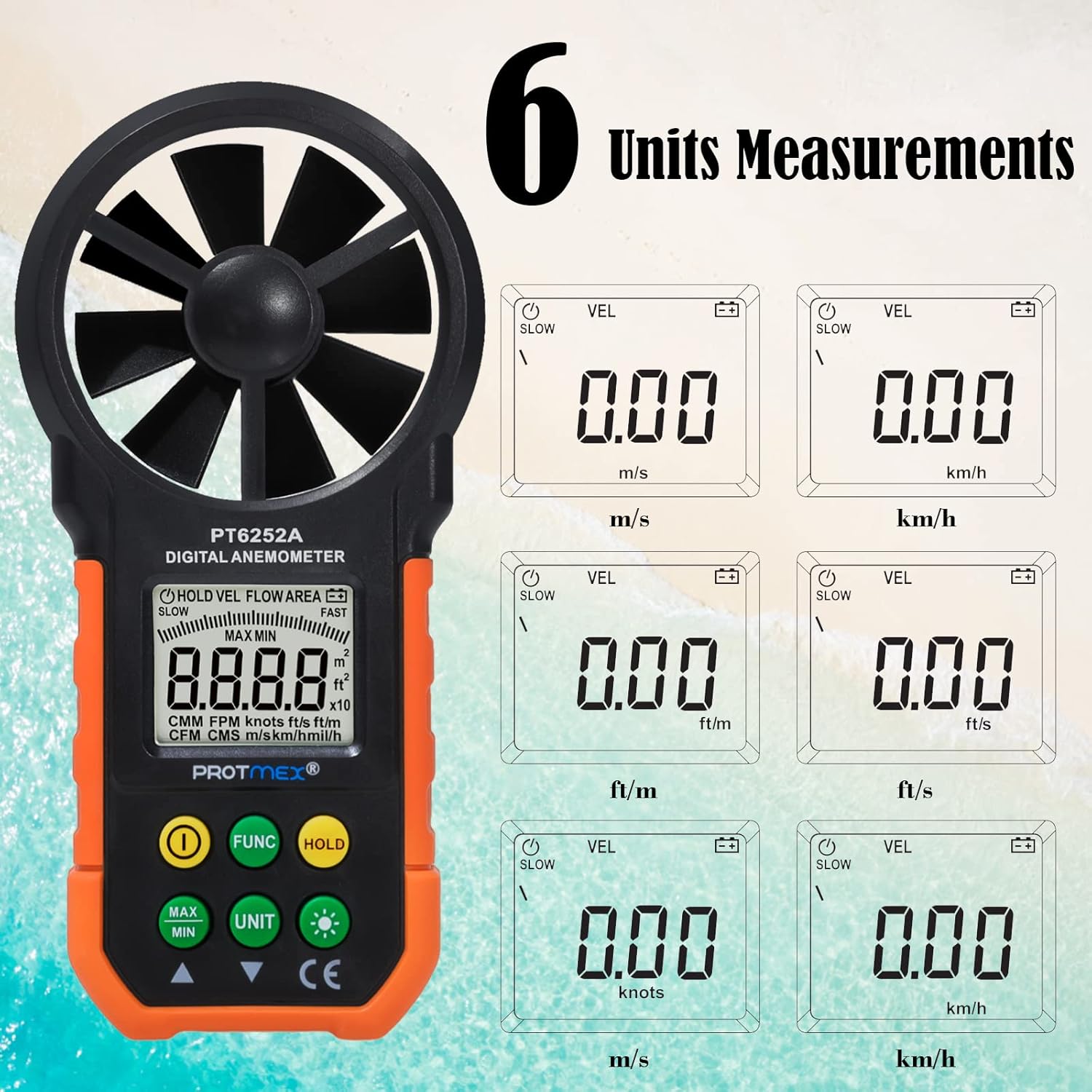
Figure 3: Available measurement units for wind speed and air volume.
- Wind Speed Units: m/s, km/h, ft/m, ft/s, knots, mph
- Air Volume Units: CMM, CFM
Nastavení
Instalace baterie
The Protmex MS6252A requires one 9V battery for operation.
- Vyhledejte kryt přihrádky na baterie na zadní straně zařízení.
- Posuňte nebo odepněte kryt pro otevření přihrádky.
- Vložte novou 9V baterii a dbejte na správnou polaritu (+ a -).
- Bezpečně zavřete kryt bateriového prostoru.
Operace
Zapnutí/vypnutí
- To turn on the device, press the ① (Power Switch) button.
- To turn off the device, press and hold the ① (Power Switch) button for a few seconds until the display turns off.
Measurement Modes (FUNC Button)
Stiskněte tlačítko ZAMĚSTNANEC button to cycle through different measurement modes, such as wind speed (VEL) and air volume (FLOW AREA).
Unit Selection (UNIT Button)
While in a measurement mode, press the JEDNOTKA button to change the measurement units. For example, in wind speed mode, you can switch between m/s, km/h, ft/m, ft/s, knots, and mph.
Data Hold (HOLD Button)
- Stiskněte tlačítko DRŽET button once to freeze the current reading on the display. The "HOLD" indicator will appear.
- Stiskněte tlačítko DRŽET znovu stiskněte tlačítko pro uvolnění datového blokování a obnovení měření v reálném čase.
MAX/MIN Measurement (MAX/MIN Button)
- Stiskněte tlačítko MAX/MIN button once to display the maximum recorded value. "MAX" will appear on the display.
- Stiskněte tlačítko MAX/MIN button again to display the minimum recorded value. "MIN" will appear on the display.
- Stiskněte tlačítko MAX/MIN button a third time to exit MAX/MIN mode and return to live measurement.
Backlight Function (☀ Button)
The device features a bright LCD display with a backlight for visibility in low-light conditions.

Figure 4: The bright LCD display with backlight function.
- Press the ☀ (Backlight) button once to turn on the backlight.
- Press the ☀ (Backlight) button again to turn off the backlight.
Údržba
Čištění
- Otřete zařízení měkkým suchým hadříkem.
- Nepoužívejte abrazivní čisticí prostředky nebo rozpouštědla.
- Ensure the fan blades are free from dust and debris for accurate readings. Use a soft brush if necessary.
Skladování
- Pokud zařízení nepoužíváte, skladujte jej na chladném a suchém místě.
- Remove the battery if storing for an extended period to prevent battery leakage and damage to the device.
Výměna baterie
When the battery indicator appears on the LCD, replace the 9V battery following the steps in the "Battery Installation" section.
Odstraňování problémů
| Problém | Možná příčina | Řešení |
|---|---|---|
| Zařízení se nezapne. | Slabá nebo vybitá baterie; nesprávná instalace baterie. | Vyměňte baterii; dbejte na správnou polaritu. |
| Nepřesné údaje. | Fan blades obstructed or damaged; device not held correctly in airflow. | Clean fan blades; ensure clear path for airflow; hold device perpendicular to airflow. |
| Displej je tlumený nebo bliká. | Slabá baterie. | Vyměňte baterii. |
| Tlačítka nereagují. | Zařízení zamrzlo; slabá baterie. | Remove and reinsert battery; replace battery. |
Záruka a podpora
Protmex products are manufactured to high quality standards. For warranty information or technical support, please refer to the warranty card included with your purchase or contact Protmex customer service through their official webmístě nebo autorizovaným distributorům.
Uschovejte si prosím účtenku jako doklad o koupi pro případ reklamace.
Ask a question about this manual
Ask about setup, troubleshooting, compatibility, parts, safety, or missing instructions. Manuals+ will review the question and use this page’s manual context to help answer it.