
1. Úvod
Děkuji za nákupasing the iRULU BL20 Video Projector. This manual provides essential information for the safe and efficient operation of your device. Please read it thoroughly before use and retain it for future reference.
2. Bezpečnostní informace
- Neblokujte větrací otvory. Zajistěte dostatečný prostor kolem projektoru pro správné proudění vzduchu.
- Používejte pouze napájecí adaptér dodaný s projektorem.
- Zabraňte přímému kontaktu očí s objektivem projektoru, když je zapnutýamp je zapnuto.
- Neumisťujte projektor na nestabilní povrchy.
- Chraňte projektor před vodou nebo jinými kapalinami.
- Během bouřek nebo pokud projektor delší dobu nepoužíváte, odpojte jej ze zásuvky.
- Veškeré opravy svěřte kvalifikovanému servisnímu personálu.
3. Obsah balení
Ověřte, zda jsou v balení obsaženy všechny níže uvedené položky:
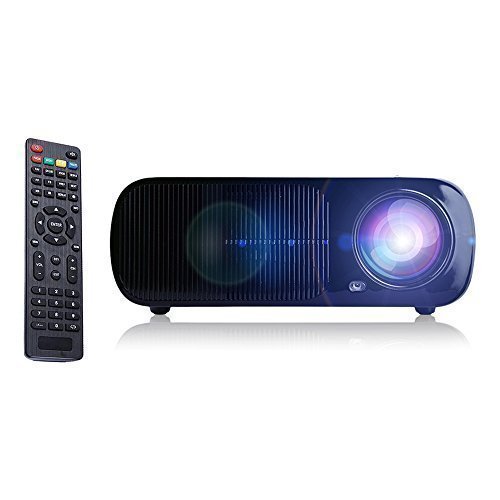
- iRULU BL20 Video Projector
- Napájecí kabel
- AV kabel
- Dálkové ovládání (baterie nejsou součástí balení)
- Uživatelská příručka (tento dokument)
- Čistič čoček
- Šrouby

4. Konec produktuview
4.1. Front Panel and Lens
The front of the projector features the projection lens and an infrared receiver for the remote control.

4.2. Zadní panel a připojení
The rear panel provides various input and output ports for connecting external devices.

- USB (2x): Připojte paměťová zařízení USB pro přehrávání médií.
- HDMI (x2): Connect devices such as laptops, gaming consoles, or streaming sticks.
- TV/digitální TV: Connect to a television antenna for broadcast channels.
- VGA: Connect to computers or laptops.
- AV: Connect to devices using a composite video and stereo audio cable.
- YPbPr: Connect to devices using component video cables.
- Zvukový vstup/výstup: Připojte externí audiosystémy nebo sluchátka.
5. Nastavení
5.1. Možnosti umístění
The projector supports multiple projection methods:
- Přední projekce: Place the projector in front of the screen.
- Zadní projekce: Umístěte projektor za průsvitné promítací plátno.
- Projekce stropu: Mount the projector upside down on the ceiling (bracket not included).

5.2. Připojení zařízení
Connect your desired source device to the appropriate port on the projector.

5.3. Zapnutí/vypnutí
Connect the power cable to the projector and a power outlet. Press the power button on the projector or the remote control to turn the unit on or off.
6. Provoz
6.1. Základní ovládací prvky
The projector can be controlled using the buttons on the unit or the included remote control.

6.2. Zaostření a korekce lichoběžníkového zkreslení
Adjust the focus ring on the lens to achieve a clear image. Use the keystone correction dial on the rear panel to correct trapezoidal distortion if the projector is not perfectly perpendicular to the screen. The keystone correction allows for approximately ±15° manual vertical adjustment.
6.3. Projection Distance and Screen Size
The optimal projection distance ranges from 1.2 to 6 meters, yielding screen sizes from 32 to 200 inches. Refer to the chart below for guidance:
6.4. Výběr zdroje vstupu
Press the 'Source' button on the remote control or projector to cycle through available input sources (HDMI1, HDMI2, USB1, USB2, AV, VGA, YPbPr, TV).
6.5. Zvukový výstup
The projector has built-in speakers. For enhanced audio, connect external speakers or a sound system to the audio output port.
7. Údržba
- Čištění objektivu: Use the provided lens cleaner cloth or a soft, lint-free cloth to gently wipe the lens. Avoid abrasive materials.
- Generální úklid: Vnější povrch projektoru otřete měkkým, suchým hadříkem. Nepoužívejte tekuté ani aerosolové čisticí prostředky.
- Lamp Život: LED lamp has an estimated lifespan of 20,000 hours. No user replacement is required.
- Větrání: Pravidelně kontrolujte, zda jsou větrací otvory čisté a bez prachu, abyste zabránili přehřátí.
8. Řešení problémů
- Bez obrázku: Ensure the power cable is securely connected and the projector is turned on. Verify the correct input source is selected. Check the connection cable to the source device.
- Rozmazaný obrázek: Adjust the focus ring on the lens. Ensure the projection distance is within the recommended range.
- Trapezoidal Image: Adjust the keystone correction dial on the rear panel.
- Žádný zvuk: Check the volume settings on both the projector and the source device. Ensure external speakers are properly connected if used.
- Dálkové ovládání nefunguje: Ensure batteries are correctly inserted and not depleted. Point the remote directly at the projector's IR receiver.
- Přehřívání: Ensure ventilation openings are not blocked. Operate the projector in a well-ventilated area.
9. Specifikace
| Funkce | Specifikace |
|---|---|
| Značka | iRULU |
| Název modelu | BL20 |
| Nativní rozlišení | 800 x 480 |
| Podporované rozlišení | Až 1080p |
| Lamp Typ | LED |
| Provozní životnost světelného zdroje | 20,000 hodin |
| Kontrastní poměr | 2000:1 |
| Poměr stran | 4:3 / 16:9 |
| Velikost projekce | 32-200 palců |
| Projekční vzdálenost | 1.2 až 6 metrů |
| Korekce lichoběžníkového zkreslení | ±15° Manuální vertikální |
| Technologie připojení | HDMI, USB, VGA, AV, YPbPr, TV |
| Vestavěný reproduktor | 3W Audio Output |
| Spotřeba energie | 110 W |
| Napájení | AC 110V - 240V (± 10%), 50/60 Hz |
| Hmotnost položky | 4.8 libry |
10. Záruka a podpora
The iRULU BL20 Video Projector comes with a 1-year warranty. For any issues concerning the remote control, lamp, or general product performance, please contact iRULU customer service for assistance, replacement, or refund.
For customer service and technical support, please refer to the contact information provided on the official iRULU webwebu nebo v dokumentaci k nákupu.