
Zavedení
The Reflexion PS07BT is a versatile mobile karaoke system designed for portable entertainment. This unit combines powerful audio output with various connectivity options, including Bluetooth, USB, and AUX-in, along with microphone and guitar inputs. It features integrated light effects and a rechargeable battery, making it suitable for both indoor and outdoor use. This manual provides essential information for the safe and effective operation of your PS07BT system.
Bezpečnostní informace
Před použitím zařízení si pečlivě přečtěte všechny bezpečnostní pokyny. Uschovejte si tento návod pro budoucí použití.
- Nevystavujte jednotku dešti, vlhkosti ani extrémním teplotám.
- Neumísťujte přístroj do blízkosti zdrojů tepla, jako jsou radiátory, kamna nebo jiná zařízení produkující teplo.
- Používejte pouze napájecí adaptér dodaný s jednotkou.
- Neotevírejte casing. Veškerý servis svěřte kvalifikovanému personálu.
- Udržujte jednotku mimo dosah silných magnetických polí.
- Zajistěte správné větrání a neblokujte žádné větrací otvory.
- S mikrofonem a kabely zacházejte opatrně, abyste předešli jejich poškození.
Obsah balení
Ověřte, zda jsou v balení přítomny všechny položky:
- Reflexion PS07BT Mobile Karaoke System
- Mikrofon
- Uživatelská příručka
- Power Adapter (not explicitly listed but implied for charging)
Konec produktuview
Familiarize yourself with the components and controls of your Reflexion PS07BT system.

Obrázek 1: Přední strana view of the Reflexion PS07BT Mobile Karaoke System, showcasing the speaker grille and blue LED light effects.

Obrázek 2: Přesview of the PS07BT system, highlighting its dimensions (49cm height, 20cm width), LCD display, and karaoke function.
Ovládací panel
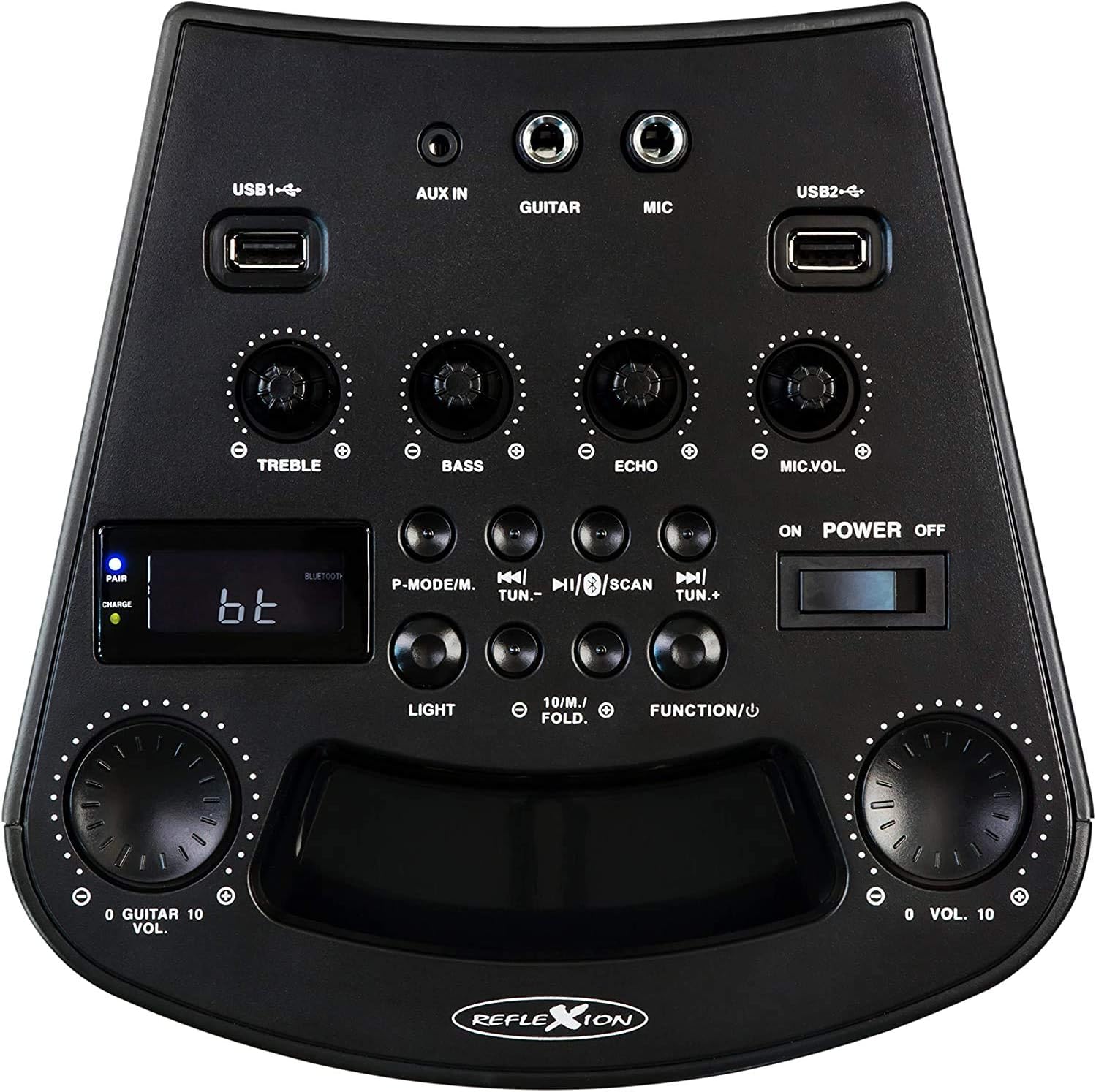
Obrázek 3: Detailní view of the PS07BT control panel, showing input ports, sound adjustment knobs, and function buttons.
- USB1 / USB2 Ports: Pro přehrávání zvuku z paměťových zařízení USB.
- AUX IN: 3.5mm vstup pro externí audio zdroje.
- KYTARA: 6.3mm input for connecting a guitar.
- MIC: 6.3mm input for connecting the microphone.
- Knoflík TREBLE: Upravuje vysokofrekvenční zvuk.
- Knoflík BASS: Upravuje nízkofrekvenční zvuk.
- Knoflík ECHO: Adjusts the echo effect for microphone input.
- MIC.VOL Knob: Nastavuje hlasitost mikrofonu.
- P-MODE/M Button: Program mode / Mode selection.
- TUN.- / TUN.+ Buttons: Tune down / Tune up for FM radio.
- Tlačítko SCAN: Scans for FM radio stations.
- Tlačítko SVĚTLO: Ovládá světelné efekty LED.
- FUNCTION/U Button: Přepíná mezi vstupními režimy (Bluetooth, USB, AUX, FM).
- VOL. Knob: Hlavní ovládání hlasitosti.
- POWER ON/OFF Switch: Zapíná nebo vypíná jednotku.
- LCD displej: Zobrazuje aktuální režim, informace o skladbě nebo frekvenci FM.
- PAIR/CHARGE Indicators: Bluetooth pairing status and battery charging status.
Zadní panel

Figure 4: Rear panel of the PS07BT, displaying the AC power input and product information label.
- Vstup střídavého proudu: Connect the power adapter here for charging and operation.
- Štítek produktu: Contains model number, serial number, and electrical specifications.
Nastavení
Nabíjení baterie
The PS07BT features a built-in rechargeable battery. Before first use, fully charge the unit.
- Connect the supplied power adapter to the AC power input on the rear of the unit.
- Zapojte napájecí adaptér do elektrické zásuvky.
- The CHARGE indicator light will illuminate during charging.
- A full charge takes approximately 4 hours. The CHARGE indicator may change or turn off once fully charged (refer to specific indicator behavior in the quick start guide if available).
A fully charged battery provides up to 4 hours of playback time.
Connecting Microphone and Guitar
To use the karaoke or instrument features:
- Insert the microphone cable into the MIC input on the control panel.
- If connecting a guitar, insert its cable into the KYTARA vstup.
- Upravte MIC.VOL a ECHO knobs as desired during operation.
Návod k obsluze
Zapnutí/vypnutí
Posuňte POWER ON/OFF switch to the 'ON' position to turn on the unit. Slide it to 'OFF' to power down.
Výběr vstupního režimu
Stiskněte tlačítko FUNCTION/U button repeatedly to cycle through available input modes: Bluetooth (bt), USB, AUX, and FM Radio.
Bluetooth připojení
- Turn on the PS07BT and select 'bt' mode using the FUNCTION/U button. The 'PAIR' indicator will flash, indicating it's ready for pairing.
- Povolte Bluetooth na svém mobilním zařízení (chytrém telefonu, tabletu atd.).
- Hledat available devices and select 'Reflexion PS07BT' from the list.
- Once connected, the 'PAIR' indicator will stop flashing and remain solid. You can now play audio from your device through the PS07BT.
USB přehrávání
- Vložte paměťové zařízení USB (např. USB flash disk) obsahující audio files into either the USB 1 or USB 2 přístav.
- Select 'USB' mode using the FUNCTION/U tlačítko.
- Jednotka automaticky začne přehrávat zvuk files from the USB device. Use the track control buttons (usually combined with TUN.-/TUN.+) to navigate tracks.
Připojení AUX-In
- Connect an external audio source (e.g., MP3 player, laptop) to the AUX IN portu pomocí 3.5mm audio kabelu.
- Select 'AUX' mode using the FUNCTION/U tlačítko.
- Play audio from your external device. The volume can be controlled via both the external device and the PS07BT's master volume knob.
Provoz FM rádia
- Select 'FM' mode using the FUNCTION/U tlačítko.
- Stiskněte tlačítko SKENOVAT tlačítko pro automatické prohledávání a ukládání dostupných stanic FM rádia.
- Použijte KÁĎ.- a TUN.+ buttons to manually tune to stations or select saved stations.
Funkce karaoke
With a microphone connected to the MIC input, you can sing along to music playing from any source (Bluetooth, USB, AUX, FM). Adjust the MIC.VOL knob to control your voice volume and the ECHO knob for an echo effect.
Světelné efekty
Stiskněte tlačítko SVĚTLO button to activate or change the integrated blue LED light effects, which can synchronize with the music beat.
Nastavení hlasitosti a zvuku
- Hlavní hlasitost: Použijte velký VOL. knob to adjust the overall sound output level.
- Výšky / basy: Použijte ZTROJNÁSOBIT a BASS knobs to fine-tune the audio's high and low frequencies.
Údržba
Čištění
Wipe the unit with a soft, dry cloth. Do not use abrasive cleaners, waxes, or solvents as they may damage the finish. Ensure the unit is powered off and unplugged before cleaning.
Skladování
When not in use for extended periods, store the unit in a cool, dry place, away from direct sunlight and extreme temperatures. It is recommended to fully charge the battery before storing and to recharge it every few months to maintain battery health.
Odstraňování problémů
If you encounter issues with your PS07BT, refer to the following common problems and solutions:
| Problém | Možné řešení |
|---|---|
| Žádná síla | Ensure the power adapter is securely connected and plugged into a working outlet. Check if the battery is charged. Slide the POWER switch to ON. |
| Žádný zvuk | Increase the master VOL. knob. Check the volume on your connected audio source (e.g., phone). Ensure the correct input mode (Bluetooth, USB, AUX, FM) is selected. Check all cable connections. |
| Bluetooth se nepřipojuje | Ensure the unit is in 'bt' mode and the 'PAIR' indicator is flashing. Turn off and on Bluetooth on your device. Move your device closer to the PS07BT. Forget the device from your phone's Bluetooth list and try pairing again. |
| Mikrofon nefunguje | Ensure the microphone is securely plugged into the MIC input. Increase the MIC.VOL knob. Check if the microphone has its own ON/OFF switch and is turned on. |
| Problémy s přehráváním z USB | Ensure the USB device is formatted correctly (FAT32 recommended) and contains compatible audio files. Zkuste jiné zařízení USB. |
Specifikace
Technical details for the Reflexion PS07BT Mobile Karaoke System:
- Název modelu: PS07BT
- Rozměry (D x Š x V): 20.2 x 49 x 20.1 cm
- Hmotnost: 2 kg
- Maximální výstupní výkon reproduktoru: 320 wattů
- Technologie připojení: Bluetooth
- Režim výstupu zvuku: Stereo
- Materiál: Plast
- Typ reproduktoru: Subwoofer
- Speciální vlastnosti: Bluetooth, USB port
- Průměrná životnost baterie: 4 hodin
- Doba nabíjení: 4 hodin
- Způsob ovládání: Touch (referring to buttons/knobs)
- Total USB 2.0 Ports: 2
- Barva: Černý
- Zdroj napájení: Corded Electric / Battery

Figure 5: The PS07BT's integrated handle allows for easy portability.
Záruka a podpora
The Reflexion PS07BT comes with a spare parts availability period of 1 year. For technical support or warranty inquiries, please contact your retailer or the manufacturer's customer service. Keep your proof of purchase for warranty claims.