
Logitech M337
Logitech M337 Bluetooth Mouse Uživatelská příručka
Model: M337
Zavedení
The Logitech M337 Bluetooth Mouse is a versatile wireless mouse designed for seamless connectivity and comfortable use. It features a 10-meter wireless range, a laser-grade optical sensor for precise tracking, and an LED indicator light. Powered by a single AA battery, it offers extended battery life for up to 10 months.
This manual provides detailed instructions for setting up, operating, and maintaining your M337 Bluetooth Mouse, along with troubleshooting tips and product specifications.
Obsah balení
- Bluetooth myš Logitech M337
- 1 baterie AA (předinstalovaná nebo součástí balení)
- Uživatelská dokumentace
Nastavení
1. Instalace baterie
The Logitech M337 mouse uses one AA battery. If the battery is not pre-installed, follow these steps:
- Najděte kryt přihrádky na baterie na spodní straně myši.
- Posunutím otevřete kryt.
- Vložte jednu baterii typu AA a ujistěte se, že kladný (+) a záporný (-) pól správně směřují k indikátorům uvnitř přihrádky.
- Bezpečně zavřete kryt bateriového prostoru.

Obrázek: Spodní strana view of the Logitech M337 mouse, illustrating the location of the battery compartment and power switch.
2. Zapnutí myši
Locate the On/Off switch on the underside of the mouse. Slide the switch to the "On" position. An LED indicator light on the top of the mouse will illuminate briefly.
3. Párování Bluetooth
The M337 mouse connects via Bluetooth. Follow these steps to pair it with your device:
- Ujistěte se, že vaše zařízení (počítač, tablet, chytrý telefon) má povolenou technologii Bluetooth.
- On the underside of the mouse, press and hold the Tlačítko připojení (often located near the optical sensor or power switch) for a few seconds until the LED indicator on the top of the mouse starts blinking rapidly. This indicates the mouse is in pairing mode.
- V zařízení přejděte do nastavení Bluetooth a vyhledejte nová zařízení.
- Select "Logitech M337" from the list of available devices.
- Follow any on-screen prompts to complete the pairing process. Once successfully paired, the LED indicator on the mouse will stop blinking and remain solid for a moment, then turn off.
Myš je nyní připravena k použití.
Ovládání myši
Základní funkce
- Levé kliknutí: Hlavní tlačítko pro výběr položek, otevírání odkazů atd.
- Klikněte pravým tlačítkem myši: Sekundární tlačítko pro kontextové nabídky a další možnosti.
- Rolovací kolečko: Procházejte dokumenty nahoru nebo dolů a web stránky. Rolovací kolečko funguje také jako prostřední tlačítko.
- Multifunkční tlačítko: Located below the scroll wheel. This button's function can vary depending on your operating system and installed Logitech software. It often defaults to a gesture button for Windows (e.g., Task View) or Mac (e.g., Mission Control).
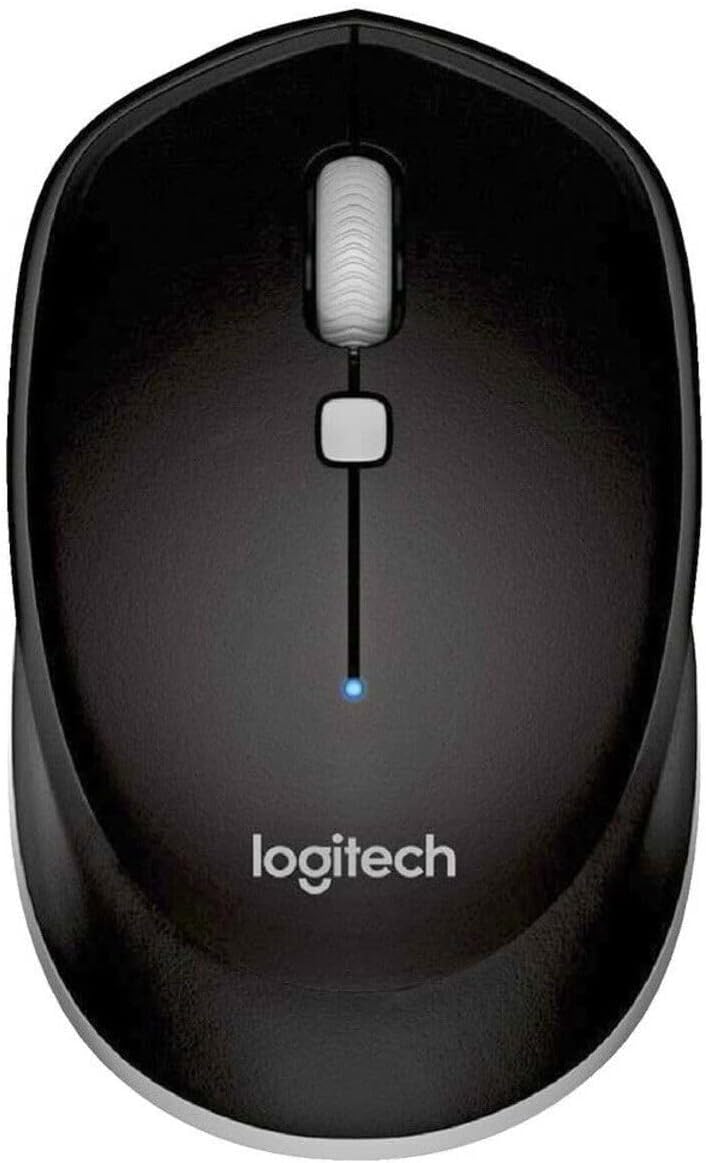
Obrázek: Shora dolů view of the Logitech M337 mouse, highlighting the left and right click buttons, scroll wheel, and multi-function button.
Oboustranný design
The M337 mouse features a symmetrical design, making it comfortable for both left-handed and right-handed users. Its contoured shape fits naturally in the palm of your hand.

Image: A person using the Logitech M337 mouse alongside a laptop on a wooden desk, demonstrating its compact size and comfortable grip.

Image: A woman using the Logitech M337 mouse with her laptop at a cafe table, showcasing its portability and suitability for various environments.
Údržba
Čištění
To clean your mouse, gently wipe it with a soft, damp hadříkem. Nepoužívejte agresivní chemikálie nebo abrazivní čisticí prostředky, protože by mohly poškodit povrch.
Životnost baterie
The M337 mouse is designed for long battery life, up to 10 months with typical use. Battery life may vary based on usage and computing conditions. When the battery is low, the LED indicator on the mouse may flash to alert you. Replace the AA battery when necessary.
Skladování
When not in use for extended periods, it is recommended to turn off the mouse using the On/Off switch on the underside to conserve battery life.
Odstraňování problémů
- Myš nereaguje:
- Ujistěte se, že je myš zapnutá.
- Zkontrolujte baterii. V případě potřeby ji vyměňte.
- Ujistěte se, že je na vašem zařízení povoleno Bluetooth.
- Try re-pairing the mouse with your device.
- Move the mouse closer to your device to ensure it's within the 10-meter range.
- Zpožděný nebo nepravidelný pohyb kurzoru:
- Ujistěte se, že myš je na čistém, nereflexním povrchu.
- Zkontrolujte, zda nedochází k rušení jinými bezdrátovými zařízeními.
- Re-pair the mouse.
- Aktualizujte ovladače Bluetooth vašeho zařízení.
- Cannot pair the mouse:
- Ensure the mouse is in pairing mode (LED blinking rapidly).
- Remove any previous pairings of the M337 from your device's Bluetooth settings and try again.
- Restart your device and the mouse.
Specifikace
| Funkce | Detail |
|---|---|
| Číslo modelu | M337 |
| Konektivita | Bezdrátové Bluetooth |
| Bezdrátové Dosah | Až 10 metrů (33 stop) |
| technologie Sensor | Optické sledování laserové kvality |
| Typ baterie | 1 x AA baterie |
| Životnost baterie | Až 10 měsíců |
| Rozměry (D x Š x V) | 7.32 x 4.96 x 3.27 palce |
| Hmotnost | 2.89 unce |
| Barva | Černý |
| Výrobce | GAXIWILO (Brand: Logitech) |
| První dostupný termín | 21. ledna 2016 |
Záruka a podpora
Informace o záruce a technickou podporu získáte od oficiálního prodejce Logitech. webnebo se obraťte na zákaznický servis Logitech. Uschovejte si doklad o koupi pro případ reklamace.
You can find additional support resources, FAQs, and driver downloads by visiting the Stránka podpory Logitechu.