
Zavedení
This manual provides instructions for the setup, operation, maintenance, and troubleshooting of your Soundcandy Rave Ball Light Show Bluetooth Speaker. Please read this manual thoroughly before using the device to ensure proper function and longevity.
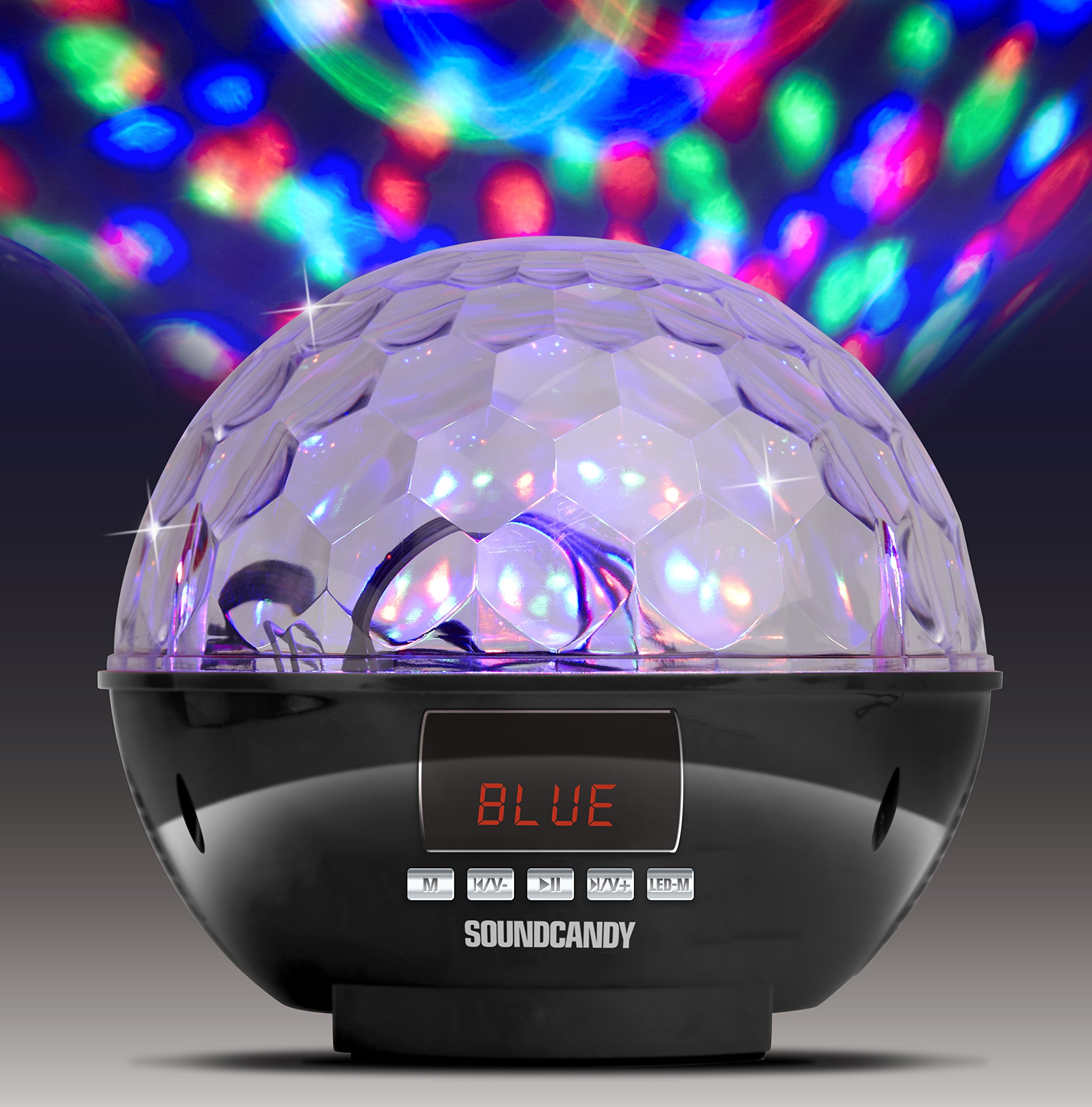
Image: The Soundcandy Rave Ball Light Show Bluetooth Speaker, a spherical device with a faceted top surface designed to project light patterns. The base contains control buttons and input ports.
Co je v krabici
Po vybalení se prosím ujistěte, že jsou přítomny všechny komponenty:
- Reproduktor Rave Ball
- Nabíjecí kabel USB (Note: Some packages may not include this cable.)
- 3.5mm Audio Cable (Note: Some packages may not include this cable.)
If any items are missing, please contact customer support.
Nastavení
1. Nabíjení reproduktoru
- Najděte nabíjecí port na reproduktoru.
- Connect the provided USB charging cable to the speaker and a compatible USB power adapter (not included) or computer USB port.
- Rozsvítí se kontrolka nabíjení. Plné nabití trvá přibližně 2–3 hodiny.
- Plné nabití poskytuje až 4 hodin přehrávání.
2. Zapnutí/vypnutí
- To power on, press and hold the Power button until the device activates.
- Chcete-li zařízení vypnout, znovu stiskněte a podržte tlačítko napájení, dokud se nevypne.
Návod k obsluze
1. Párování Bluetooth
- Ensure the speaker is powered on and in Bluetooth mode (indicated by a specific light or display).
- Na svém mobilním zařízení povolte Bluetooth a vyhledejte dostupná zařízení.
- Select "Soundcandy Rave Ball" from the list of devices.
- Once paired, the speaker will emit an audible confirmation, and you can begin playing audio from your device.
2. Playing Music from USB Drive or Micro SD Card
- Insert a USB drive or Micro SD card containing MP3 audio files do odpovídajícího portu na reproduktoru.
- Reproduktor automaticky detekuje paměťové zařízení a začne přehrávat hudbu.
- Use the control buttons on the speaker to navigate tracks (next/previous) and adjust volume.
3. Using Aux-in Connection
- Connect one end of a 3.5mm audio cable (if included) to the Aux-in port on the speaker.
- Connect the other end of the cable to the headphone jack or audio output of your external device (smartphone, radio, etc.).
- The speaker will automatically switch to Aux-in mode. Play audio from your external device.
4. Provoz rádia FM
- Přepněte reproduktor do režimu FM rádia.
- Use the control buttons to scan for available radio stations. The digital LCD display will show the station frequency.
- Podle potřeby upravte hlasitost.
5. Light Show Modes
- The speaker features a built-in rotation motor that creates a spinning light effect.
- There are four different light modes with various rotating lighting effects and colors.
- Press the "Light Mode" button (or similar, refer to device markings) to cycle through the available light patterns.
- The light effects are designed to fill a room with dynamic visuals.
Údržba
Čištění
Pro zachování vzhledu a funkčnosti reproduktoru:
- Vnější povrchy otřete měkkým, suchým hadříkem.
- Nepoužívejte abrazivní čisticí prostředky, rozpouštědla ani agresivní chemikálie.
- Zabraňte vniknutí vlhkosti do jakýchkoli otvorů.
Péče o baterie
- Chcete-li prodloužit životnost baterie, vyvarujte se častého úplného vybíjení.
- Pokud reproduktor skladujete delší dobu, nabijte jej přibližně na 50 % každé několik měsíců.
Odstraňování problémů
| Problém | Možná příčina | Řešení |
|---|---|---|
| Žádná síla | Baterie je vybitá. | Nabijte reproduktor pomocí nabíjecího kabelu USB. |
| Nelze spárovat přes Bluetooth | Reproduktor není v režimu párování nebo je příliš daleko od zařízení. | Ensure speaker is in Bluetooth mode. Move device closer to speaker. Restart both devices. |
| Žádný zvuk | Volume too low, incorrect input mode, or faulty connection. | Increase volume on both speaker and connected device. Verify correct input mode (Bluetooth, USB, Aux, FM). Check cable connections. |
| Světelná show nefunguje | Light mode is off or device malfunction. | Press the "Light Mode" button to activate or change patterns. If issue persists, contact support. |
Specifikace
| Funkce | Detail |
|---|---|
| Číslo modelu | SC3002BKB-BT |
| Značka | soundcandy |
| Barva | Stříbro |
| Tvar | Kolo |
| Materiál | Plast |
| Typ dokončení | Stříbrná metalíza |
| Typ světelného zdroje | Světelná dioda (LED) |
| Zdroj napájení | Napájení z baterie, Elektrický kabel |
| Typ baterie | 1 lithium-polymerová baterie (součástí balení) |
| Životnost baterie | Až 4 hodin hraní |
| Typ montáže | Zástrčka Mount |
| Speciální funkce | Light Modes, FM Radio, Rechargeable Battery, Bluetooth Connectivity, USB/Micro SD Playback, Aux-in |
| Počet světelných zdrojů | 4 |
| Hmotnost položky | 1.2 libry |
| Výrobce | Gluten Free Palace - HPC |
| UPC | 814092020231 |
| ASIN | B017DV02P6 |
Záruka a podpora
Informace o záruce
This product comes with a standard manufacturer's warranty. Please retain your proof of purchase for warranty claims. For specific warranty terms and conditions, refer to the documentation included with your purchase or contact the manufacturer directly.
Zákaznická podpora
If you encounter any issues not covered in the troubleshooting section or require further assistance, please contact Soundcandy customer support. Contact details can typically be found on the product packaging or the official Soundcandy webmísto.