
1. Úvod
This manual provides essential information for the safe and efficient use of your HP EliteDisplay E242 Monitor. Please read these instructions thoroughly before operating the device and retain them for future reference. This document covers setup, operation, maintenance, and troubleshooting for the HP EliteDisplay E242 Monitor, model number M1P02AA#ABA.
2. Bezpečnostní informace
Dodržujte následující bezpečnostní opatření, abyste předešli poškození monitoru nebo zranění:
- Nevystavujte monitor dešti ani vlhkosti.
- Nezakrývejte ventilační otvory.
- Používejte pouze napájecí kabel a adaptér dodaný s monitorem.
- Ujistěte se, že je monitor umístěn na stabilním a rovném povrchu.
- Před čištěním odpojte napájecí kabel ze zásuvky.
3. Obsah balení
Ověřte, zda jsou v balení přítomny všechny komponenty:
- Monitor HP EliteDisplay E242
- Stojan na monitor (základna a podstavec)
- Napájecí kabel
- Video Cable (e.g., DisplayPort, HDMI, or VGA)
- USB Cable (for USB hub functionality)
- Dokumentace (tato příručka)
4. Nastavení
4.1. Fyzické nastavení
- Připevněte stojan: Carefully place the monitor face down on a soft, clean surface. Align the stand riser with the slots on the back of the monitor and secure it. Attach the stand base to the riser and tighten any screws.
- Umístění monitoru: Place the monitor on a stable desk or table. Adjust the height, tilt, swivel, and pivot for optimal viewpohodlí.
4.2. Připojení k počítači
The HP EliteDisplay E242 Monitor offers multiple connectivity options:
- DisplayPort: For high-resolution digital video and audio.
- HDMI: For digital video and audio, commonly used with various devices.
- VGA: For analog video connections.
- Porty USB 2.0 (x3): For connecting peripherals like keyboards, mice, or USB drives. Connect the upstream USB cable from the monitor to your computer to enable these ports.
Kroky připojení:
- Ensure both the monitor and computer are powered off.
- Connect one end of the desired video cable (DisplayPort, HDMI, or VGA) to the corresponding port on the monitor and the other end to your computer's video output port.
- Připojte napájecí kabel k monitoru a poté k uzemněné elektrické zásuvce.
- If using the USB hub, connect the USB upstream cable from the monitor to an available USB port on your computer.
- Power on your computer, then power on the monitor.
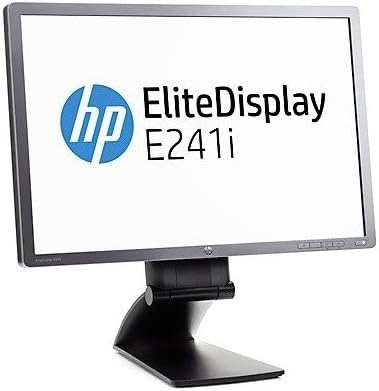
Obrázek: Přední strana view of an HP EliteDisplay monitor, similar in design to the E242 model, shown with its adjustable stand. The screen displays the 'HP EliteDisplay E241i' logo.
5. Obsluha monitoru
5.1. Zapnutí/vypnutí
Stisknutím tlačítka napájení na přední nebo spodní straně monitoru jej zapnete nebo vypnete. Kontrolka napájení se rozsvítí, když je monitor zapnutý.
5.2. Nabídka na obrazovce (OSD).
The OSD menu allows you to adjust various monitor settings. Access it using the buttons on the monitor's bezel.
- Stisknutím tlačítka Nabídka otevřete nabídku OSD.
- Use the navigation buttons (usually arrows) to scroll through menu options.
- Press the Select or OK button to enter a submenu or confirm a selection.
- Use the Exit or Back button to return to the previous menu or close the OSD.
5.3. Úprava nastavení
Commonly adjusted settings include:
- Jas/kontrast: Upravte celkový jas a rozdíl mezi světlými a tmavými oblastmi.
- Výběr vstupu: Manually switch between DisplayPort, HDMI, or VGA inputs.
- Ovládání barev: Upravte teplotu barev, úrovně RGB nebo vyberte přednastavené barevné režimy.
- Ovládání obrazu: Adjust sharpness, aspect ratio, and other display characteristics.
6. Údržba
Pro zachování výkonu a vzhledu monitoru:
- Čištění obrazovky: Jemně otřete obrazovku měkkým hadříkem, který nepouští vlákna. V případě odolných skvrn lehceampOpláchněte hadřík vodou nebo neabrazivním čističem obrazovek. Nestříkejte čistič přímo na obrazovku.
- Čištění Casing: K otření monitoru použijte měkký, suchý hadřík casing. Vyhněte se agresivním chemikáliím nebo abrazivním materiálům.
- Větrání: Ujistěte se, že větrací otvory jsou čisté a bez prachu a překážek, abyste zabránili přehřátí.
7. Řešení problémů
Pokud se s monitorem setkáte s problémy, podívejte se na následující běžné problémy a jejich řešení:
| Problém | Možné řešení |
|---|---|
| Na obrazovce není žádný obraz | Ensure power cable is securely connected. Verify video cable is connected to both monitor and computer. Select correct input source via OSD. |
| Obraz je rozmazaný nebo zkreslený | Check video cable connection. Adjust resolution settings on your computer to match the monitor's native resolution (1920x1200). Run OSD auto-adjustment. |
| Monitor se nezapíná | Confirm power cable is plugged into a working outlet. Check power button status. |
| USB porty nefungují | Ensure the USB upstream cable is connected from the monitor to your computer. Check computer's USB drivers. |
8. Specifikace
Key technical specifications for the HP EliteDisplay E242 Monitor:
- Značka: HP
- Model: EliteDisplay E242 (M1P02AA#ABA)
- Velikost obrazovky: 24 palce
- Maximální rozlišení obrazovky: 1920 x 1200 pixelů
- Poměr stran: 16:9
- Konektivita: DisplayPort, HDMI, VGA, 3x USB 2.0 ports
- Rozměry produktu (DxŠxV): 1.97 x 22.13 x 14.86 palce
- Hmotnost položky: 13.7 libry
- Barva: Černý
- Výrobce: Kancelář Hewlett Packard
- Datum první dostupnosti: 7. října 2015
9. Záruka a podpora
Informace o záruce a technickou podporu naleznete v záručním listu dodaném s produktem nebo navštivte oficiální stránky podpory HP. website. You may also contact HP customer service for assistance with product registration, troubleshooting, or service requests.
Podpora HP Webmísto: www.hp.com/support