
1. Úvod
This manual provides essential information for the safe and efficient operation of your NEC X555UNS 55-inch 1080p LED TV. Please read these instructions thoroughly before installation and use, and retain them for future reference.
The NEC X555UNS is designed for professional signage applications, particularly for building video walls, offering superior off-angle viewing and minimal color shift due to its S-IPS panel technology. It supports 24/7 operation with advanced heat management and localized dimming for improved brightness uniformity.

Image: The NEC X555UNS 55-inch LED TV displaying vibrant, colorful content, showcasing its high-quality visual output.
2. Bezpečnostní informace
Vždy dodržujte následující bezpečnostní opatření, abyste zabránili poškození výrobku a zajistili bezpečnost uživatele:
- Ensure the product is installed by qualified personnel.
- Nezakrývejte ventilační otvory.
- Nevystavujte jednotku dešti nebo vlhkosti.
- Používejte pouze napájecí kabel dodaný s jednotkou nebo vhodnou náhradu.
- Před čištěním nebo opravou odpojte napájení.
- Nepokoušejte se jednotku opravovat sami. Veškerý servis svěřte kvalifikovanému servisnímu personálu.
3. Obsah balení
Ověřte, zda jsou v balení přítomny všechny položky:
- NEC X555UNS 55-inch LED TV Unit
- Stánek
- Napájecí kabel
- Dálkové ovládání
- Návod k použití (tento dokument)

Obrázek: Přední strana view of the NEC X555UNS 55-inch LED TV, showing its sleek, dark display panel when powered off.
4. Nastavení a instalace
4.1 Fyzická instalace
The NEC X555UNS is designed for video wall applications. Ensure proper mounting hardware is used for secure installation. The unit weighs approximately 81 pounds (36.7 kg).
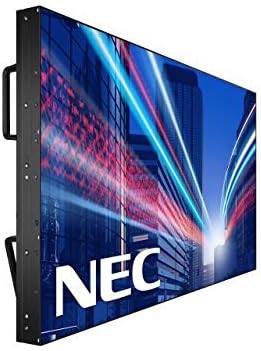
Obrázek: Boční view of the NEC X555UNS 55-inch LED TV, highlighting its robust construction and integrated handles for easier installation in video wall configurations.
4.2 Konektivita
Connect your video sources and network cables to the appropriate ports on the display. The X555UNS offers various connectivity options:
- HDMI: Pro vstup videa a zvuku ve vysokém rozlišení.
- DVI-D: For digital video input.
- LAN: For network control and content distribution.
- DisplayPort: Supports UHD pass-through for daisy-chaining multiple displays in a video wall setup.
- Slot OPS: Allows for integration of single board computers.
For video wall configurations, utilize the DisplayPort for UHD daisy-chaining to achieve a high-resolution display across the entire wall.
4.3 Počáteční zapnutí
- Connect the power cord to the display and a suitable power outlet.
- Press the power button on the display or remote control.
- The display will power on and show the NEC logo.
- Use the on-screen menu to configure initial settings such as language, input source, and display mode.
The Auto ID feature can simplify installation time, especially in multi-display setups, by reducing configuration steps to a single button press.
5. Návod k obsluze
5.1 Základní obsluha
Use the remote control or the buttons on the display to navigate the on-screen menu (OSD). Adjust settings such as brightness, contrast, color temperature, and input source.
5.2 Funkce displeje
- S-IPS Panel Technology: Provides excellent off-angle viewing and minimizes color shift, making it ideal for public viewing and video walls.
- Direct LED Backlighting with Localized Dimming: Enhances brightness uniformity and achieves a higher dynamic contrast ratio.
- Provoz 24/7: Designed for continuous use with advanced thermal protection, internal temperature sensors, and fan-based cooling.
- Jas 700 cd/m²: Ensures clear visibility even in brightly lit environments.
6. Údržba
6.1 Čištění displeje
Obrazovku jemně otřete měkkým hadříkem, který nepouští vlákna. V případě odolných skvrn dampHadřík lehce navlhčete vodou nebo jemným, neabrazivním čističem obrazovek. Nestříkejte tekutinu přímo na obrazovku.
6.2 Obecná péče
- Uchovávejte displej v dobře větraném prostoru, aby nedošlo k jeho přehřátí.
- Nepokládejte na displej těžké předměty.
- Pravidelně kontrolujte kabelová připojení, abyste se ujistili, že jsou bezpečná.
7. Řešení problémů
If you encounter issues with your NEC X555UNS, refer to the following common problems and solutions:
| Problém | Možná příčina | Řešení |
|---|---|---|
| Žádná síla | Napájecí kabel odpojený; Vadná zásuvka. | Check power cord connection; Test power outlet with another device. |
| Žádný obrázek | Vybrán nesprávný vstupní zdroj; Video kabel je uvolněný nebo vadný. | Vyberte správný vstupní zdroj; zkontrolujte připojení video kabelu. |
| Špatná kvalita obrazu | Resolution mismatch; Display settings incorrect. | Adjust resolution on source device; Calibrate display settings (brightness, contrast). |
If the problem persists, contact NEC customer support.
8. Specifikace
| Funkce | Detail |
|---|---|
| Název modelu | X555UNS |
| Velikost obrazovky | 55 palce |
| Technologie displeje | LED, S-IPS Panel |
| Rezoluce | 1080p (Full HD) |
| Poměr stran | 16:9 |
| Obnovovací frekvence | 60 Hz |
| Jas | 700 cd/m² (nits) |
| Konektivita | HDMI, DVI-D, LAN, DisplayPort |
| Speciální funkce | Flat, S-IPS Panel, Auto ID, UHD Daisy Chain, OPS Slot, 24/7 Operation, Advanced Thermal Protection |
| Rozměry produktu | 54 x 12 x 34 palce (přibližně) |
| Hmotnost položky | 81 liber (cca) |
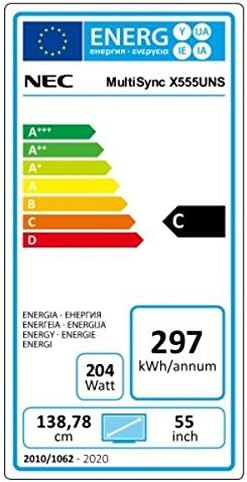
Image: Energy efficiency label for the NEC MultiSync X555UNS, showing energy consumption details and efficiency class.
9. Záruka a podpora
For warranty information and technical support, please refer to the official NEC website or contact your local NEC representative. Keep your purchase receipt as proof of purchase.
Online zdroje: Návštěva www.necdisplay.com for product documentation, drivers, and support contact information.
Zákaznická podpora: For direct assistance, please contact NEC customer service.