
1. Úvod
This manual provides essential information for the proper installation, operation, and maintenance of your Goodmans GSCOUTHD HD Dash Camera. Please read this manual thoroughly before using the device to ensure optimal performance and safety. This dash camera is designed to record video footage while driving, offering features such as 1080p HD recording, a wide-angle lens, GPS tracking, and impact detection.
2. Obsah balení
Carefully unpack the box and ensure all items are present. If any items are missing or damaged, please contact your retailer.

Image: All components included in the Goodmans GSCOUTHD Dash Camera package.
- Goodmans GSCOUTHD HD Dash Camera
- Držák přísavky
- Car Charger (USB adapter)
- USB kabel
- 8GB MicroSD karta
- Uživatelská příručka (tento dokument)
3. Konec produktuview
Seznamte se s komponenty a ovládacími prvky fotoaparátu.
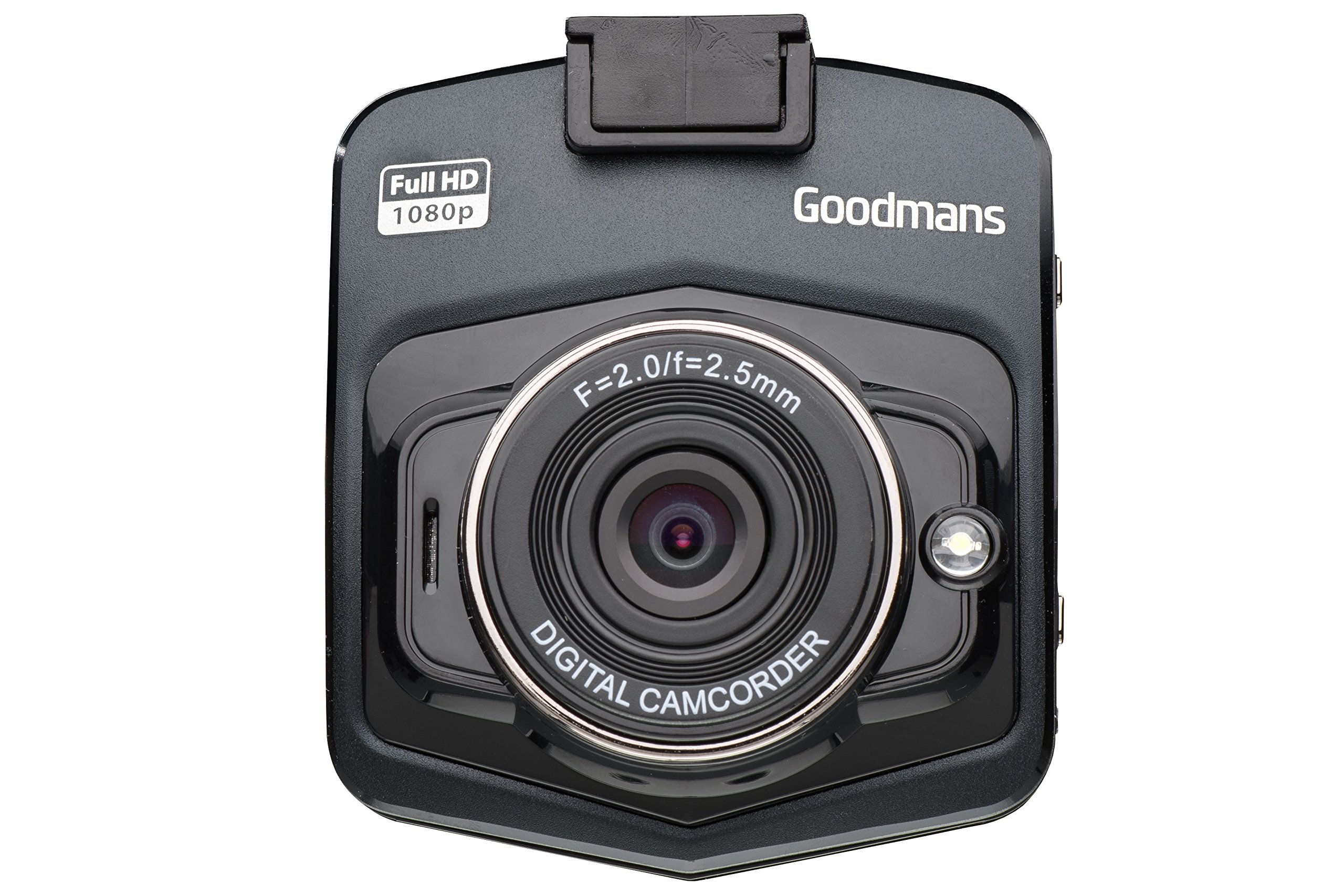
Obrázek: Přední a z úhlu view of the dash camera.

Obrázek: Boční view of the dash camera with control buttons and ports.

Obrázek: Zadní view of the dash camera displaying the LCD screen.
Komponenty fotoaparátu:
- Čočka: Wide-angle lens for capturing a broad view silnice.
- LCD obrazovka: 2.4palcový displej pro živé vysílání view, navigace v menu a přehrávání.
- Vypínač: Zapíná/vypíná zařízení.
- Tlačítko režimu (M): Switches between video recording, still photo, and playback modes.
- Tlačítko OK: Potvrzuje výběr nebo spouští/zastavuje nahrávání.
- Tlačítka nahoru/dolů: Navigates through menu options or playback.
- MicroSD Card Slot (TF): Pro vložení paměťové karty.
- Mini USB port: Pro napájení a přenos dat.
- Resetovací tlačítko: (Small pinhole) For factory reset if needed.
- Reproduktor/mikrofon: Pro nahrávání a přehrávání zvuku.
4. Nastavení
4.1. Nabíjení zařízení
Before first use, fully charge the dash camera's internal battery. Connect the camera to the car charger or a USB power source using the provided USB cable. The charging indicator will illuminate during charging and turn off when fully charged.
4.2. Vložení karty MicroSD
The camera requires a MicroSD card (8GB included) for recording. Ensure the camera is powered off before inserting or removing the card.
- Vyhledejte slot pro kartu MicroSD na boku fotoaparátu.
- Vložte kartu MicroSD zlatými kontakty směrem k zadní straně fotoaparátu, dokud nezacvakne.
- Chcete-li kartu vyjmout, jemně ji zatlačte, dokud nezaklapne, poté ji uvolněte a karta sama vyskočí.
4.3. Montáž palubní kamery
The suction cup mount allows for secure attachment to your vehicle's windshield.

Image: Dash camera mounted on the suction cup.
- Vyčistěte oblast na čelním skle, kam chcete kameru namontovat.
- Attach the camera to the suction cup mount.
- Pevně přitlačte přísavku k čelnímu sklu a zajistěte ji přepnutím páčky.
- Upravte úhel kamery pro zajištění jasného obrazu view of the road, avoiding obstruction from wipers or the rearview zrcadlo.
4.4. Připojování k napájení
For continuous operation, connect the dash camera to your vehicle's 12V power outlet using the provided car charger.
- Zapojte autonabíječku do 12V zásuvky ve vozidle (zásuvka zapalovače cigaret).
- Connect the small end of the USB cable to the camera's Mini USB port and the other end to the car charger.
- The camera will typically power on automatically when the vehicle's ignition is turned on and begin recording.
5. Návod k obsluze
5.1. Zapnutí/vypnutí
- Ruční zapnutí: Stiskněte a na několik sekund podržte tlačítko Napájení.
- Manuální vypnutí: Stiskněte a podržte tlačítko Napájení, dokud se obrazovka nevypne.
- Automatické zapnutí/vypnutí: When connected to the car charger, the camera will power on and off with the vehicle's ignition.
5.2. Režimy nahrávání
Fotoaparát podporuje různé režimy nahrávání:
- Nahrávání videa: The default mode. Press the OK button to start/stop recording. Videos are saved in segments (e.g., 1, 3, or 5 minutes) to the MicroSD card.
- Nahrávání ve smyčce: When the memory card is full, the camera will automatically overwrite the oldest unlocked files.
- Impact Detection (G-Sensor): In the event of a sudden impact or collision, the built-in G-sensor will automatically lock the current video file to prevent it from being overwritten. These filejsou uloženy v samostatné složce.
- Still Photo Mode: Press the Mode button to switch to photo mode. Press OK to take a picture.
5.3. Navigace v menu
To access the camera settings:
- Stop any active recording.
- Stisknutím tlačítka Mode vstoupíte do nabídky.
- Use the Up/Down buttons to navigate through options.
- Press OK to select an option or enter a sub-menu.
- Press the Mode button again to exit the menu.
5.4. Funkce GPS
The integrated GPS module records your driving route, speed, and location data. This information can be viewed using compatible playback software on a computer (software not included, typically available from manufacturer's webstránky).
5.5. Přehrávání
Na review recorded videos or photos on the camera:
- Press the Mode button repeatedly until you enter Playback mode.
- Use the Up/Down buttons to browse through files.
- Press OK to play a selected video or view fotka.
- Press the Mode button to exit Playback mode.
6. Údržba
6.1. Čištění fotoaparátu
- K čištění těla fotoaparátu použijte měkký, suchý hadřík.
- Na objektiv použijte hadřík na čištění objektivů a speciální čisticí roztok na objektivy, abyste zabránili poškrábání.
- Nepoužívejte abrazivní čisticí prostředky nebo rozpouštědla.
6.2. Správa paměťových karet
- It is recommended to format the MicroSD card periodically (e.g., once a month) to maintain optimal recording performance and prevent data corruption. This can usually be done through the camera's menu settings.
- Always ensure important files jsou před formátováním zálohovány.
- Use high-quality MicroSD cards (Class 10 or higher) for reliable recording.
6.3. Péče o baterie
- Avoid exposing the camera to extreme temperatures, which can degrade battery life.
- If the camera is not used for an extended period, charge it periodically to prevent deep discharge.
7. Řešení problémů
If you encounter issues with your dash camera, refer to the following common problems and solutions:
| Problém | Možná příčina / řešení |
|---|---|
| Fotoaparát se nezapne. |
|
| "Card Error" or "No Memory Card" message. |
|
| Camera does not record. |
|
| Špatná kvalita videa. |
|
| Suction mount detaches. |
|
8. Specifikace
| Funkce | Specifikace |
|---|---|
| Značka | Goodmans |
| Číslo modelu | GSCOUTHD |
| Barva | Černý |
| Typ zobrazení | LCD |
| Velikost obrazovky | 2.4 palce |
| Rozlišení záznamu videa | 1080p HD |
| Efektivní rozlišení | 2.1 megapixelů |
| Speciální funkce | Integrated GPS, Impact Detection (G-Sensor), Wide Angle Lens |
| Technologie připojení | USB |
| Kompatibilní zařízení | Auto |
| Zahrnuté komponenty | Paměťová karta (8 GB) |
| Zdroj napájení | Rechargeable Battery, Car Charger |
9. Záruka a podpora
For warranty information and technical support, please refer to the warranty card included in your product packaging or visit the official Goodmans website. You can find more information about Goodmans in-car cameras at www.goodmans.co.uk/in-car-cameras.