
1. Konec produktuview
The NVX VUBT2 is a universal waterproof Bluetooth 4.0 audio receiver designed to add wireless audio streaming capabilities to various vehicles and vessels, including marine, boats, cars, and ATVs. It features a robust, water-resistant design and provides high-quality stereo audio output.
Klíčové vlastnosti:
- Bluetooth Profile: A2DP (vysoká kvalita, stereo zvuk)
- Bluetooth Core Specification: Version 4.0 with aptX
- výstupy: One Stereo Pair, Low-Level RCA Plugs
- Výstupní objemtage: 2V RMS
- Poměr signálu k šumu: 93 dB (20 Hz - 20 kHz)
- Voděodolnost: IPX67 rated for protection against dust and water immersion.
- Konektivita: 3.5mm audio vstup/výstup.
- Zapínání na dálku: Amplifier remote turn-on feature.
2. Bezpečnostní informace
Please read all instructions carefully before installation and use. Failure to follow these instructions may result in product damage, property damage, or personal injury.
- Ensure the vehicle's power is disconnected before installation to prevent electrical shorts.
- Use appropriate wiring gauges and fuses as recommended.
- Mount the device securely to prevent movement during operation.
- Do not expose the device to extreme temperatures or direct flame.
- While the device is waterproof (IPX67), ensure all connections are properly sealed and protected from direct water exposure to maintain integrity.
3. Obsah balení
Ověřte, zda jsou v balení přítomny všechny položky:
- NVX VUBT2 Bluetooth Audio Receiver
- Power/Ground/Remote Wiring Harness with In-line Fuse
- Audio kabel 3.5 mm na RCA
- Mounting Hardware (screws or adhesive pads)
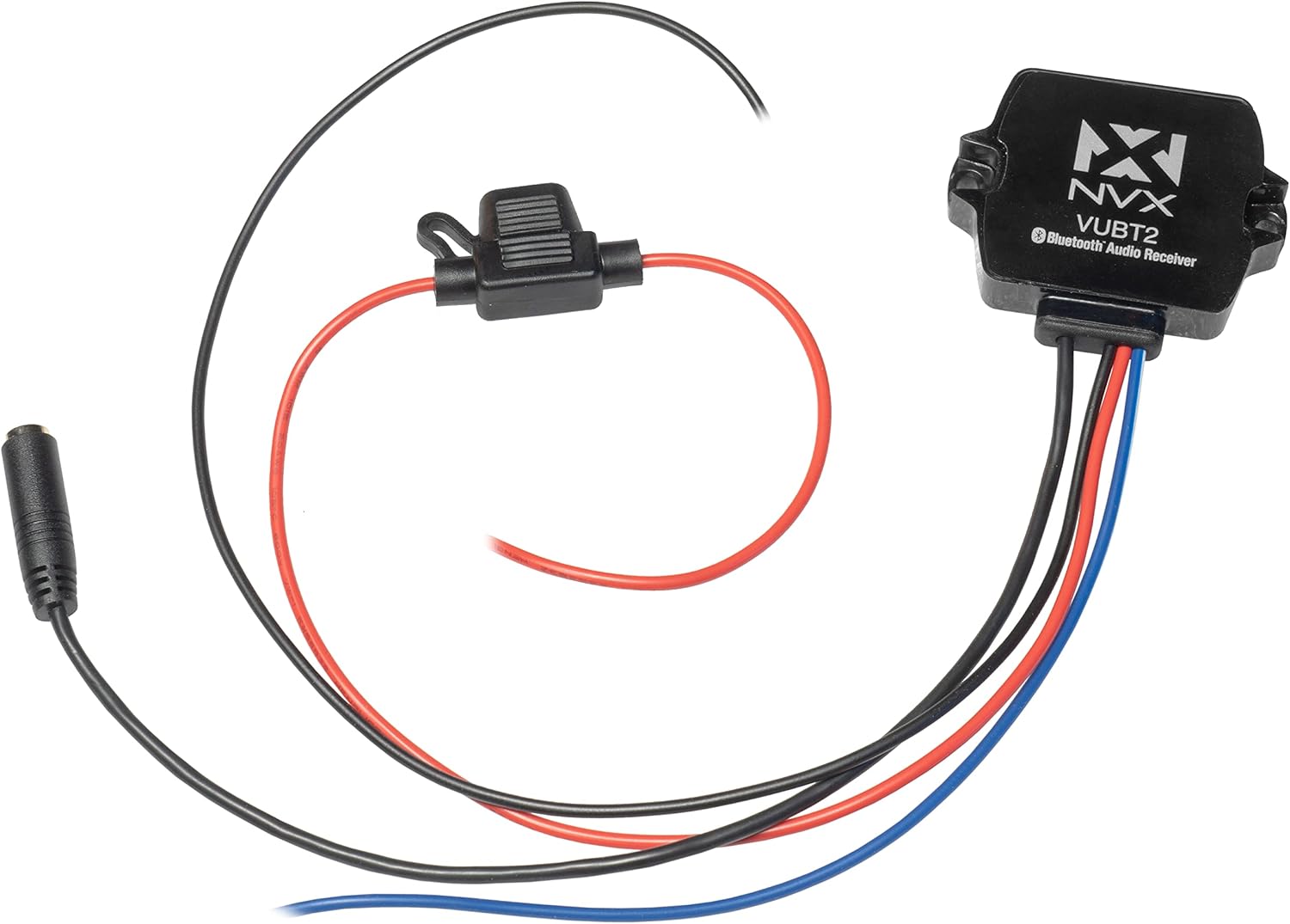
Image: The NVX VUBT2 Bluetooth Audio Receiver shown with its power/ground/remote wiring harness, in-line fuse, and 3.5mm to RCA audio cable.
4. Nastavení a instalace
4.1 Zapojení kabeláže
The VUBT2 requires power, ground, and a remote turn-on connection. It outputs audio via RCA connections.
- Napájení (červený vodič): Connect the red wire to a switched 12V power source. This can be the accessory wire from your vehicle's ignition or a dedicated switch. The in-line fuse should be installed close to the power source.
- Uzemnění (černý vodič): Connect the black wire to a solid chassis ground point. Ensure a clean, secure connection for optimal performance.
- Dálkové zapnutí (modrý vodič): Connect the blue wire to the remote turn-on input of your amplifier or other audio components. This will power on the VUBT2 when your system is activated.
- Audio Output (3.5mm to RCA): Connect the 3.5mm jack from the VUBT2 to the included 3.5mm to RCA cable. Then, connect the RCA plugs (red for right, white for left) to the audio input of your ampzvlhčovač nebo hlavní jednotka.

Image: The NVX VUBT2 Bluetooth receiver wired to an amplifier, demonstrating the remote turn-on and RCA audio connections.

Image: Close-up of the 3.5mm audio output connected to RCA cables, ready for connection to an audio system.
4.2 Montáž
The compact design of the VUBT2 allows for flexible mounting options. It can be mounted using screws through its integrated tabs or with adhesive pads (if included).
- Choose a location that is dry, secure, and allows for proper cable routing.
- Ensure the mounting surface is clean and flat if using adhesive.
- The device is IPX67 rated, making it suitable for exposed locations, but protecting connections is still recommended.

Image: The underside of the NVX VUBT2 unit, displaying the 3M adhesive backing for secure mounting in various applications.
5. Návod k obsluze
5.1 Párování Bluetooth
- Ensure the VUBT2 is powered on (your audio system is active).
- Na svém mobilním zařízení (chytrém telefonu, tabletu atd.) přejděte do nastavení Bluetooth.
- Scan for available Bluetooth devices. The VUBT2 will appear as "NVX VUBT2" or similar.
- Select the VUBT2 to pair. A confirmation tone or LED indicator may signal a successful connection.
- Once paired, your device will typically reconnect automatically when in range and the VUBT2 is powered on.
5.2 Přehrávání zvuku
After successful pairing, you can stream audio from your mobile device to your connected audio system. Control playback (play/pause, skip tracks, volume) directly from your paired device.

Image: A smartphone screen displaying music controls, illustrating how users can manage audio playback through the NVX VUBT2.
Video: Overview of the NVX VUBT2 Universal Waterproof Bluetooth 4.0 Audio Receiver, demonstrating its features and applications in various environments.
6. Údržba
The NVX VUBT2 is designed for durability and minimal maintenance. Follow these guidelines to ensure longevity:
- Čištění: Použijte měkký, damp cloth to wipe the exterior of the unit. Avoid harsh chemicals or abrasive cleaners.
- Voděodolnost: While IPX67 rated, avoid prolonged submersion or high-pressure water jets directly on the unit or its connections. Regularly inspect wiring and connections for any signs of wear or damage that could compromise water resistance.
- Spojení: Pravidelně kontrolujte všechna kabelová připojení, abyste se ujistili, že jsou bezpečná a bez koroze.

Image: The NVX VUBT2 unit covered in water droplets, illustrating its IPX67 water-resistance rating for use in challenging environments.
7. Řešení problémů
| Problém | Možná příčina | Řešení |
|---|---|---|
| No power to the VUBT2. |
|
|
| Nelze spárovat se zařízením Bluetooth. |
|
|
| No audio output or distorted audio. |
|
|
| Bluetooth connection drops intermittently. |
|
|
8. Specifikace
| Funkce | Detail |
|---|---|
| Značka | NVX |
| Číslo modelu | VUBT2 (4326582821) |
| Technologie připojení | Bluetooth |
| Bluetooth Core Specification | Version 4.0 with aptX |
| Bluetooth Profile | A2DP (vysoká kvalita, stereo zvuk) |
| Hodnocení odolnosti proti vodě | IPX67 |
| Typ zvukového výstupu | RCA (Stereo Pair) |
| Výstupní objemtage | 2V RMS |
| Poměr signálu k šumu | 93 dB (20 Hz - 20 kHz) |
| Počet kanálů | 2 (stereo) |
| Kompatibilní zařízení | reproduktory, Ampzáchranáři |
| UPC | 818060013812 |
| ASIN | B015XLMA08 |
9. Informace o záruce
NVX products are designed and manufactured to the highest quality standards. For specific warranty details, including coverage period and terms, please refer to the warranty card included with your product or visit the official NVX webUschovejte si doklad o koupi pro případ reklamace.
10. Zákaznická podpora
If you encounter any issues or have questions regarding your NVX VUBT2 Bluetooth Audio Receiver that are not covered in this manual, please contact NVX customer support for assistance.
- Online podpora: Visit the official NVX webweb s nejčastějšími dotazy, zdroji podpory a kontaktními informacemi.
- Podpora prodejců: For purchase-related inquiries, contact the seller directly.