
1. Úvod
This manual provides comprehensive instructions for the setup, installation, operation, maintenance, and troubleshooting of your Antec VSK2000-U3 Micro-ATX Desktop Case. Please read this manual thoroughly before beginning installation to ensure proper assembly and optimal performance.
Video 1: Computer Case Display. This video provides a visual overview of a computer case, demonstrating its external features and design.
2. Klíčové vlastnosti
The Antec VSK2000-U3 Micro-ATX Desktop Case is designed for efficient and compact PC builds. Key features include:
- Motherboard Support: Up to Micro-ATX
- Cooling: 1 x 92 mm temperature-controlled fan included
- Power Supply Unit (PSU) Support: TFX form factor
- Drive Bays: Supports up to 1 x 5.25” ODD, 1 x 3.5" HDD & 1 x 2.5" SSD
- Rozšiřující sloty: 4

Obrázek 1: Přední strana view of the Antec VSK2000-U3 case, highlighting the front panel I/O and optical drive bay.
3. Nastavení a instalace
Follow these steps to install your components into the Antec VSK2000-U3 case. Ensure all power is disconnected before handling internal components.
3.1. Příprava případu
- Odstraňte boční panely: Carefully remove the side panels of the case to access the interior.
- Instalace krytu I/O: Nainstalujte kryt I/O dodaný se základní deskou do zadního otvoru skříně.

Obrázek 2: Strana view of the Antec VSK2000-U3 case with the side panel removed, showing the internal layout.
3.2. Instalace základní desky
- Align Motherboard: Carefully align your Micro-ATX motherboard with the standoffs inside the case.
- Bezpečná základní deska: Use the provided screws to secure the motherboard to the standoffs.
3.3. Instalace napájecího zdroje
- Pozice zdroje napájení: Install your TFX form factor power supply into its designated bay.
- Zabezpečený zdroj: Secure the power supply with screws from the rear of the case.
- Připojení napájecích kabelů: Route and connect the necessary power cables to your motherboard and other components.

Obrázek 3: Zadní view of the Antec VSK2000-U3 case, showing the I/O shield area, expansion slots, and PSU mounting.
3.4. Drive Installation (ODD, HDD, SSD)
- Optical Drive (ODD): Install your 5.25" optical drive into the front bay. The case features a tool-less ODD housing system.
- Pevný disk (HDD): Install your 3.5" HDD into the designated bay. The case features a tool-less HDD housing system.
- Solid State Drive (SSD): Install your 2.5" SSD into the designated bay.
- Připojení disků: Connect SATA data and power cables to all installed drives.
3.5. Instalace rozšiřující karty
- Odstraňte kryty slotů: Odstraňte potřebné kryty rozšiřujících slotů ze zadní strany skříně.
- Install Card: Insert your expansion card (e.g., graphics card) into the appropriate PCI-E slot on the motherboard.
- Bezpečná karta: Secure the expansion card with a screw.
3.6. Připojení na předním panelu
Connect the front panel cables (USB 3.0, audio, power switch, reset switch, LED indicators) to the corresponding headers on your motherboard. Refer to your motherboard manual for specific header locations.
3.7. Správa kabelů
Route cables neatly to improve airflow and aesthetics. Use cable ties or the case's cable management features to secure cables away from moving parts and airflow paths.
3.8. Video Tutorials for Installation
Video 2: Detailed Installation Tutorial. This video demonstrates the step-by-step process of installing components into a computer case, including the motherboard, power supply, and drives.
Video 3: Micro ATX PC Case Installation. This video illustrates the assembly process for a Micro ATX PC case, covering component placement and cable routing.
4. Návod k obsluze
Once all components are securely installed and connected, replace the side panels. Connect your monitor, keyboard, mouse, and other peripherals to the appropriate ports on the rear I/O panel and front panel. Connect the power cable to the power supply and a wall outlet, then press the power button on the front of the case to start your system.
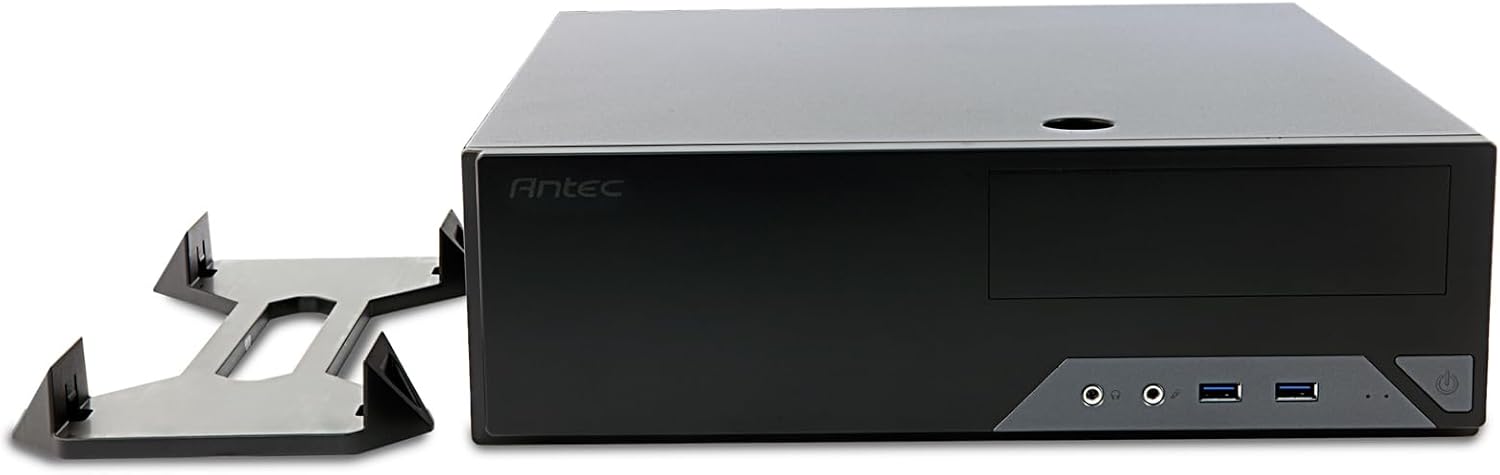
Figure 4: The Antec VSK2000-U3 case shown in a horizontal orientation with its included stand, demonstrating versatile placement options.
5. Údržba
Pravidelná údržba pomáhá zajistit dlouhou životnost a optimální výkon vašeho počítače.
- Čištění prachu: Periodically clean dust from the case interior, fans, and air vents using compressed air or a soft brush. Ensure the system is powered off and unplugged before cleaning.
- Správa kabelů: Check cable routing periodically to ensure no cables are obstructing airflow or fan operation.
- Kontrola ventilátoru: Ensure the included 92mm temperature-controlled fan and any other installed fans are operating correctly and free from obstructions.
6. Řešení problémů
Pokud narazíte na problémy s sestavením počítače, zvažte následující běžné kroky pro řešení potíží:
- Bez napájení:
- Verify the power cable is securely connected to the PSU and wall outlet.
- Ujistěte se, že je vypínač zdroje napájení v poloze „ON“.
- Check all internal power connections (24-pin ATX, 8-pin CPU, GPU power, drive power).
- Confirm front panel power switch cable is correctly connected to the motherboard.
- Bez displeje:
- Ensure the monitor is connected to the correct graphics output (dedicated GPU or motherboard integrated graphics).
- Znovu vložte grafickou kartu a moduly RAM.
- Nadměrný hluk:
- Identify the source of the noise (fan, HDD).
- Clean dust from fans.
- Ujistěte se, že se žádné kabely nedotýkají lopatek ventilátoru.
7. Specifikace
| Funkce | Detail |
|---|---|
| Značka | Antec |
| Série | VSK2000-U3 |
| Název modelu | VSK2000-U3 |
| Kompatibilita základní desky | Micro ATX |
| Typ pouzdra | Mid Tower (Slim Desktop) |
| Rozměry (DxŠxV) | 18.6 x 15.9 x 7 palce |
| Hmotnost položky | 5.28 libry |
| Barva | Černý |
| Materiál | Painted/Coated Metal (Likely Steel Or Aluminum With Plastic Components) |
| Typ montáže napájecího zdroje | Rear Mount (TFX form factor) |
| Způsob chlazení | Air (1 x 92 mm temperature-controlled fan included) |
| Velikost ventilátoru | 92 milimetrů |
| Drive Bays | 1 x 5.25” ODD, 1 x 3.5" HDD, 1 x 2.5" SSD |
| Rozšiřující sloty | 4 |
8. Záruka a podpora
The Antec VSK2000-U3 Micro-ATX Desktop Case comes with a 2-letá záruka. For technical support, warranty claims, or additional product information, please visit the official Antec webnebo se obraťte na jejich zákaznický servis. Uschovejte si doklad o koupi pro ověření záruky.
Pro další pomoc se prosím podívejte na Antec Store.