
1. Úvod
The Sony SBH54 is a versatile Stereo Bluetooth Headset designed for wireless communication and audio playback. It offers both handset and headset functionalities, allowing you to take and make calls, view messages, listen to music, and tune into FM radio directly from its display. Crafted from premium metal with a splash-proof design, it combines elegance with durability.
Key features include Bluetooth Wireless 3.0, NFC technology for easy pairing, an OLED display, and built-in noise cancellation for clear audio during calls. The headset supports A2DP profile and can connect to two devices simultaneously.
2. Konec produktuview
The SBH54 features a compact design that fits comfortably in your hand. It includes an OLED display for information at a glance and physical controls for media and call management.
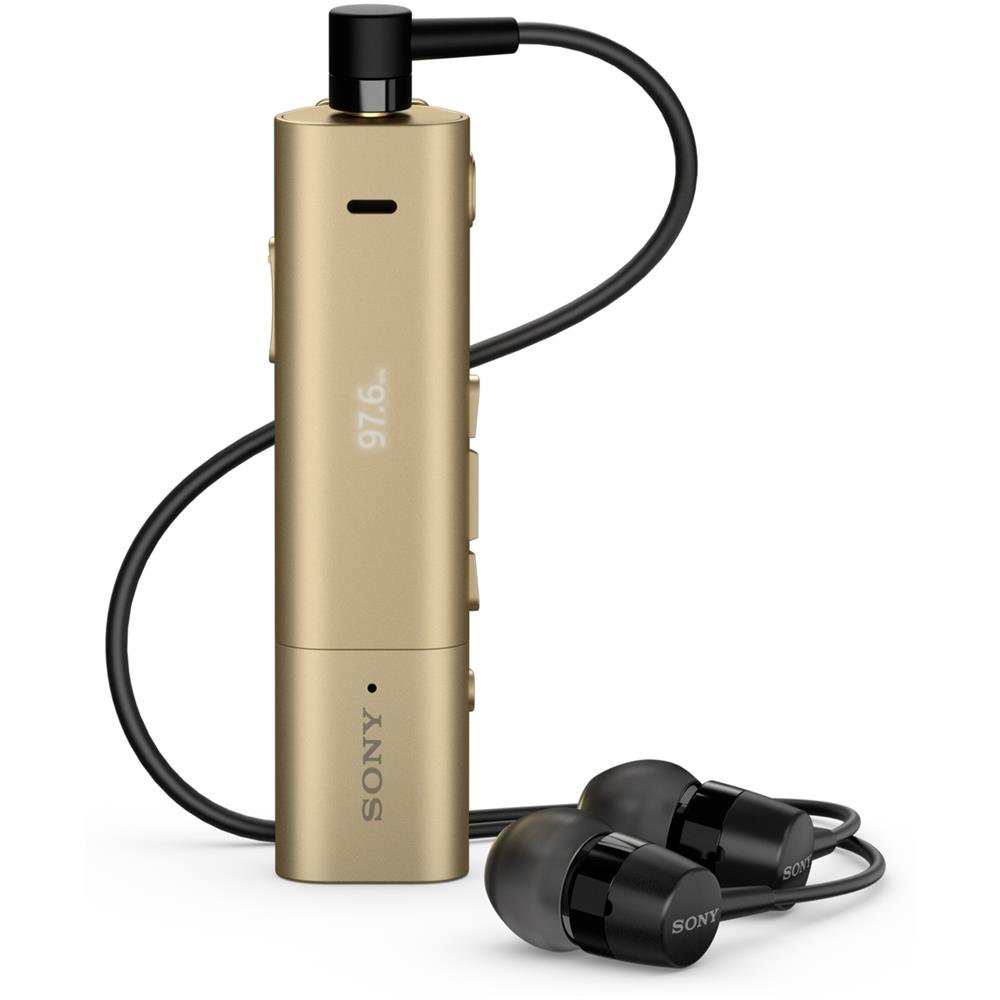
Image: Sony SBH54 Gold Stereo Bluetooth Headset. This image displays the compact, gold-colored headset with its integrated clip and display screen.
Ovládací prvky a indikátory:
- OLED displej: Shows caller ID, messages, music track information, and FM radio frequency.
- Multifunkční tlačítko: For call answering/ending, play/pause music.
- Tlačítka hlasitosti: Upravte hlasitost zvuku.
- Navigační tlačítka: Pro navigaci v menu a přeskakování skladeb.
- Mikrofon: Integrated for voice calls.
- Sluchátkový jack: 3.5mm port for connecting the included premium headphones.
- Nabíjecí port: Micro USB port pro nabíjení zařízení.
3. Nastavení
3.1 Nabíjení headsetu
- Connect the supplied USB cable to the headset's charging port and to a USB power adapter or a computer's USB port.
- Indikátor baterie na displeji bude zobrazovat stav nabíjení.
- Před prvním použitím náhlavní soupravu plně nabijte.
3.2 Pairing with a Device (Bluetooth)
- Ujistěte se, že je sluchátko nabité a vypnuté.
- Press and hold the power button until the headset enters pairing mode (indicated by a specific light pattern or message on the display).
- Na smartphonu nebo jiném zařízení s podporou Bluetooth povolte Bluetooth a vyhledejte dostupná zařízení.
- Select "SBH54" from the list of found devices.
- If prompted, enter the passcode "0000" (four zeros).
- Po spárování bude headset signalizovat úspěšné připojení.
3.3 Pairing with a Device (NFC)
For devices with NFC (Near Field Communication):
- Ensure NFC is enabled on your smartphone and the screen is unlocked.
- Touch the NFC detection area of your smartphone to the NFC detection area on the SBH54 headset.
- Dokončete proces párování podle pokynů na obrazovce.
4. Ovládání náhlavní soupravy
4.1 Zapnutí/vypnutí
- Zapnutí: Stiskněte a podržte tlačítko napájení, dokud se nerozsvítí displej.
- Vypnutí: Stiskněte a podržte tlačítko napájení, dokud se displej nevypne.
4.2 Uskutečňování a přijímání hovorů
- Přijetí hovoru: When a call comes in, press the multi-function button.
- Ukončení hovoru: During a call, press the multi-function button.
- Odmítnutí hovoru: Press and hold the multi-function button when a call comes in.
- Uskutečnění hovoru: Dial the number on your phone. The call will automatically route to the headset. You can also use voice commands if supported by your phone.
- Handset Function: The compact SBH54 can be used as an unobtrusive handset for calls.
- Zrušení hluku: The headset features echo, wind, and noise cancellation for clear voice transmission.
- HD Voice: Enhances voice clarity for both parties during a call.
4.3 Přehrávání hudby
- Přehrát/pozastavit: Stiskněte multifunkční tlačítko.
- Další skladba: Press the forward navigation button.
- Předchozí skladba: Press the backward navigation button.
- Ovládání hlasitosti: Použijte tlačítka pro zvýšení/snížení hlasitosti.
4.4 FM rádio
- Aktivace FM rádia: Navigate through the headset menu to select the FM Radio function.
- Nalaďte si stanice: Use the navigation buttons to scan or manually tune to FM frequencies.
- Uložit předvolby: The headset may allow saving favorite stations (refer to on-screen prompts).
5. Údržba
- Čištění: Otřete sluchátka měkkým, suchým hadříkem. Nepoužívejte agresivní chemikálie ani abrazivní materiály.
- Voděodolnost: The SBH54 has a splash-proof design. This means it can withstand light splashes of water but should not be submerged or exposed to heavy rain. Ensure the charging port cover is securely closed.
- Skladování: Sluchátka skladujte na chladném a suchém místě mimo dosah přímého slunečního záření a extrémních teplot.
- Péče o baterie: Pro prodloužení životnosti baterie se vyvarujte častého úplného vybíjení. Pravidelně ji nabíjejte.
6. Řešení problémů
Běžné problémy a řešení:
- Sluchátka se nezapínají: Ujistěte se, že je baterie nabitá. Připojte ke zdroji napájení a zkuste to znovu.
- Cannot pair with a device:
- Ensure the headset is in pairing mode.
- Ujistěte se, že je na vašem zařízení povoleno Bluetooth.
- Přesuňte náhlavní soupravu blíže k vašemu zařízení.
- Restartujte headset i zařízení.
- Vymažte předchozí připojení Bluetooth na zařízení a zkuste spárování znovu.
- Žádný zvuk nebo špatná kvalita zvuku:
- Zkontrolujte úroveň hlasitosti na sluchátkách i na připojeném zařízení.
- Ujistěte se, že je headset v dosahu vašeho zařízení.
- Odpojte a znovu připojte připojení Bluetooth.
- Ensure the headphones are properly plugged into the 3.5mm jack.
- FM rádio nefunguje: Ensure you are in an area with good FM signal reception.
7. Specifikace
| Funkce | Detail |
|---|---|
| Značka | Sony |
| Číslo modelu | SBH54GD |
| Barva | Zlato |
| Umístění uší | V uchu |
| Form Factor | V uchu |
| Kontrola hluku | Aktivní potlačení hluku |
| Hmotnost položky | 0.1 kg |
| Typ zvukového ovladače | Dynamický ovladač |
| Frekvenční rozsah | 20 Hz - 20,000 XNUMX Hz |
| Materiál pouzdra | Kov |
| Kompatibilní zařízení | Chytré telefony, notebooky, tablety, zařízení s podporou Bluetooth |
| Úroveň odolnosti proti vodě | Water Resistant (Splash-proof) |
| Technologie připojení | Bluetooth, NFC |
| Bezdrátová technologie | Bluetooth, NFC |
| Verze Bluetooth | 3.0 |
| Typ ovládání | Ovládání médií |
| Kontrolní metoda | Vzdálený |
8. Záruka a podpora
For warranty information and customer support, please refer to the documentation included with your purchase or visit the official Sony support webwebu. Konkrétní záruční podmínky se mohou lišit v závislosti na regionu a prodejci.
Online podpora: www.sony.com/electronics/support