
Zavedení
This manual provides essential information for the safe and efficient installation, operation, and maintenance of your APC Smart-UPS SRT 8kVA Rack Mount Uninterruptible Power Supply (UPS) with a 208V to 120V Step-Down Transformer. Please read this manual thoroughly before installing or operating the equipment.
The APC Smart-UPS SRT 8kVA is designed to provide protected power to electronic equipment from utility power outages, sags, surges, and small utility fluctuations. The integrated step-down transformer converts 208V input to 120V output for compatible equipment.
Důležité bezpečnostní pokyny
USCHOVEJTE TYTO POKYNY - This manual contains important instructions that should be followed during installation and maintenance of the UPS and batteries.
- Tato UPS je určena pouze pro vnitřní použití.
- Neprovozujte tuto UPS na přímém slunci, v kontaktu s tekutinami nebo tam, kde je nadměrná prašnost nebo vlhkost.
- Připojte napájecí kabel UPS přímo do elektrické zásuvky. Nepoužívejte přepěťové ochrany ani prodlužovací kabely.
- Servis baterií by měl provádět nebo na něj dohlížet personál znalý baterií a požadovaných opatření. Udržujte neoprávněný personál mimo dosah baterií.
- Při výměně baterií použijte stejný typ a počet baterií nebo sad baterií.
- Nevhazujte baterie do ohně. Baterie mohou explodovat.
- Baterie neotevírejte ani nepoškozujte. Uvolněný elektrolyt je škodlivý pro kůži a oči. Může být toxický.
- Baterie může představovat riziko úrazu elektrickým proudem a vysokého zkratového proudu. Při práci s bateriemi je třeba dodržovat následující opatření:
- Sundejte hodinky, prsteny nebo jiné kovové předměty.
- Používejte nástroje s izolovanými rukojeťmi.
- Používejte gumové rukavice a boty.
- Na baterie nepokládejte nástroje ani kovové části.
- Před připojením nebo odpojením svorek baterie odpojte zdroj nabíjení.
Obsah balení
Inspect the package upon receipt. Notify the carrier and dealer if there is any damage. The package contains:
- APC Smart-UPS SRT 8kVA UPS Unit
- 208V to 120V Step-Down Transformer
- Hardware pro montáž do racku
- Sériový komunikační kabel
- USB komunikační kabel
- CD s dokumentací
- Bezpečnostní pokyny
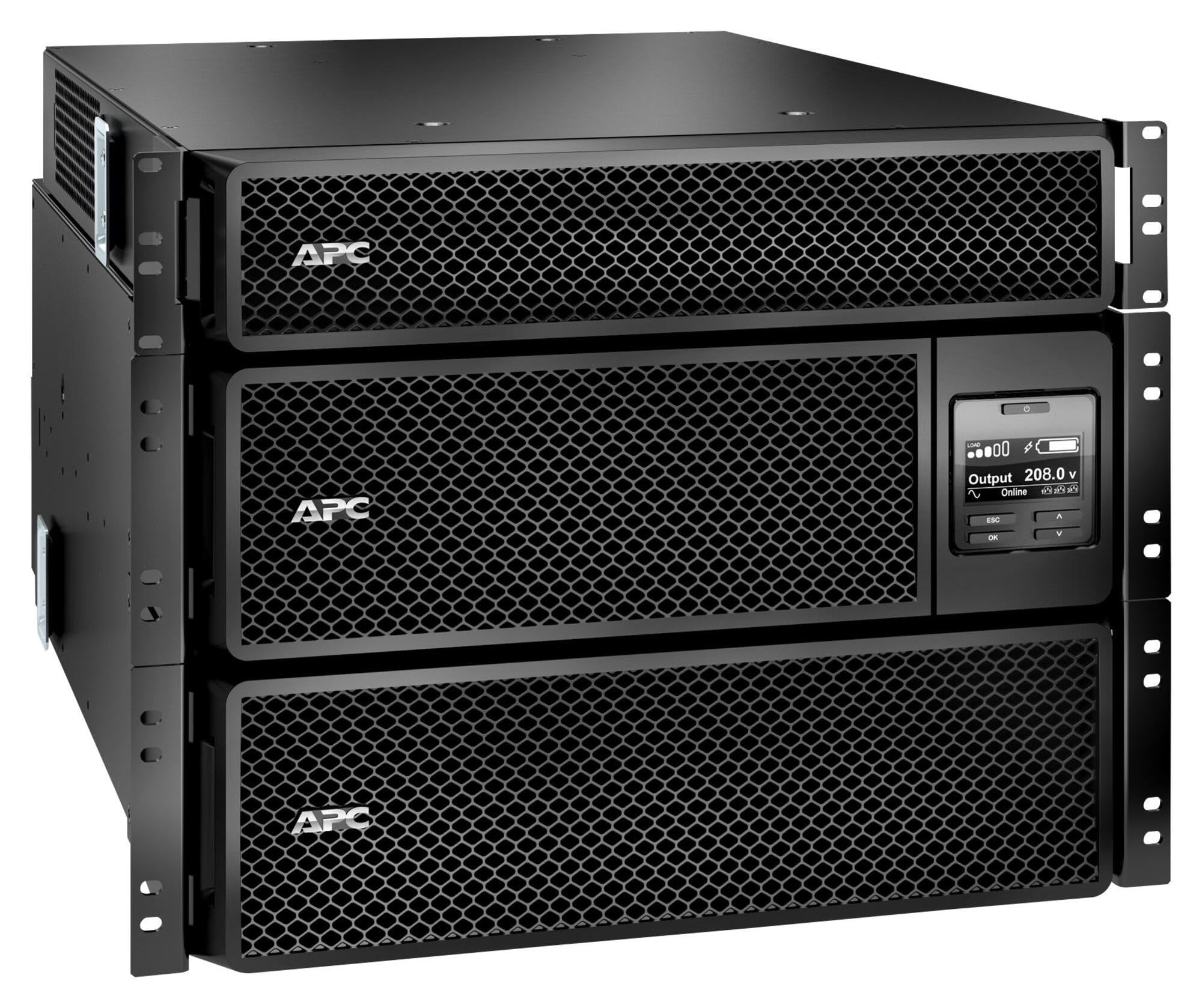
Image: APC Smart-UPS SRT 8kVA Rack Mount UPS with 208V to 120V Step-Down Transformer. This image shows the main UPS unit and the accompanying step-down transformer, typically in a rack-mountable configuration.
Nastavení
1. Umístění
The UPS and transformer are heavy. For rack-mount installations, ensure the rack is stable and capable of supporting the combined weight of the UPS, transformer, and any other equipment. For tower installations, place the unit on a flat, stable surface.
- Maintain at least 20 cm (8 inches) of clearance from the front and rear panels for proper ventilation.
- Neumisťujte jednotku do blízkosti zdrojů tepla nebo na přímé sluneční světlo.
2. Připojení baterie
The UPS is shipped with the internal batteries disconnected for safety. Follow these steps to connect the batteries:
- Remove the front bezel or access panel to expose the battery compartment.
- Connect the internal battery cables as indicated by the labels or instructions inside the compartment. Ensure a secure connection.
- Replace the front bezel or access panel.
3. Připojení napájení
Connect the UPS to utility power and your equipment.
- Vstupní výkon: Connect the UPS input power cord (NEMA L6-30P) to a dedicated 208V AC outlet. Ensure the outlet is properly grounded and rated for the UPS capacity.
- Připojení transformátoru: Connect the output of the UPS to the input of the 208V to 120V Step-Down Transformer.
- Výstupní výkon: Connect your 120V equipment to the 120V output receptacles on the step-down transformer. Do not overload the transformer or the UPS.
- Komunikační kabely: Connect the serial or USB communication cable from the UPS to your computer or server for monitoring and management.
4. Počáteční spuštění
Po provedení všech připojení:
- Press the power ON button on the UPS front panel. The UPS will perform a self-test.
- Allow the UPS to charge its batteries for at least 24 hours before connecting critical loads to ensure full runtime capacity.
- Verify the UPS display shows normal operation status.
Obsluha UPS
Displej a ovládací prvky na předním panelu
The front panel features an LCD display and control buttons for monitoring and configuring the UPS. Refer to the detailed user manual on the documentation CD for specific menu navigation.
- Tlačítko ON/OFF: Powers the UPS on or off.
- Escape/Menu Button: Navigates back or enters the main menu.
- Šipky nahoru/dolů: Scrolls through menu options or adjusts settings.
- Tlačítko Enter: Vybere možnost nebo potvrdí nastavení.
- LED indikátory: Provide quick status updates (e.g., On Line, On Battery, Fault).
Normální provoz
During normal operation, the UPS will be in "On Line" mode, providing conditioned power to connected equipment and charging its batteries. The LCD display will show input/output voltage, zatížení procenttage a úroveň nabití baterie.
Režim baterie
If utility power fails or fluctuates outside acceptable limits, the UPS will automatically switch to battery power. An audible alarm may sound, and the display will indicate "On Battery" mode. The runtime available depends on the load and battery charge level.
Postupy vypnutí
- Elegantní vypnutí: Use the PowerChute software (if installed) to gracefully shut down connected equipment before the UPS runs out of battery power.
- Ruční vypnutí: Press and hold the OFF button on the front panel until the UPS powers down. Ensure all connected equipment is safely shut down first.
Údržba
Výměna baterie
The batteries in the UPS are user-replaceable hot-swappable battery modules. Refer to the specific battery replacement instructions provided with your replacement battery kit or on the APC website. Always use genuine APC replacement battery cartridges (RBCs).
- Battery life is typically 3-5 years, but can vary based on temperature and discharge cycles.
- Replace batteries when the UPS indicates a "Replace Battery" warning or when runtime significantly decreases.
Čištění
Keep the UPS and transformer free of dust and debris. Use a dry cloth to clean the exterior. Do not use liquid cleaners or solvents.
Aktualizace firmwaru
Pravidelně kontrolujte APC website for available firmware updates for your UPS model. Firmware updates can provide enhanced features, improved performance, or bug fixes. Follow the instructions provided with the firmware update package carefully.
Odstraňování problémů
This section provides solutions to common issues. For more complex problems, contact APC Technical Support.
| Problém | Možná příčina | Řešení |
|---|---|---|
| UPS se nezapne. | Battery not connected; No input power; UPS fault. | Ensure battery cables are securely connected. Verify input power cable is plugged into a live outlet. If fault persists, contact support. |
| Jednotka UPS pípá nepřetržitě nebo často. | On battery mode; Overload; Low battery. | Check utility power. Reduce connected load. Allow batteries to charge. |
| Svítí kontrolka „Vyměňte baterii“. | Batteries are at end of life or faulty. | Order and install new APC replacement battery cartridges. |
| Connected equipment not receiving 120V. | Transformer not connected or faulty; UPS output issue. | Verify transformer connections. Check UPS output voltage on display. Ensure equipment is plugged into the 120V outlets of the transformer. |
Specifikace
The following table outlines the key specifications for the APC Smart-UPS SRT 8kVA Rack Mount with 208V to 120V Step-Down Transformer (SRT8KRMXLT-5KTF).
| Funkce | Detail |
|---|---|
| Značka | APC |
| Číslo modelu | SRT8KRMXLT-5KTF |
| Kapacita (VA/W) | 8000 VA / 8000 W |
| Vstupní objemtage | 208 V AC |
| Výstupní objemtage | 120 V AC (via Step-Down Transformer) |
| Výstupní proud | 66.67 Amps |
| Frekvenční rozsah | 50/60 Hz |
| Typ baterie | Olověná kyselina |
| Doba nabíjení baterie | 1.5 hodiny |
| Typical Runtime (Full Load) | 5 minut |
| Form Factor | Rack / Tower Mountable (8U) |
| Rozměry produktu (D x Š x V) | 28.2" x 17" x 13.9" (71.6 cm x 43.2 cm x 35.3 cm) |
| Hmotnost položky | 341 liber (154.7 kg) |
| Výstupní připojení | 1 x NEMA L6-30R, 4 x NEMA 5-20R (via transformer) |
| Materiál pouzdra | Kov |
| Barva | Černý |
| Bezpečnostní standard | UL 1778 |
Záruka a podpora
Podrobné informace o záruce naleznete v záručním listu dodaném s vaším produktem nebo na oficiálních webových stránkách společnosti APC. website. APC offers technical support to assist with installation, troubleshooting, and product inquiries.
- Online podpora: Navštivte APC webweb s častými dotazy, dokumentací a softwarem ke stažení.
- Telefonická podpora: Contact APC Technical Support using the numbers provided on the APC webstránky pro váš region.
- Registrace výrobku: Register your product online to receive notifications about firmware updates and product information.