
Zavedení
Welcome to your new Casio AE-2100W-4AV digital watch. This manual provides detailed instructions for setup, operation, and maintenance to ensure optimal performance and longevity of your timepiece. Please read this manual thoroughly to understand all functions and proper usage.
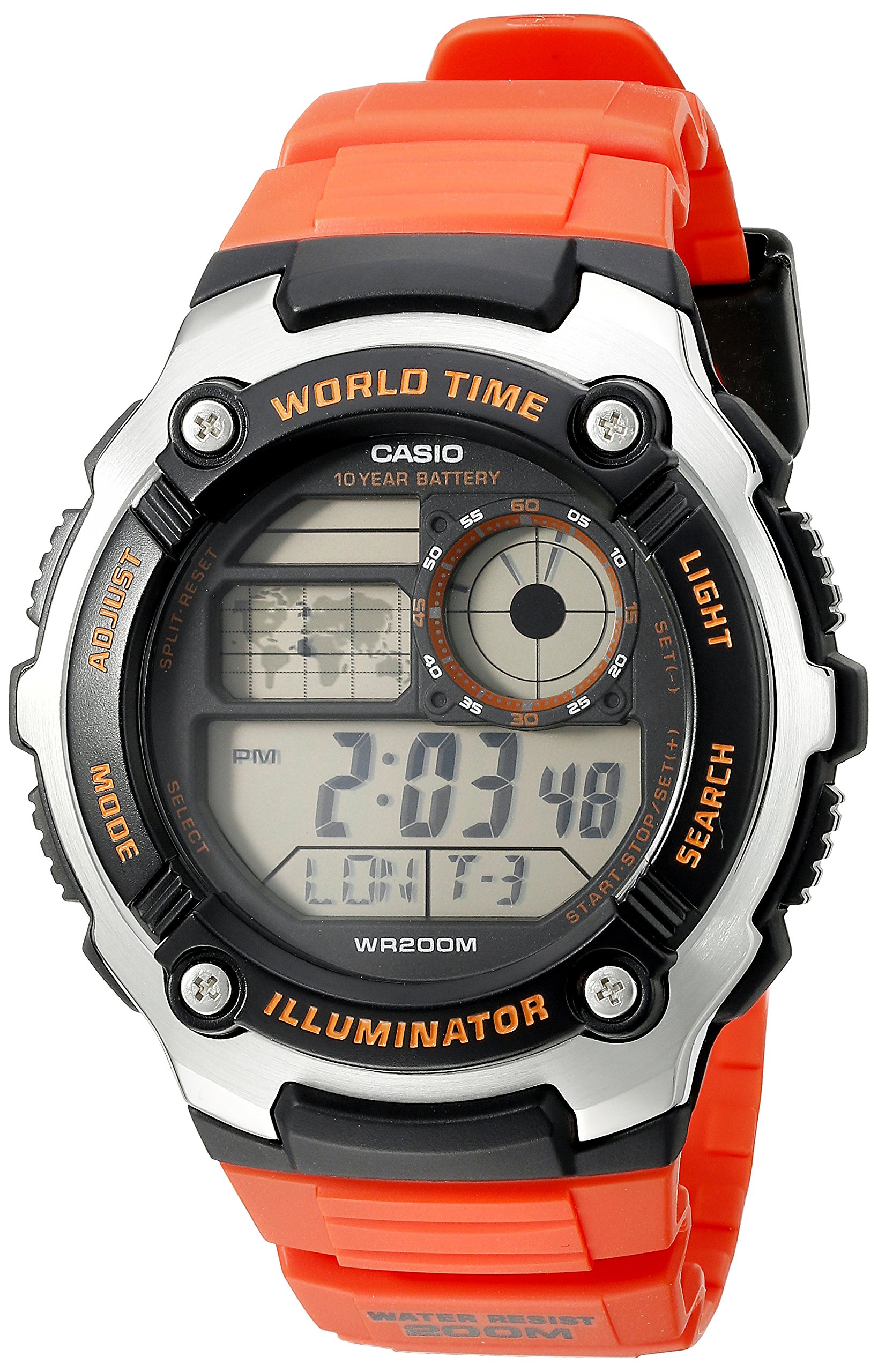
Obrázek: Přední strana view of the Casio AE-2100W-4AV digital watch, showcasing its display and button layout.
Klíčové vlastnosti
- Digital 10-Year Battery: Extended battery life for long-term use.
- World Map & LC Analog Display: Visual representation of world time zones and an analog-style display.
- Minerální sklo: Durable and scratch-resistant watch face.
- Vodotěsnost 200 metrů: Suitable for swimming and diving (not for deep sea diving).
- Case / Bezel Material: Resin / Stainless Steel construction for durability.
- Resin Band: Comfortable and durable strap.
- Multi Time (4 Different Cities): Track time in up to four different cities simultaneously.
- světový čas: 31 time zones (48 cities + Coordinated Universal Time).
- Stopky 1/100 sekundy: Precise time measurement.
- Odpočítávadlo: Nastavte časovač na konkrétní dobu trvání.
- 5 Daily Alarms or One-Time Alarms: Multiple alarm settings for daily reminders or single events.
- HourlČasový signál: Zvonění každou hodinu v hodinu.
- Plný automatický kalendář (do roku 2099): Automaticky se upravuje podle délky měsíců a přestupných let.
- 12/24hodinový formát: Choose between standard and military time display.
- Button Operation Tone On/Off: Option to mute button sounds.
- Pravidelné měření času: Digital display of hour, minute, second, PM, month, date, day.
Počáteční nastavení
Nastavení času a data
To set the current time and date on your watch, follow these general steps. Specific button labels are usually found on the watch case itself (e.g., ADJUST, MODE, LIGHT, SEARCH).
- V režimu měření času stiskněte a podržte tlačítko UPRAVIT button until the city code starts to flash, indicating the setting screen.
- Použijte MODE button to cycle through the settings: City Code, DST (Daylight Saving Time), 12/24-hour format, Seconds, Hour, Minute, Year, Month, Day.
- Použijte VYHLEDÁVÁNÍ or SVĚTLO tlačítky pro změnu blikající hodnoty.
- Jakmile jsou všechna nastavení správná, stiskněte tlačítko UPRAVIT znovu stiskněte tlačítko pro opuštění obrazovky nastavení.

Image: The Casio AE-2100W-4AV watch on a wrist, demonstrating its appearance when worn.
Provozní režimy
Your watch features several modes accessible via the MODE tlačítko. Lisování MODE cycles through Timekeeping, World Time, Stopwatch, Countdown Timer, and Alarm modes.
Režim měření času
This is the default mode, displaying the current time, date, and day of the week for your home city. In this mode, you can press the SVĚTLO tlačítko pro podsvícení displeje.
Režim světového času
V režimu měření času stiskněte MODE to enter World Time Mode. Use the VYHLEDÁVÁNÍ button to scroll through different city codes and view their current times. The watch can store up to four different city times.
Režim stopek
Použití stopek:
- Přejděte do režimu stopek pomocí MODE tlačítko.
- Stiskněte tlačítko VYHLEDÁVÁNÍ tlačítko pro spuštění stopek.
- Stiskněte VYHLEDÁVÁNÍ znovu zastavit.
- Stiskněte tlačítko UPRAVIT tlačítko pro vynulování stopek.
Režim odpočítávání
Nastavení a použití odpočítávacího časovače:
- Přejděte do režimu odpočítávání pomocí MODE tlačítko.
- Stiskněte a podržte UPRAVIT button until the timer setting starts to flash.
- Použijte MODE pro výběr hodin, minut nebo sekund.
- Použijte VYHLEDÁVÁNÍ or SVĚTLO hodnoty upravte.
- Stiskněte UPRAVIT pro potvrzení nastavení.
- Stiskněte VYHLEDÁVÁNÍ pro spuštění nebo zastavení odpočítávání.
Režim alarmu
Vaše hodinky podporují až pět denních budíků a jedenurly časový signál.
- Přejděte do režimu alarmu pomocí MODE tlačítko.
- Použijte VYHLEDÁVÁNÍ button to cycle through the different alarm numbers (AL1, AL2, etc.) and the Hourly Časový signál (SIG).
- Chcete-li nastavit budík, stiskněte a podržte tlačítko UPRAVIT button when the desired alarm number is displayed.
- Použití MODE vyberte hodiny nebo minuty a VYHLEDÁVÁNÍ or SVĚTLO upravte hodnoty.
- Stiskněte UPRAVIT potvrdit.
- To turn an alarm or the hourlzapnutí/vypnutí časového signálu y, vyberte jej a stiskněte VYHLEDÁVÁNÍ tlačítko.
Illuminator Light
Stiskněte tlačítko SVĚTLO tlačítko pro snadné osvětlení ciferníku viewza zhoršených světelných podmínek.
Video: A 21-second product rotation video of the Casio AE-2100W-4AV watch, showing its design from various angles. This helps visualize the watch's physical features and button placement.
Údržba a péče
Životnost baterie
This watch is equipped with a 10-year battery (CR2025). While designed for longevity, actual battery life may vary depending on usage frequency of features like the illuminator light and alarms. When the display becomes dim or functions become erratic, it may be time for a battery replacement. It is recommended to have battery replacement performed by an authorized service center.
Voděodolnost
The watch is rated for 200-meter (660 feet) water resistance. This means it is suitable for recreational swimming, snorkeling, and diving. However, it is not designed for saturation diving. Do not operate buttons while the watch is wet or submerged to prevent water ingress. Avoid exposing the watch to hot water or steam, as this can compromise the water resistance seals.
Čištění
Pro zachování vzhledu hodinek:
- Wipe the watch case and band with a soft, dry cloth regularly.
- For resin bands, you can use a mild soap solution and a soft brush, then rinse thoroughly with clean water and dry completely.
- Avoid using harsh chemicals, solvents, or abrasive cleaners, as these can damage the watch's materials.
Odstraňování problémů
Problémy se zobrazením
- Prázdný nebo tmavý displej: Baterie může být slabá nebo vybitá. Zvažte výměnu baterie.
- Nesprávný čas/datum: Re-enter the Time and Date Setting mode and adjust as necessary. Ensure your home city code and DST settings are correct.
Tlačítka nereagují
- Ensure the watch is not in a locked mode (if applicable, though this model typically does not have a button lock).
- If the watch was recently submerged, ensure it is completely dry before operating buttons.
- Slabá baterie může někdy ovlivnit odezvu tlačítek.
Časová nepřesnost
- Digital quartz watches are generally highly accurate. If significant inaccuracy occurs, it may indicate a need for battery replacement or service.
- Ensure the correct city code and DST settings are applied for your current location.
Specifikace
| Funkce | Detail |
|---|---|
| Číslo modelu | AE2100W-4AV |
| Průměr pouzdra | 47.7 mm |
| Rozměry produktu | 6 x 6 x 4 palce; 4.8 unce |
| Voděodolnost | 200 metrů (660 stop) |
| Typ baterie | 1 lithium-kovová baterie (CR2025) |
| Přibližná výdrž baterie | 10 roky |
| Hnutí | Křemen |
| Materiál sklo | Minerální sklo |
| Materiál pouzdra/lunety | Pryskyřice / Nerezová ocel |
| Materiál pásku | Pryskyřice |
| Kalendář | Plně automatický kalendář (do roku 2099) |

Image: Watch size guide for reference, illustrating different watch diameters and heights.
Záruka a podpora
Your Casio AE-2100W-4AV watch is covered by a manufacturer's warranty. Please refer to the warranty card included with your purchase for specific terms and conditions, including coverage duration and service procedures. For technical support, spare parts, or warranty claims, please contact Casio customer service or visit their official webstránky s autorizovanými servisními středisky.
Pro další informace a podporu můžete navštívit oficiální webové stránky společnosti Casio. webmísto: www.casio.com