
Zavedení
The myTouchSmart Plug-In Indoor/Outdoor Digital Timer is designed to simplify the automation of your lighting and appliances. This weather-resistant timer features two grounded outlets, offering versatile control for landscape, patio, and seasonal lighting. It provides both customizable "My On/Off Time" settings and convenient daily preset options, along with a 24-hour countdown feature. The large LCD screen and blue LED indicators ensure easy programming and monitoring of active programs. Compatible with various light sources including CFL, LED, incandescent, and halogen, this UL listed product is built for convenience and energy efficiency.
Vlastnosti produktu
- Easy-to-set digital timer with two grounded outlets for landscape, patio, and seasonal lights and appliances.
- Features simple daily preset options, fully customizable "My On/Off Time" settings, and a custom, up to 24-hour countdown feature.
- Weather resistant for both outdoor and indoor use. Includes an attached bracket for easy mounting and installation.
- Kompatibilní s CFL, LED, žárovkami a halogenovými světelnými zdroji.
- Large LCD screen and blue LED indicators to show active programs.
- Electrical Rating: 125V/60Hz, 15A/1875W General purpose/resistive.
- CSA listed for safety.

Figure 1: Control outdoor or indoor lights with the myTouchSmart timer.

Figure 2: The timer is weather resistant and suitable for outdoor use.
Pokyny pro nastavení
- Počáteční zapnutí: Plug the timer into a standard 125V AC outlet. The LCD screen will illuminate. If the screen is blank or not reading, plug it in for at least one hour to charge the internal battery.
- Nastavit aktuální čas:
- Stiskněte tlačítko HODINY tlačítko.
- Použijte NAHORU (▲) a DOLŮ (▼) šipkami upravte hodinu.
- Stiskněte HODINY again to move to minutes, then use the arrows to adjust.
- Stiskněte HODINY a third time to confirm and exit time setting.
- Montáž: Use the integrated mounting bracket to securely attach the timer near your desired outlet. Ensure the timer is positioned to prevent water accumulation.

Figure 3: Simple setup involves setting the current time and custom ON/OFF times.
Video 1: An instructional video demonstrating how to set the current time and program ON/OFF times on the myTouchSmart timer.
Návod k obsluze
Setting Custom ON/OFF Times ("My On/Off Time")
- Nastavení času zapnutí:
- Stiskněte tlačítko MY ON TIME button. The display will show the current ON time setting.
- Použijte NAHORU (▲) a DOLŮ (▼) arrows to adjust the desired ON hour.
- Stiskněte MY ON TIME again to move to minutes, then use the arrows to adjust.
- Stiskněte MY ON TIME a third time to confirm and save the ON time. The blue LED indicator next to "my on time" will illuminate when active.
- Nastavení času vypnutí:
- Stiskněte tlačítko MY OFF TIME button. The display will show the current OFF time setting.
- Použijte NAHORU (▲) a DOLŮ (▼) arrows to adjust the desired OFF hour.
- Stiskněte MY OFF TIME again to move to minutes, then use the arrows to adjust.
- Stiskněte MY OFF TIME a third time to confirm and save the OFF time. The blue LED indicator next to "my off time" will illuminate when active.
Using Preset Schedules
The timer offers three convenient preset schedules:
- Evening (5pm-12am): Stiskněte tlačítko VEČER tlačítko.
- Morning (5am-8am): Stiskněte tlačítko RÁNO tlačítko.
- All Night (6pm-6am): Stiskněte tlačítko ALL NIGHT tlačítko.
To activate a preset, simply press the corresponding button. The blue LED indicator next to the selected preset will light up.
24-Hour Countdown
To use the countdown feature:
- Stiskněte tlačítko MY COUNTDOWN tlačítko.
- Použijte NAHORU (▲) a DOLŮ (▼) arrows to set the desired countdown duration (up to 24 hours).
- Stiskněte MY COUNTDOWN again to start the countdown. The timer will turn ON for the set duration and then turn OFF.

Figure 4: Program custom ON/OFF times or select from convenient preset schedules.
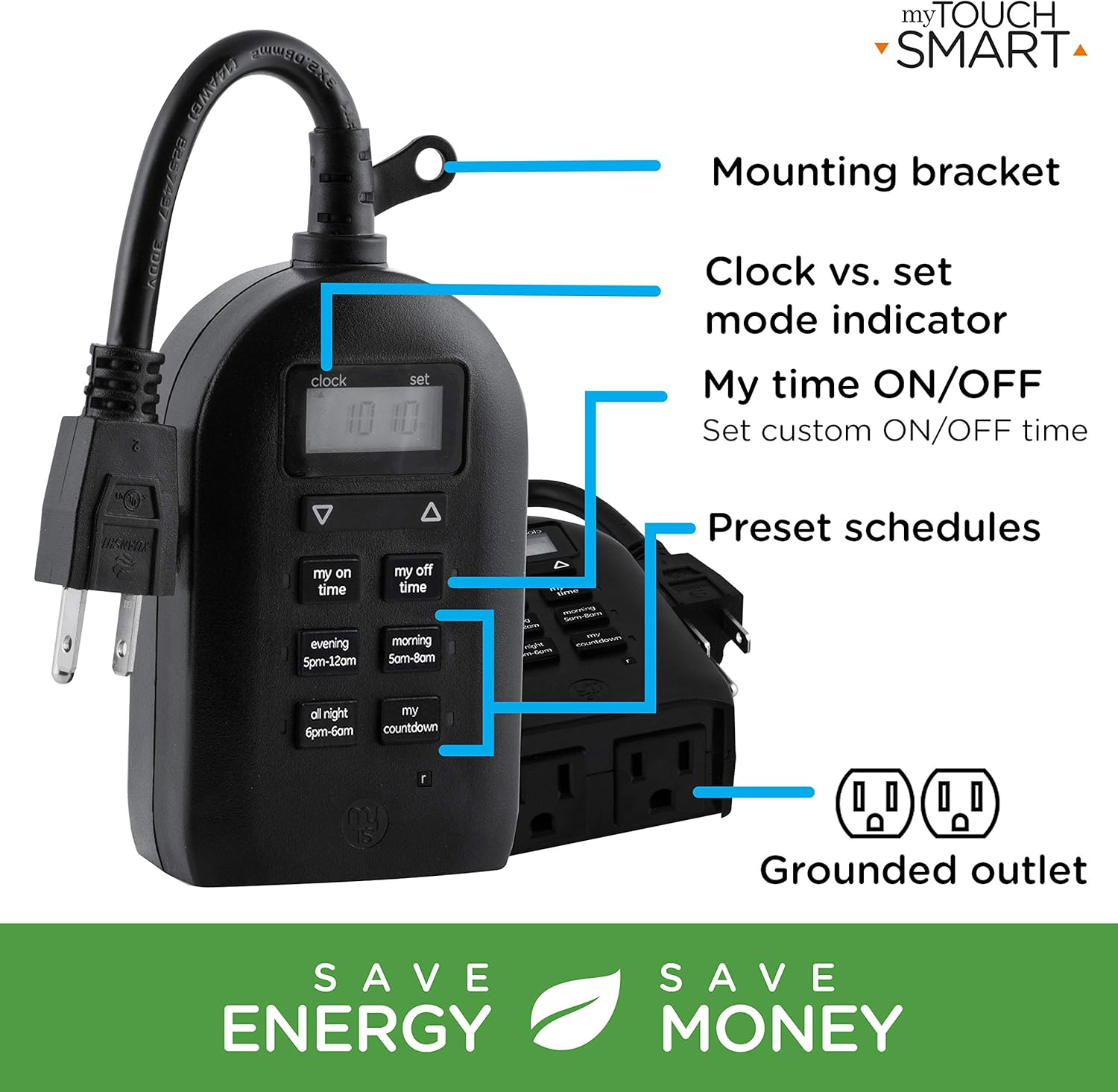
Figure 5: Key features and controls of the myTouchSmart timer.
Údržba
- Čištění: Před čištěním odpojte časovač ze zásuvky. Vnější povrch otřete měkkým hadříkem.amp tkanina. Nepoužívejte agresivní chemikálie nebo abrazivní čisticí prostředky.
- Skladování: Pokud časovač delší dobu nepoužíváte, skladujte jej na chladném a suchém místě mimo dosah přímého slunečního záření a extrémních teplot.
- Interní baterie: The timer contains an internal battery to maintain settings during power outages. If the display is dim or blank, plug the timer into an outlet for at least one hour to recharge the battery.
Odstraňování problémů
| Problém | Možná příčina | Řešení |
|---|---|---|
| Displej časovače je prázdný nebo tmavý. | Vnitřní baterie je slabá nebo vybitá. | Plug the timer into a live outlet for at least one hour to charge the internal battery. |
| Připojené zařízení se nezapíná/nevypíná. |
|
|
| Časovač nereaguje na stisknutí tlačítek. | Dočasná softwarová závada nebo slabá baterie. | Unplug the timer from the outlet for a few minutes, then plug it back in. Allow the internal battery to charge if the display was dim. |
Specifikace
| Funkce | Detail |
|---|---|
| Číslo modelu | 26898-P1 |
| Elektrické hodnocení | 125V AC, 60Hz, 15A, 1875W (General Purpose/Resistive) |
| Vývody | 2 uzemněné zásuvky |
| Rozměry | 3.2 cm H x 7 cm Š x 7.5 cm V (přibližně) |
| Hmotnost položky | 9.92 unce |
| Typ zobrazení | LCD |
| Typ montáže | Plug-In Mount |
| Certifikace | UL Listed, CSA Listed |
| Interní baterie | Yes (for settings retention) |

Figure 6: Product dimensions for the myTouchSmart timer.
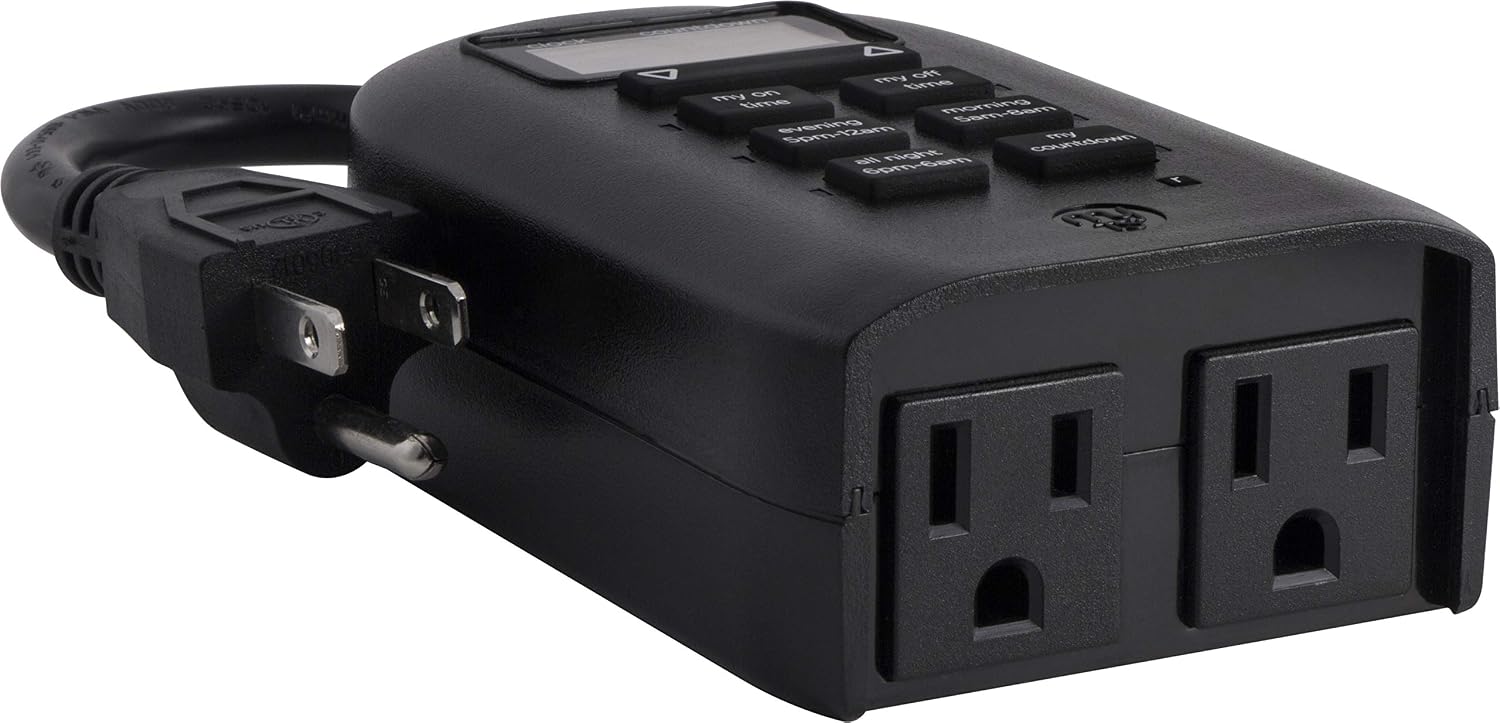
Figure 7: Dual grounded outlets for connecting devices.
Záruka a podpora
This myTouchSmart timer is backed by a jednoletá omezená záruka from the date of purchase. For warranty claims or technical support, please refer to the contact information provided with your product packaging or visit the official myTouchSmart webmísto.
Další zdroje naleznete také na oficiálních stránkách Uživatelská příručka (PDF) or Instalační manuál (PDF) dostupné online.