
1. Úvod
This manual provides detailed instructions for installing, configuring, and maintaining your GIGABYTE GA-B150M-D3H Micro ATX motherboard. The GA-B150M-D3H is designed to support 6th Generation Intel Core Processors and features Dual Channel DDR4 memory, PCIe Gen3 x4 M.2 connector, SATA Express, and 8-channel HD audio with Audio Noise Guard.
Please read this manual thoroughly before beginning installation to ensure proper setup and operation.
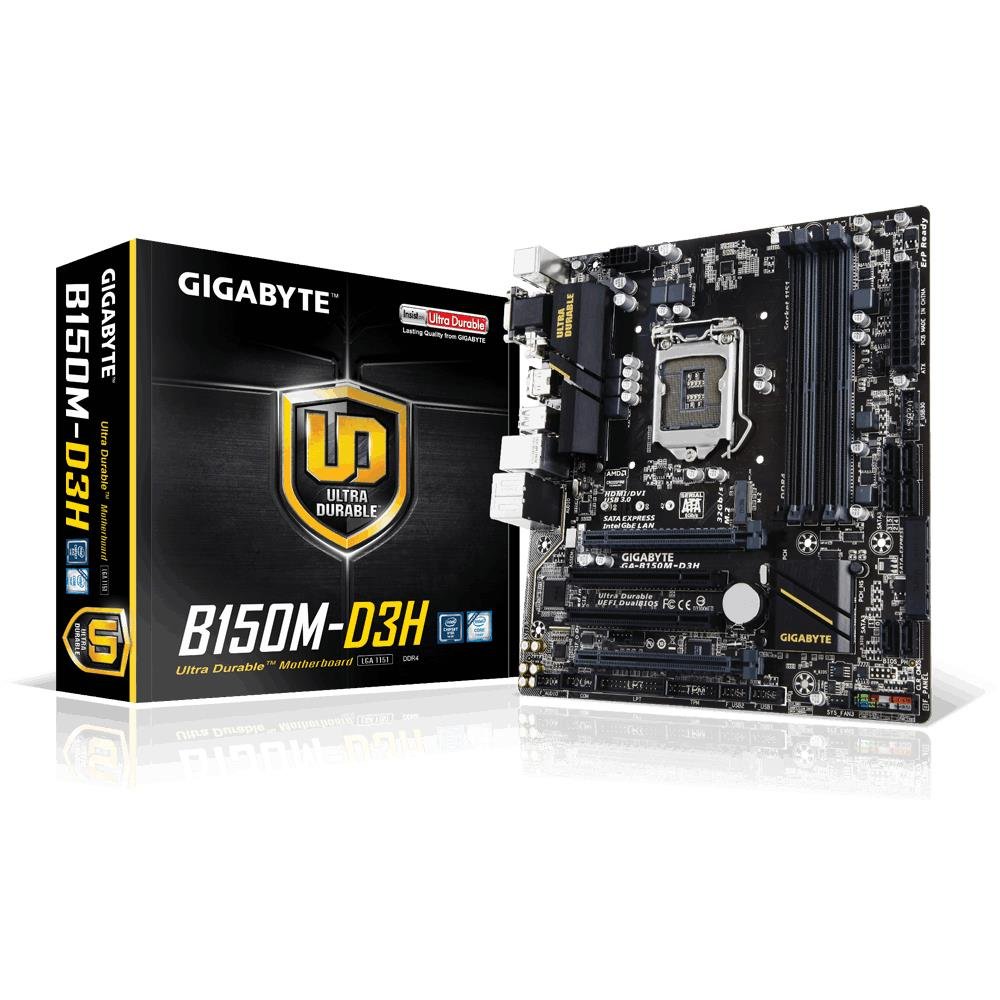
Image 1.1: GIGABYTE GA-B150M-D3H Micro ATX Motherboard. This image displays the overall layout of the motherboard, highlighting its compact Micro ATX form factor and various component slots.
2. Bezpečnostní informace
Observe the following safety precautions to prevent damage to the motherboard and injury to yourself:
- Před dotykem jakýchkoli součástí vždy odpojte napájecí kabel ze zásuvky.
- Noste antistatický náramek nebo se často dotýkejte uzemněného kovového předmětu, abyste vybili statickou elektřinu.
- Základní desku držte za okraje, abyste se nedotkli citlivých součástek.
- Chraňte základní desku před vlhkostí a extrémními teplotami.
- Zajistěte dostatečné větrání uvnitř skříně počítače, abyste zabránili přehřátí.
3. Obsah balení
Ověřte, zda jsou v balení základní desky přítomny všechny položky:
- GIGABYTE GA-B150M-D3H Motherboard
- Uživatelská příručka
- I / O štít
- SATA kabely
- CD/DVD s ovladači
Note: Contents may vary slightly depending on region or revision.
4. Rozložení základní desky
Familiarize yourself with the various components and connectors on the GA-B150M-D3H motherboard.
Image 4.1: GIGABYTE GA-B150M-D3H Motherboard Layout. This image provides a visual reference for the location of key components such as the CPU socket, DIMM slots, PCIe slots, SATA ports, and M.2 connector.
Klíčové komponenty:
- Patice procesoru LGA 1151: For 6th Generation Intel Core Processors.
- Sloty DDR4 DIMM (4): Supports Dual Channel DDR4 memory up to 2133 MHz.
- PCIe sloty: Includes PCIe Gen3 x16 for graphics cards and PCIe x1 slots for expansion.
- M.2 Connector: Supports PCIe NVMe & SATA SSDs with up to 32Gb/s data transfer.
- SATA Express Connector: For up to 16Gb/s data transfer.
- Porty SATA 6 Gb/s: Pro připojení tradičních úložných zařízení SATA.
- 24-Pin ATX Power Connector: Hlavní napájecí vstup.
- 8-Pin ATX 12V Power Connector: Příkon procesoru.
- Záhlaví na předním panelu: For power button, reset button, LED indicators, and USB ports.
- Audio konektory: 8-channel HD Audio with high quality capacitors and Audio Noise Guard.
5. Nastavení a instalace
Pro správnou instalaci základní desky a jejích součástí postupujte podle těchto kroků.
5.1. Instalace procesoru
- Vyhledejte patici procesoru LGA 1151.
- Otevřete páčku patice procesoru a zvedněte nosnou desku.
- Opatrně zarovnejte procesor s paticí a ujistěte se, že zlatý trojúhelník na procesoru odpovídá trojúhelníku na patici. Nevkládejte procesor do patice silou.
- Spusťte nosnou desku dolů a zajistěte ji pákou.
5.2. Instalace chladiče procesoru
Refer to your CPU cooler's instruction manual for specific installation steps. Ensure thermal paste is applied correctly between the CPU and cooler base.
5.3. Instalace paměti (RAM)
- Otevřete klipy na obou koncích slotů DDR4 DIMM.
- Zarovnejte paměťový modul se slotem a ujistěte se, že zářez na modulu odpovídá výstupku ve slotu.
- Pevně zatlačte na oba konce paměťového modulu, dokud klipsy nezacvaknou na místo.
- For dual-channel performance, install memory modules in matching colored slots (e.g., DIMM1 and DIMM2).
5.4. Installing Expansion Cards
- Remove the metal bracket from the desired PCIe slot on your computer case.
- Align the expansion card with the PCIe slot and press down firmly until it is seated correctly.
- Připevněte kartu šroubem k pouzdru počítače.
5.5. Připojení úložných zařízení
- Zařízení SATA: Connect one end of the SATA data cable to a SATA 6Gb/s port on the motherboard and the other end to your hard drive or SSD. Connect the SATA power cable from your power supply to the device.
- M.2 SSD: Vložte disk M.2 SSD do slotu M.2 pod úhlem, poté jej jemně zatlačte dolů a zajistěte jej dodaným šroubem.
- SATA Express: If using a SATA Express device, connect it to the designated SATA Express connector.
5.6. Připojení konektorů na předním panelu
Connect the cables from your computer case's front panel (power button, reset button, HDD LED, power LED, front USB, front audio) to the corresponding headers on the motherboard. Refer to the motherboard layout diagram for exact locations and pin assignments.
5.7. Připojení napájení
- Connect the 24-pin ATX main power connector from your power supply to the 24-pin power socket on the motherboard.
- Connect the 8-pin ATX 12V CPU power connector to the 8-pin socket near the CPU.
- Ujistěte se, že jsou všechna napájecí připojení bezpečná.
6. Návod k obsluze
6.1. První spuštění
After assembling all components, connect your monitor, keyboard, and mouse. Power on the system. The system should display the GIGABYTE splash screen and then enter the BIOS/UEFI setup or attempt to boot from a connected storage device.
6.2. Nastavení BIOSu/UEFI
Chcete-li vstoupit do nastavení BIOS/UEFI, stiskněte DEL key repeatedly during the boot process when the GIGABYTE logo appears. Here you can configure system settings, boot order, and monitor hardware status. The GA-B150M-D3H features GIGABYTE UEFI Dual BIOS for enhanced reliability.
6.3. Instalace ovladače
After installing your operating system, install the necessary drivers for the motherboard components. These can be found on the included driver CD/DVD or downloaded from the official GIGABYTE website. Key drivers include chipset, audio (Realtek ALC892 codec), LAN, and any integrated graphics drivers.
6.4. Instalace operačního systému
Insert your operating system installation media (USB drive or DVD) and configure the boot order in the BIOS/UEFI to boot from it. Follow the on-screen instructions to install your preferred operating system (e.g., Windows 8.1, Windows 10).
7. Údržba
7.1. Čištění
Regularly clean the interior of your computer case to prevent dust buildup, which can lead to overheating. Use compressed air to remove dust from fans, heatsinks, and motherboard components. Ensure the system is powered off and unplugged before cleaning.
7.2. Aktualizace BIOSu
GIGABYTE periodically releases BIOS updates to improve system stability, compatibility, and performance. Visit the official GIGABYTE website for your motherboard model (GA-B150M-D3H) to check for the latest BIOS version and follow the provided instructions for updating. Exercise caution during BIOS updates, as an interruption can render the motherboard inoperable.
8. Řešení problémů
Tato část se zabývá běžnými problémy, se kterými se můžete setkat.
8.1. Žádné napájení / Systém se nezapne
- Check if the power supply is connected correctly to the motherboard (24-pin and 8-pin connectors).
- Ujistěte se, že je vypínač napájení v poloze ON.
- Ověřte, zda je kabel tlačítka napájení na předním panelu správně připojen ke konektoru základní desky.
- Otestujte napájecí zdroj pomocí jiného systému nebo testeru napájecích zdrojů.
8.2. Žádný výstup na displej
- Ensure the monitor is connected to the correct graphics output (either integrated graphics on the motherboard or a dedicated graphics card).
- Znovu vložte grafickou kartu a paměťové moduly.
- Zkuste spustit systém pouze s jedním nainstalovaným paměťovým modulem.
- Zkontrolujte, zda je monitor zapnutý a nastavený na správný vstupní zdroj.
8.3. Nestabilita systému / Pády
- Zkontrolujte teploty CPU a GPU, abyste se ujistili, že jsou v bezpečných provozních mezích.
- Verify that all drivers are installed and up to date.
- Spusťte diagnostické nástroje paměti a zkontrolujte, zda není RAM vadná.
- Zajistěte, aby zdroj napájení poskytoval dostatečné a stabilní napájení všem komponentům.
9. Specifikace
Detailed technical specifications for the GIGABYTE GA-B150M-D3H motherboard:
| Funkce | Specifikace |
|---|---|
| Název modelu | GA-B150M-D3H |
| Form Factor | Micro ATX (24.4 cm x 22.5 cm) |
| Zásuvka CPU | LGA 1151 |
| Kompatibilní procesory | 6th Generation Intel Core Processors |
| Čipová sada | Čipová sada Intel B150 Express |
| Technologie paměti | DDR4 |
| Paměťové sloty | 4 x patice DDR4 DIMM (dvoukanálové) |
| Maximální kapacita paměti | 16 GB |
| Rychlost paměti | 2133 MHz |
| PCIe sloty | 1 x PCI Express x16, 1 x Total PCIe Ports |
| Úložná rozhraní | PCIe Gen3 x4 M.2, SATA Express, SATA 6Gb/s |
| Audio kodek | Realtek ALC892 codec, 8-channel HD Audio |
| USB porty | Celkem 8 USB porty (včetně USB 2.0) |
| Hlavní napájecí konektor | 24pinový ATX |
| Napájecí konektor CPU | 8-Pin ATX 12V |
| Jedinečné vlastnosti | GIGABYTE UEFI Dual BIOS, Audio Noise Guard with LED Trace Path Lighting, App Center (Easy Tune, Cloud Station) |
10. Záruka a podpora
For warranty information, please refer to the warranty card included in your product package or visit the official GIGABYTE webZáruční podmínky se mohou lišit v závislosti na regionu.
For technical support, driver downloads, BIOS updates, and further product information, please visit the GIGABYTE official support webmísto:
https://www.gigabyte.com/Support
When contacting support, please have your motherboard model (GA-B150M-D3H) and serial number ready.