
Zavedení
The Electro-Harmonix KEY9 Electric Piano Machine Pedal is designed to emulate a variety of classic electric pianos and other keyboard instruments. This pedal allows guitarists to transform their instrument's sound, offering a versatile range of tones from iconic Wurlitzer and Rhodes sounds to mallets and steel drums. Each of the 9 presets provides control over fundamental parameters that define the instrument's sound, often including adjustable modulation effects such as tremolo, phaser, and chorus. The KEY9 is a powerful tool for expanding your sonic palette.

Figure 1: The KEY9 Electric Piano Machine Pedal positioned on a keyboard.
Nastavení
To begin using your KEY9 pedal, follow these steps:
- Připojení napájení: Connect the included 9.6VDC 500mA power supply to the 9V power jack on the pedal.
- Vstupní připojení: Připojte kytaru ke vstupu INPUT na pravé straně pedálu pomocí standardního 6 mm kabelu.
- Výstupní připojení: Connect the KEYS OUTPUT jack on the left side of the pedal to your amplifier or mixer using a standard 1/4-inch instrument cable. An additional DRY OUTPUT jack is available to send your unaffected guitar signal to a separate ampzáznamník nebo vstup.
- Počáteční nastavení: Ensure all control knobs (DRY, VOL, KEYS, CTRL 1, CTRL 2) are set to their minimum positions before powering on to avoid sudden volume changes.

Obrázek 2: Shora dolů view of the KEY9 pedal showing input and output connections.
Návod k obsluze
The KEY9 pedal features intuitive controls for shaping your sound. Familiarize yourself with the knobs and presets to unlock its full potential.
Ovládání:
- Knoflík DRY: Controls the volume of your unaffected guitar signal at the KEYS OUTPUT.
- Knoflík VOL: Controls the overall volume of the selected KEY9 preset sound.
- KEYS Knob: Controls the volume of the selected KEY9 preset sound at the KEYS OUTPUT.
- CTRL 1 & CTRL 2 Knobs: These controls adjust different parameters depending on the selected preset. They typically modify aspects like modulation speed/depth, tone, or attack characteristics.
- Preset Selector Knob: A 9-position rotary switch to select between the different electric piano and keyboard sounds.
- Obtokový nožní spínač: Toggles the effect on/off. When the effect is active, the LED illuminates red.
výstupy:
- KEYS OUTPUT: Delivers the processed KEY9 sound, mixed with the dry signal if the DRY knob is raised.
- DRY OUTPUT: Provides a buffered bypass of your guitar signal, allowing you to send your unaffected signal to a separate destination.
Předvolby:
The KEY9 offers 9 distinct presets, each emulating a unique keyboard or percussive instrument. The CTRL 1 and CTRL 2 knobs will have different functions for each preset.
- Dynamo: Emulates a classic Fender Rhodes electric piano, known for its smooth, ambient tones. CTRL 1 and CTRL 2 adjust overtones and low-end response.
- Wurli: Recreates the distinct sound of a Wurlitzer electric piano, often featuring a built-in tremolo. CTRL 1 and CTRL 2 typically control tremolo speed and depth.
- Kufr: A variation of the electric piano sound, often characterized by a phase shifter effect. CTRL 1 and CTRL 2 adjust phaser speed and depth.
- Mallets: Produces marimba-like or other mallet percussion sounds. This preset is highly responsive to playing dynamics.
- Eighty Eight: Another Rhodes electric piano emulation, often with a bright, bell-like quality and tremolo. CTRL 1 and CTRL 2 adjust tremolo and tone.
- Tri-Glorious: Emulates a three-voice chorus rack effect, providing lush, swirling textures. CTRL 1 and CTRL 2 control chorus depth and rate.
- Vibes: Recreates the sound of a vibraphone, typically with a distinct tremolo. CTRL 1 and CTRL 2 adjust tremolo speed and depth.
- Orgán: A classic organ sound, offering rich, sustained tones. CTRL 1 and CTRL 2 may adjust attack and decay or modulation.
- Steel Drums: Produces the bright, percussive sound of steel drums. This preset is highly dynamic and responsive.
Video 1: Official demonstration of the Electro-Harmonix KEY9 Electric Piano Machine Pedal, showcasing its various presets and controls.
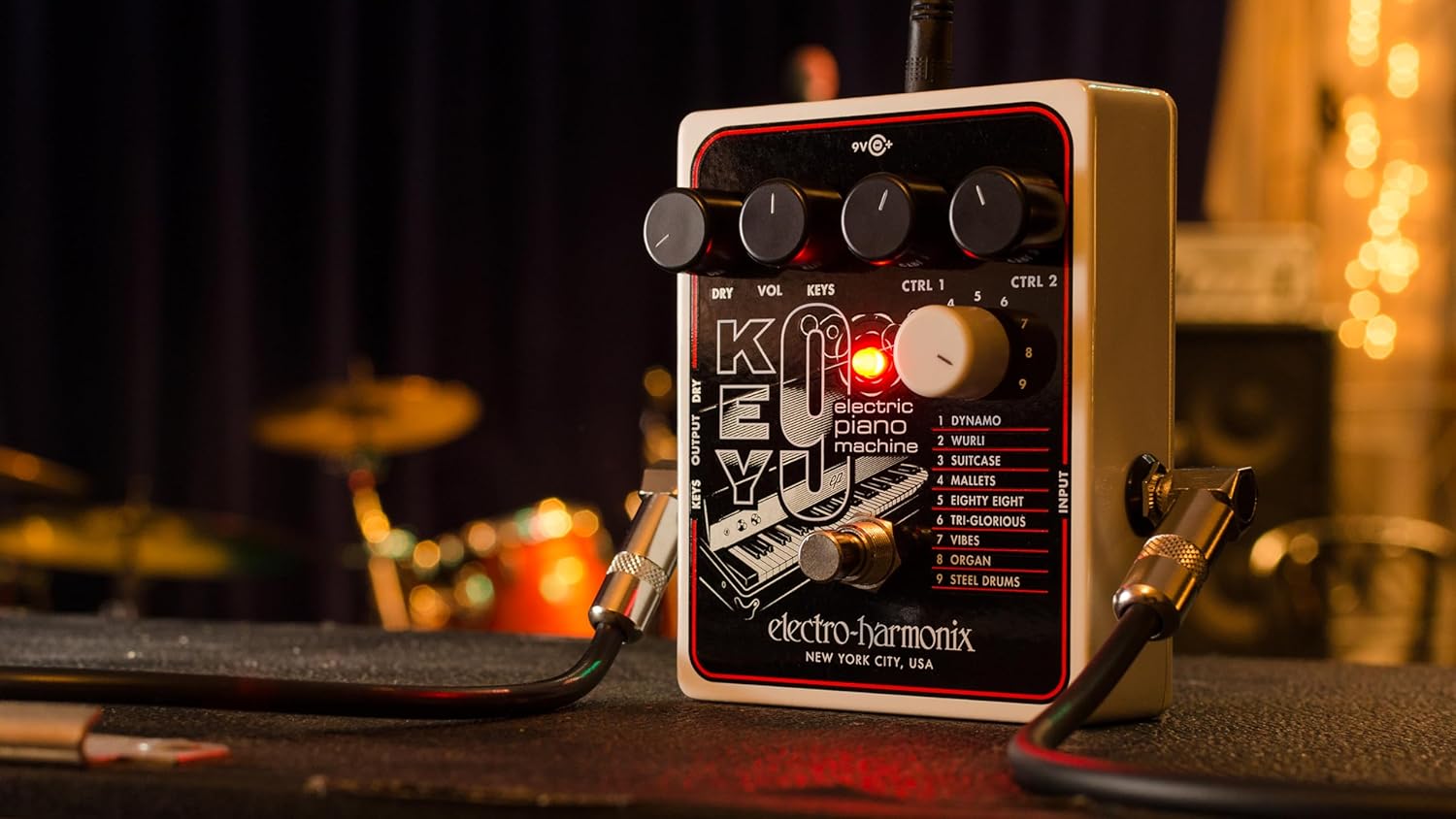
Obrázek 3: Úhlové view of the KEY9 pedal, highlighting the control knobs and jacks.
Údržba
To ensure the longevity and optimal performance of your Electro-Harmonix KEY9 pedal, follow these maintenance guidelines:
- Čištění: K čištění vnější strany pedálu používejte měkký, suchý hadřík. Nepoužívejte abrazivní čisticí prostředky ani rozpouštědla.
- Skladování: Pokud pedál nepoužíváte, skladujte jej na chladném a suchém místě mimo dosah přímého slunečního záření a extrémních teplot.
- Napájení: Always use the included 9.6VDC 500mA power supply or a compatible, regulated power supply to prevent damage.
- Spojení: Pravidelně kontrolujte všechny kabelové spoje, zda nejsou opotřebované. Ujistěte se, že konektory jsou bez prachu a nečistot.
Odstraňování problémů
If you encounter issues with your KEY9 pedal, consult the following common troubleshooting steps:
- Žádný zvuk:
- Zkontrolujte všechna kabelová připojení (vstup, výstup, napájení).
- Ujistěte se, že je napájecí zdroj správně připojen a funguje.
- Ověřte, že vaše amplifier or mixer is powered on and its volume is up.
- Adjust the DRY and KEYS/VOL knobs on the pedal.
- Špatná kvalita zvuku/šum:
- Ensure you are using a proper, regulated 9.6VDC power supply.
- Zkontrolujte vadné kabely.
- Experiment with different guitar pickups or guitar settings.
- Adjust the CTRL 1 and CTRL 2 knobs, as some settings may introduce unwanted artifacts depending on your guitar and playing style.
- Efekt není poutavý:
- Press the footswitch firmly to ensure it engages. The LED should illuminate.
- If the LED does not light up, check the power supply.
Specifikace
| Hmotnost položky | 1.1 libry |
| Rozměry produktu | 4.75 cm D x 4 cm Š x 2.25 cm V |
| Číslo modelu položky | KLÍČ 9 |
| Zdroj napájení | Corded Electric (9.6VDC 500mA power supply included) |
| Hardwarové rozhraní | 1/4palcový zvuk |
| Formát signálu | Analogový |
| Typ materiálu | Plastic (brushed aluminum finish) |
| Úroveň odbornosti | Středně pokročilý, Pokročilý |
Záruka a podpora
Electro-Harmonix products are designed for reliability and performance. For warranty information, technical support, or service inquiries, please refer to the official Electro-Harmonix webnebo se obraťte na jejich zákaznický servis. Uschovejte si účtenku jako doklad o koupi pro případné reklamace.